Forum Discussion
Sourcing from Power Bi Report
If your report is published on the PBI Service(app.powerbi.com) so, you can use the "Power BI Datasets" option in Get Data in PBI Desktop. So, whatever the data source ingesting in Power BI published report which you wanted to replica will be available in PBI desktop using "Power BI Datasets" option of Get Data.
Don't forget to give thumbs up šand accept this as a solution if it helped you.
- Lidou_Cand6 years ago
Helper III
Hello
Thank you for your answer.
I saw that I could only have "PowerBi datasets" in "Direct query" mode.
Does that mean I can't have multiple data sources in my PowerBi report?
Thanks for your help.
- Tahreem246 years ago
Super User
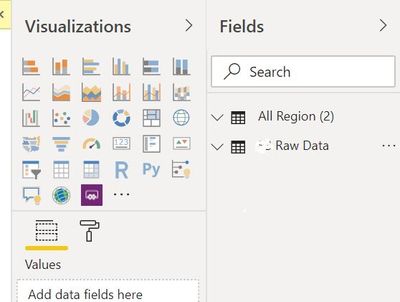
For example, if your published report has 2 data set so it will display 2 different data sets. Like in below screen shot, I have taken data from Power BI Datasets of published report and this published reports has 2 excel files loaded. So, I can see two excel file in my PBI desktop. Moreover, You can't model this data at PBI desktop.
Don't forget to give thumbs up šand accept this as a solution if it helped you.