Forum Discussion

 Resolver II
Sorting by Month as Text (Jan Feb Mar etc)

 10 years ago
OK got it
https://support.powerbi.com/knowledgebase/articles/592116
Go to data (left hand side button) and click
Then go to the table to be sorted (right hand side)
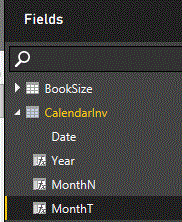
You will need three columns in this calendar table for month
create
1 Main column (to set up the link column for Invoice Date)
CalendarInv = CALENDAR (MINX(Header, Header[Invoice Date]), today())
2 Column for month in text format
MonthT = FORMAT( CalendarInv[Date], "MMM")
3 Column for month in number format
MonthN = Month (CalendarInv[Date])
Then go to field list on the right hand side Click on MonthT
then go to modelling / sort by column and select MonthN
The final step is as follows
NB Creating calendar table
http://community.powerbi.com/t5/Desktop/Possible-Tip-Trick-Dynamic-Date-Dimension-Table/td-p/8462



I just created a small chart with 2 colums 1 all the names of the month then one the number of the month.
Jan 1
Feb 2
Mar 3
ECT....
Since all of my data was pulled in with the short text already it i just did a relationship between month and then did the sort based off the number.