Join us at FabCon Atlanta from March 16 - 20, 2026, for the ultimate Fabric, Power BI, AI and SQL community-led event. Save $200 with code FABCOMM.
Register now!The Power BI Data Visualization World Championships is back! Get ahead of the game and start preparing now! Learn more
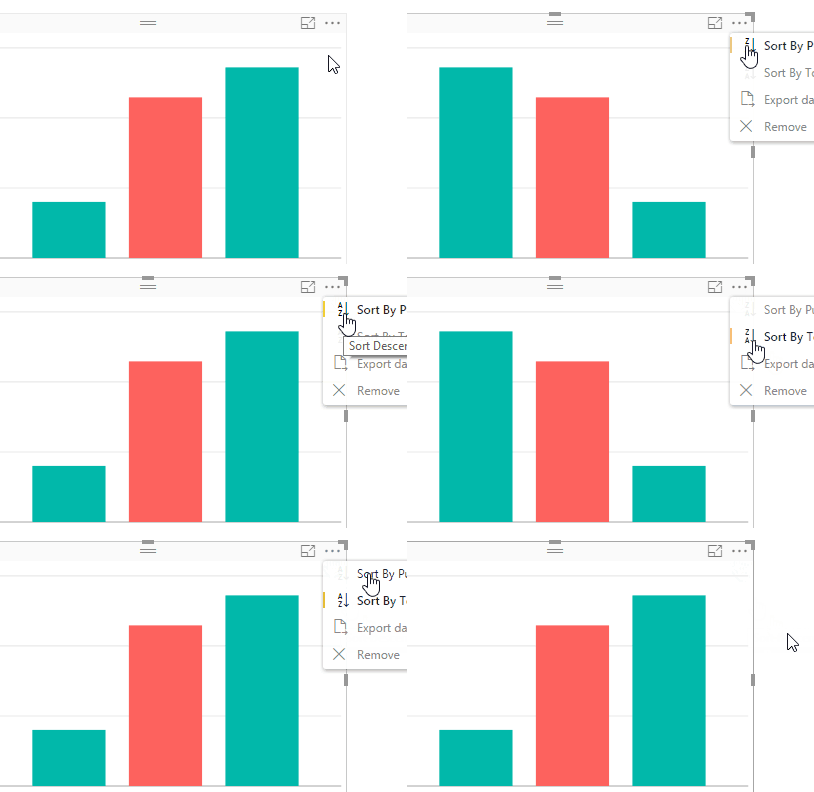
In February 2017 release I can't sort descending a chart, before was 2 click in More Options chart to do that, somebody knows if that option has changed?
Best regards
Solved! Go to Solution.
Hi @Anonymous,
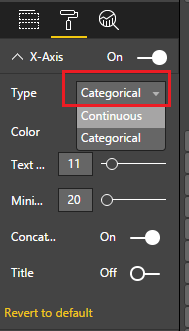
I just verified that the sort descending option is still there in More Options, and you need to set X-Axis type to Categorical, and not Continuous under Format tab to make this option available for a Chart in More Options.![]()
Regards
Hi @Anonymous,
I just verified that the sort descending option is still there in More Options, and you need to set X-Axis type to Categorical, and not Continuous under Format tab to make this option available for a Chart in More Options.![]()
Regards
Its still there... What chart are you using? Do you have anything on the Axis?
Thanks for your response, problem is X-Axis type was set to continuous
Best regards
I am on the Feb update and I see that option when clicking on the ellipses (...) for something like a column chart but only if it doesn't have a legend or does not have a hierarchy for the axis.
Check out the November 2025 Power BI update to learn about new features.
Advance your Data & AI career with 50 days of live learning, contests, hands-on challenges, study groups & certifications and more!
| User | Count |
|---|---|
| 56 | |
| 42 | |
| 41 | |
| 20 | |
| 19 |