Don't miss your chance to take exam DP-600 or DP-700 on us!
Request nowLearn from the best! Meet the four finalists headed to the FINALS of the Power BI Dataviz World Championships! Register now
Hi All,
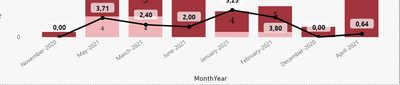
I am trying to sort by "Month-Year" but not able to get the X-axis according to that.
i created a custom column "MonthYear = FORMAT('Master data (history)'[In date].[Date],"MMMM-YYYY")" . I can not figure it out where I am lacking in it.
Here is the screen shot of result :
Thanks in advance!!
Solved! Go to Solution.
@goyalsa , Your old column will only sort correctly. You just need give sort order using sort column. No need to use this new column
refer my video, if needed - How to Create Sort Column and Solve Related Errors: https://youtu.be/KK1zu4MBb-c
Hi @amitchandak ,
I think it works in that way but itn't possible to change month in albhabets instead of numeric and do the same.
Thanks for the quick response.
@goyalsa , Your old column will only sort correctly. You just need give sort order using sort column. No need to use this new column
refer my video, if needed - How to Create Sort Column and Solve Related Errors: https://youtu.be/KK1zu4MBb-c
Share feedback directly with Fabric product managers, participate in targeted research studies and influence the Fabric roadmap.
Check out the February 2026 Power BI update to learn about new features.
| User | Count |
|---|---|
| 49 | |
| 40 | |
| 37 | |
| 14 | |
| 13 |
| User | Count |
|---|---|
| 85 | |
| 69 | |
| 37 | |
| 28 | |
| 27 |