Join us at FabCon Atlanta from March 16 - 20, 2026, for the ultimate Fabric, Power BI, AI and SQL community-led event. Save $200 with code FABCOMM.
Register now!The Power BI Data Visualization World Championships is back! Get ahead of the game and start preparing now! Learn more
i created sort table and created relationship. but how i can hide sort column in my table visual ?
Solved! Go to Solution.
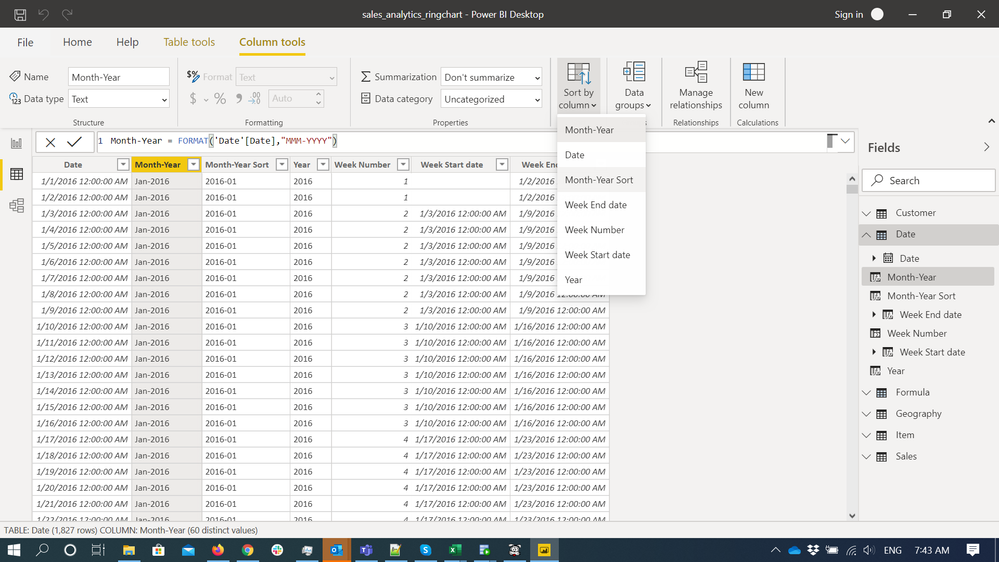
@Anonymous , You need to mark the sort column for column. You do not need it visual.
refer: https://docs.microsoft.com/en-us/power-bi/desktop-sort-by-column
@Anonymous
@amitchandak provided the solution.Basically, select a column you want to use in a visual, sort by a column (the sort column do not need to be in the visual).
Paul Zheng _ Community Support Team
@Anonymous , You need to mark the sort column for column. You do not need it visual.
refer: https://docs.microsoft.com/en-us/power-bi/desktop-sort-by-column
The Power BI Data Visualization World Championships is back! Get ahead of the game and start preparing now!
| User | Count |
|---|---|
| 41 | |
| 38 | |
| 36 | |
| 30 | |
| 28 |
| User | Count |
|---|---|
| 128 | |
| 88 | |
| 79 | |
| 67 | |
| 62 |