Join us at FabCon Atlanta from March 16 - 20, 2026, for the ultimate Fabric, Power BI, AI and SQL community-led event. Save $200 with code FABCOMM.
Register now!Get Fabric Certified for FREE during Fabric Data Days. Don't miss your chance! Request now
Hi All,
I'm look for some assitance with a report I'm working on. I've enclosed a brief simplified example of what I'm trying to achieve.
I have 2 tables
1 - CourseDimension
| CourseKey | Coursecode | Courselevel |
| 1 | BR0001A | Level1 |
| 2 | BR0001B | Level1 |
2 - CourseFact
| Coursekey | Result | Total |
| 1 | Good | 1 |
| 1 | Bad | 1 |
| 1 | Good | 1 |
| 2 | Good | 1 |
| 2 | Good | 1 |
| 2 | Good | 1 |
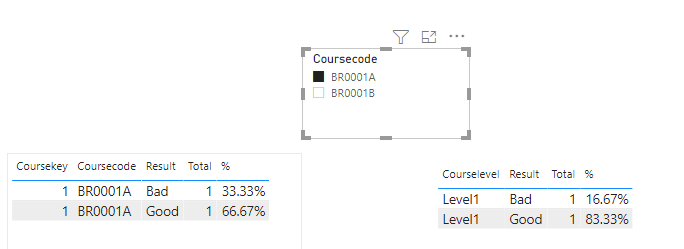
Ideally I would like a report to use a slicer (set to single selection) for Coursecode e.g Select BR0001A andthen the report produces 2 matrix that look like the below (the first matrix is straightforward)
Matrix 1 -
| CourseCode | Result | Total | % |
| BR0001A | Good | 2 | 66.3% |
| BR0001A | Bad | 1 | 33.3% |
Matrix 2- Although the slicer selection is selecting BR0001A I need the report to pull through all Courses that are set to same level as the selected course, in this case level 1.
| CourseLevel | Result | Total | % |
| Level1 | Good | 5 | 83.3% |
| Level1 | Bad | 1 | 16.7% |
I hope this makes senses. Any assitance/best practice advice would be greatly appreciated.
Thanks
Solved! Go to Solution.
Hi @DJ1978B
here attached an example
https://drive.google.com/file/d/10gA0qsCWq27i_kfUzpPpkx1YZNGPmWCZ/view?usp=sharing
Regards
Amine Jerbi
If I answered your question, please mark this thread as accepted
and you can follow me on
My Website, LinkedIn and Facebook
Welcome
Regards
Amine Jerbi
If I answered your question, please mark this thread as accepted
and you can follow me on
My Website, LinkedIn and Facebook
Hi @DJ1978B
here attached an example
https://drive.google.com/file/d/10gA0qsCWq27i_kfUzpPpkx1YZNGPmWCZ/view?usp=sharing
Regards
Amine Jerbi
If I answered your question, please mark this thread as accepted
and you can follow me on
My Website, LinkedIn and Facebook
Check out the November 2025 Power BI update to learn about new features.
Advance your Data & AI career with 50 days of live learning, contests, hands-on challenges, study groups & certifications and more!