FabCon is coming to Atlanta
Join us at FabCon Atlanta from March 16 - 20, 2026, for the ultimate Fabric, Power BI, AI and SQL community-led event. Save $200 with code FABCOMM.
Register now!- Power BI forums
- Get Help with Power BI
- Desktop
- Service
- Report Server
- Power Query
- Mobile Apps
- Developer
- DAX Commands and Tips
- Custom Visuals Development Discussion
- Health and Life Sciences
- Power BI Spanish forums
- Translated Spanish Desktop
- Training and Consulting
- Instructor Led Training
- Dashboard in a Day for Women, by Women
- Galleries
- Data Stories Gallery
- Themes Gallery
- Contests Gallery
- QuickViz Gallery
- Quick Measures Gallery
- Visual Calculations Gallery
- Notebook Gallery
- Translytical Task Flow Gallery
- TMDL Gallery
- R Script Showcase
- Webinars and Video Gallery
- Ideas
- Custom Visuals Ideas (read-only)
- Issues
- Issues
- Events
- Upcoming Events
Get Fabric Certified for FREE during Fabric Data Days. Don't miss your chance! Request now
- Power BI forums
- Forums
- Get Help with Power BI
- Desktop
- Re: Slicer AND logic
- Subscribe to RSS Feed
- Mark Topic as New
- Mark Topic as Read
- Float this Topic for Current User
- Bookmark
- Subscribe
- Printer Friendly Page


- Mark as New
- Bookmark
- Subscribe
- Mute
- Subscribe to RSS Feed
- Permalink
- Report Inappropriate Content
Slicer AND logic
Hi,
I have a dataset like below (example):
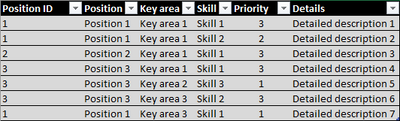
On the dashboard I want to have two identical tables that will be filtered with one slicer ('Skill' column used) with several options to choose from. Table 1 should have an additional filter 'Priority = 3', Table 2 should filter 'Priority = 2'.
What I want to achieve:
(1) when the slicer doesn't have any options selected, both tables should be empty;
(2) possibility to choose several skills in the slicer;
(3) when I choose one skill in the slicer, the tables should show all rows from the dataset for positions with this skill and, depending on the table - with a priority of 3 or 2;
(4) when adding each subsequent skill in the slicer, the table should show records only for those positions that have only the selected skills and, depending on the table, priority 3 or 2.
I would be very grateful if someone could help me with this. If it is not clear, please ask additional questions, I will try to explain.
Solved! Go to Solution.

- Mark as New
- Bookmark
- Subscribe
- Mute
- Subscribe to RSS Feed
- Permalink
- Report Inappropriate Content
See if this works for you.
First, the model:
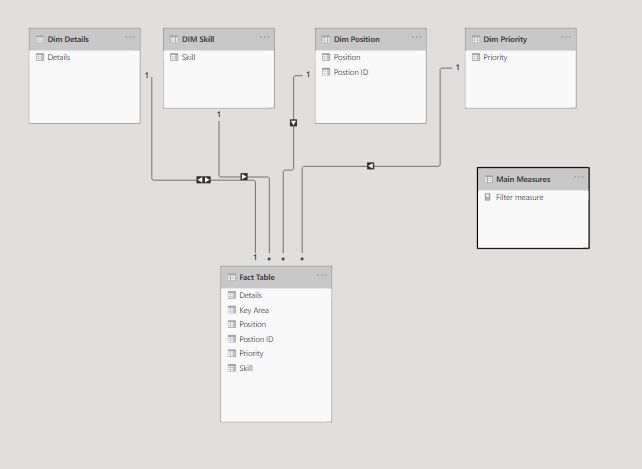
Then create a measure to use in the filter pane of the table/matrix:
Filter measure =
VAR skills = CALCULATE(COUNTROWS(ALLSELECTED('DIM Skill'[Skill])))
VAR Position = SUMX(
    SUMMARIZE('Fact Table', 'Dim Position'[Position], 'DIM Skill'[Skill], 'Dim
               Priority'[Priority]),
        CALCULATE(DISTINCTCOUNT('Fact Table'[Skill]),
            ALLEXCEPT('Fact Table', 'Dim Position'[Position], 'Dim Priority'[Priority])))
RETURN
IF(skills = 1, 1, IF(skills = Position, 1))
And you get this result:
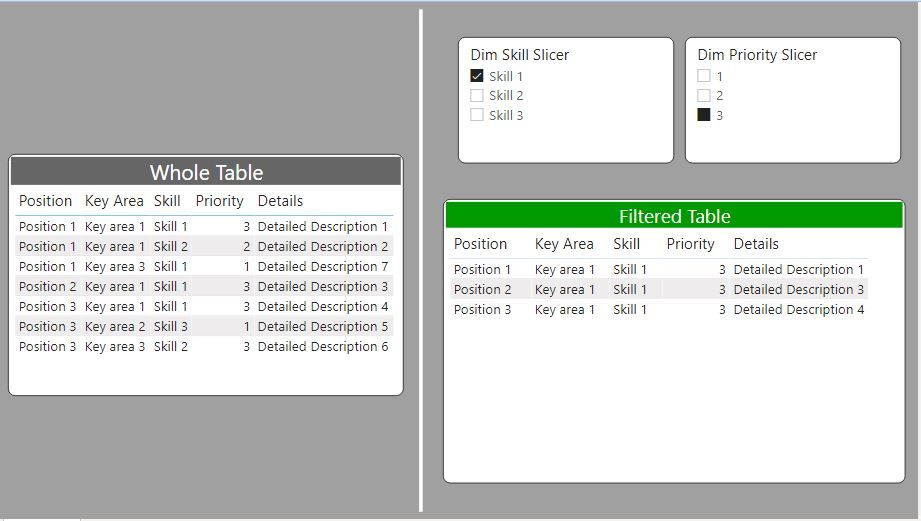
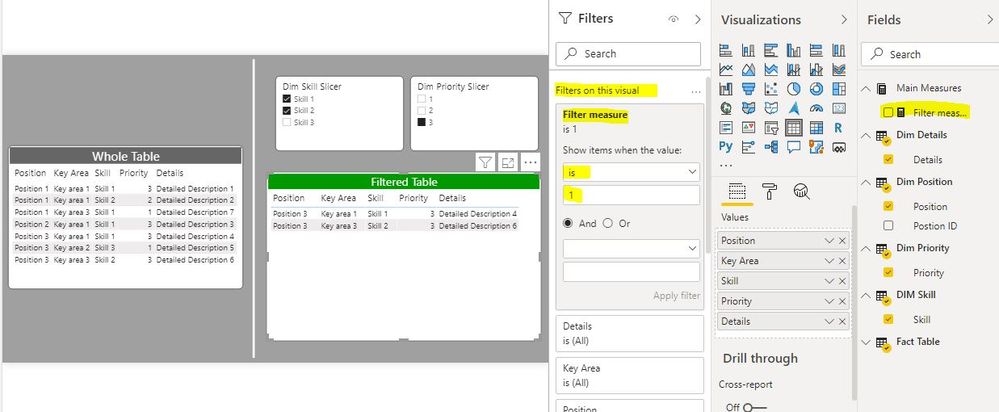
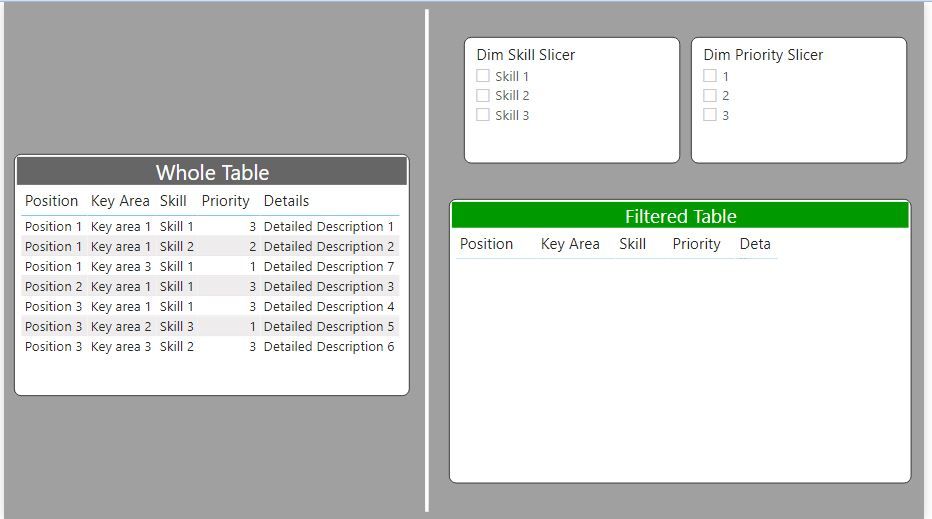
I've included the sample PBIX for your reference
Did I answer your question? Mark my post as a solution!
In doing so, you are also helping me. Thank you!
Proud to be a Super User!
Paul on Linkedin.
- Mark as New
- Bookmark
- Subscribe
- Mute
- Subscribe to RSS Feed
- Permalink
- Report Inappropriate Content
See if this works for you.
First, the model:
Then create a measure to use in the filter pane of the table/matrix:
Filter measure =
VAR skills = CALCULATE(COUNTROWS(ALLSELECTED('DIM Skill'[Skill])))
VAR Position = SUMX(
    SUMMARIZE('Fact Table', 'Dim Position'[Position], 'DIM Skill'[Skill], 'Dim
               Priority'[Priority]),
        CALCULATE(DISTINCTCOUNT('Fact Table'[Skill]),
            ALLEXCEPT('Fact Table', 'Dim Position'[Position], 'Dim Priority'[Priority])))
RETURN
IF(skills = 1, 1, IF(skills = Position, 1))
And you get this result:
I've included the sample PBIX for your reference
Did I answer your question? Mark my post as a solution!
In doing so, you are also helping me. Thank you!
Proud to be a Super User!
Paul on Linkedin.
- Mark as New
- Bookmark
- Subscribe
- Mute
- Subscribe to RSS Feed
- Permalink
- Report Inappropriate Content
@PaulDBrown, it is working like a charm. Thank you for the solution!
Big thanks also to @Sumanth_23 and @dedelman_clng for your time and help.
BR,
Pawel


- Mark as New
- Bookmark
- Subscribe
- Mute
- Subscribe to RSS Feed
- Permalink
- Report Inappropriate Content
hi @pawelk3 - you can use a Skills slicer as required to filter your report based on Skills, you can enable multi select for the slicer as show below
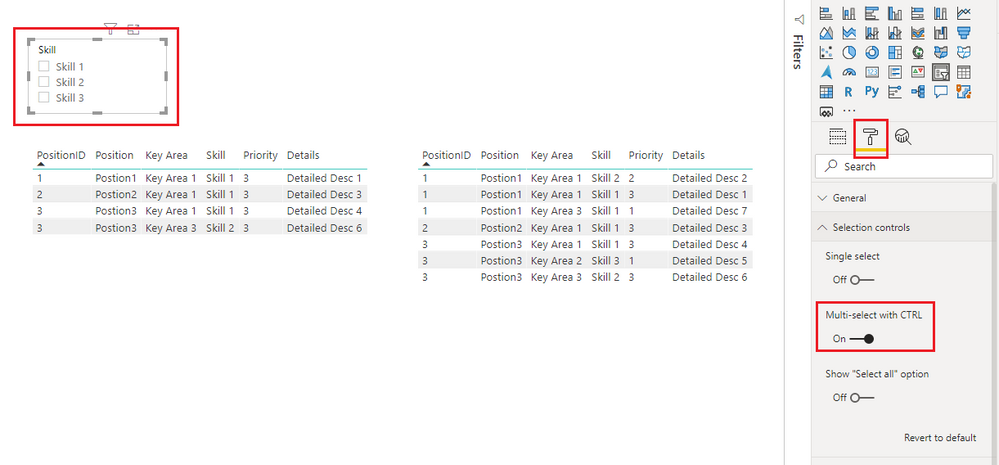
For filtering Table 1 and Table 2 to display only priority 3 and 2 respectively you can apply visual level filters as shown in the below screenshot
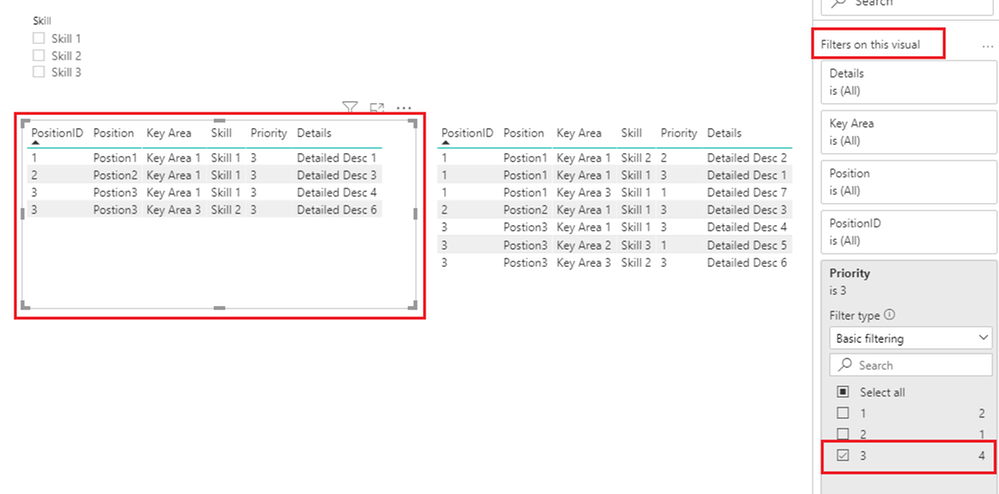
Please mark the post as a solution and provide a 👍 if my comment helped with solving your issue. Thanks!
Proud to be a Super User!
- Mark as New
- Bookmark
- Subscribe
- Mute
- Subscribe to RSS Feed
- Permalink
- Report Inappropriate Content
@Anonymous, thank you for your answer.
I know that in case of priority I can apply a filter for a specific visual and I did that. I would like the lack of a selected option in the slicer to show only the table headers. Currently, the table shows all rows for the condition 'Priority = 3'.
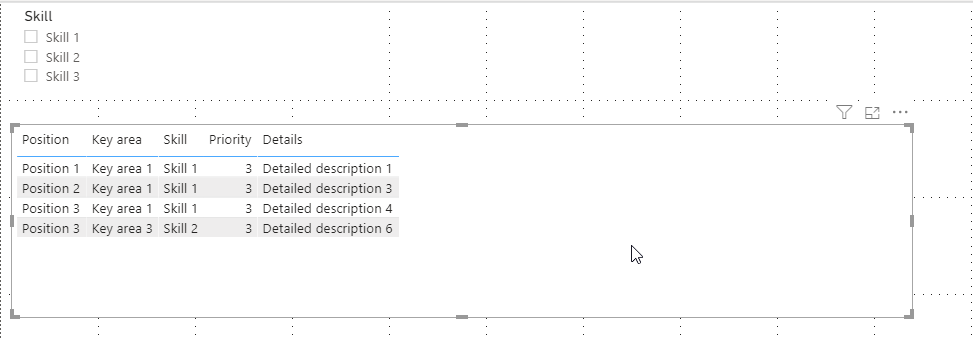
The second issue is to change the slicer logic from OR to AND. I probably did not explain my problem well enough. After selecting one skill from the slicer (Skill 1), the table should show all the rows that contain that skill (see below).
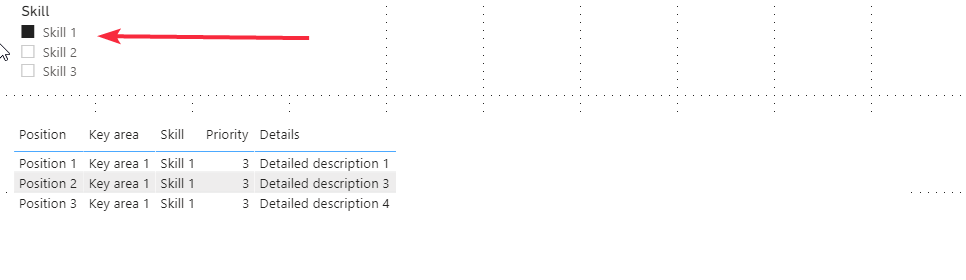
The problem I struggle with is choosing more than one skill in the slicer. After selecting two (Skill 1 and Skill 2), the table shows these rows:

but I wish it would show these:
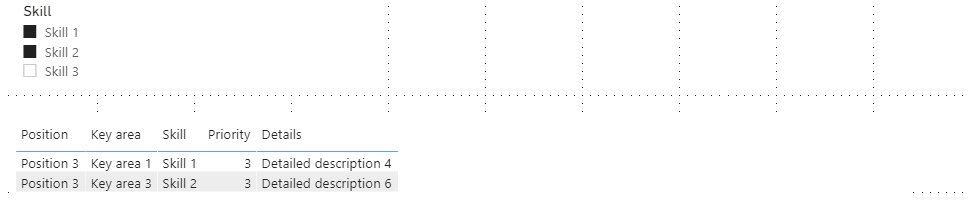
Because only 'Position 3' has both of these skills with priority 3. I would like to achieve the same effect by selecting 3 skills and more at the same time. Is it somehow possible?
- Mark as New
- Bookmark
- Subscribe
- Mute
- Subscribe to RSS Feed
- Permalink
- Report Inappropriate Content
hi @pawelk3 - I now get what you are looking to achieve with the slicers.
#1 Not selecting any values in the slicer is equivalent to "select all" and hence it shows all data - there is no default setting to hide data unless value is selected from the slicer.
You can try and implement this logic using the steps mentioned in the link below:
https://www.kasperonbi.com/show-values-in-a-chart-only-when-a-slicer-is-selected/
You can refer to the steps mentioned in the link below to setup the AND criteria on the slicer as you require - this would need to be done using DAX:
https://radacad.com/slicer-with-and-condition-in-power-bi
Please mark the post as a solution and provide a 👍 if my comment helped with solving your issue. Thanks!
Proud to be a Super User!
- Mark as New
- Bookmark
- Subscribe
- Mute
- Subscribe to RSS Feed
- Permalink
- Report Inappropriate Content
@Sumanth_23, thanks for the suggestions, I am trying to change the slicer logic with the tutorial you pointed me out (https://radacad.com/slicer-with-and-condition-in-power-bi) but I have a problem with that.
This is my simple model:

And the measure I created based on tutorial:
Chosen Skills with AND-Only Condition =
var selectedSkills=VALUES(tab_umi[Skill])
var countRowsFact=
COUNTROWS(
    DISTINCT(
        SELECTCOLUMNS(
            FILTER(
                tab_bda,
                RELATED(tab_umi[Skill]) in selectedSkills
                ),
                "Skill",
                RELATED(tab_umi[Skill])
        )
    )
)
var countRowsSkills=COUNTROWS(selectedSkills)
return
IF(countRowsFact>=countRowsSkills,countRowsFact)
When you select one skill from the slicer, everything is fine, in the case of two or more skills, the table returns no results. Where is the mistake?
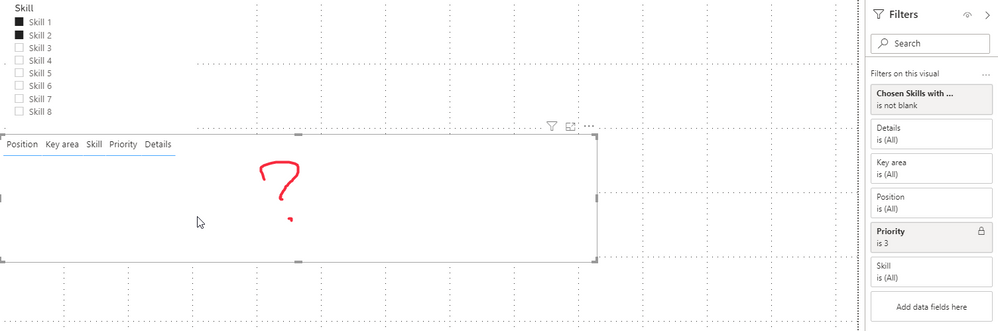
I will be very grateful if someone can help me solve this problem. I have been struggling with it for the second day, without much results.

- Mark as New
- Bookmark
- Subscribe
- Mute
- Subscribe to RSS Feed
- Permalink
- Report Inappropriate Content
@pawelk3 please link your pbix in the thread and I will get some more help on this.
- Mark as New
- Bookmark
- Subscribe
- Mute
- Subscribe to RSS Feed
- Permalink
- Report Inappropriate Content
- Mark as New
- Bookmark
- Subscribe
- Mute
- Subscribe to RSS Feed
- Permalink
- Report Inappropriate Content
Hi @pawelk3 - this blog post was pointed out to me. I haven't worked through it yet, but if you wanted to give it a shot go ahead
https://community.powerbi.com/t5/Quick-Measures-Gallery/Patient-Cohort-AND-Slicer/m-p/391883#M130
David

Helpful resources

Power BI Monthly Update - November 2025
Check out the November 2025 Power BI update to learn about new features.

Fabric Data Days
Advance your Data & AI career with 50 days of live learning, contests, hands-on challenges, study groups & certifications and more!

FabCon Atlanta 2026
Join us at FabCon Atlanta, March 16-20, for the ultimate Fabric, Power BI, AI and SQL community-led event. Save $200 with code FABCOMM.


