Don't miss your chance to take the Fabric Data Engineer (DP-700) exam on us!
Learn moreWe've captured the moments from FabCon & SQLCon that everyone is talking about, and we are bringing them to the community, live and on-demand. Starts on April 14th. Register now
I wish to do as you would in excel's search replace:
Replace ~(ignore double quotes here)
" S1*" - (S1 followed by a wildcard
to be replaced with "" ie no text
EG
"Mario S1 E1" Would be replaced with "Mario".
asterisk doesnt seem to work in replace values in the query editor however.
Any way to do the same?
Solved! Go to Solution.
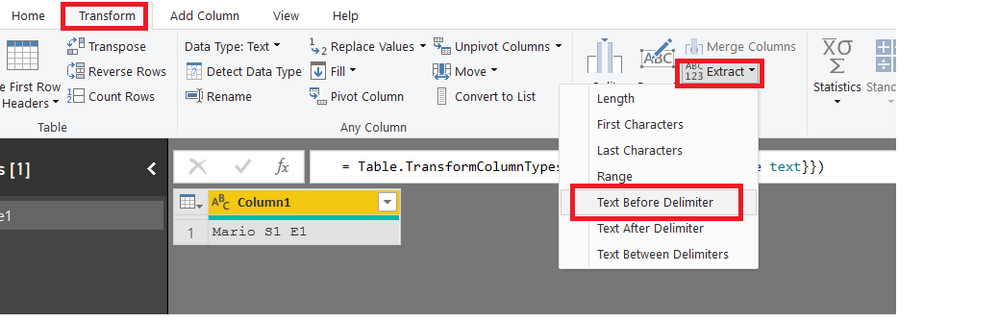
You can use Extract Text Before Delimiter and specify "S1" there
Hi @StephenF ,
You can add a column with condition to replace value, please take a look at following query.
#"Added Custom" = Table.AddColumn(#"Changed Type", "Replace", each try if Text.Split([Text]," S1")<>null then Text.Split([Text]," S1"){0} else [Text] otherwise [Text])
Full query:
let
Source = Table.FromRows(Json.Document(Binary.Decompress(Binary.FromText("i45W8k0sysxXCDZUcDVUitWJVgpJLS4Bco3AHLgkRM7RyRXESS1CkdQyMlWKjQUA", BinaryEncoding.Base64), Compression.Deflate)), let _t = ((type text) meta [Serialized.Text = true]) in type table [Text = _t]),
#"Changed Type" = Table.TransformColumnTypes(Source,{{"Text", type text}}),
#"Added Custom" = Table.AddColumn(#"Changed Type", "Replace", each try if Text.Split([Text]," S1")<>null then Text.Split([Text]," S1"){0} else [Text] otherwise [Text])
in
#"Added Custom"
Regards,
Xiaoxin Sheng
You can use Extract Text Before Delimiter and specify "S1" there
@Zubair_Muhammad Strictly this works, but if i chain a bunch of these it only picks up the last one.
The procession doesnt save the progress of the transformation on the string after each step for this function which is a bit unusual.
eg:
#"Extracted Text Before Delimiter1" = Table.TransformColumns(#"Replaced Value", {{"Programme Name", each Text.BeforeDelimiter(_, " S1"), type text}}),
#"Extracted Text Before Delimiter2" = Table.TransformColumns(#"Replaced Value", {{"Programme Name", each Text.BeforeDelimiter(_, " S3"), type text}}),
#"Extracted Text Before Delimiter3" = Table.TransformColumns(#"Replaced Value", {{"Programme Name", each Text.BeforeDelimiter(_, " S4"), type text}}),
#"Extracted Text Before Delimiter4" = Table.TransformColumns(#"Replaced Value", {{"Programme Name", each Text.BeforeDelimiter(_, " S5"), type text}}),
EDIT: Oh right I need to change #"Replaced Value" to point to previous row also on each row for it to work !
If you have recently started exploring Fabric, we'd love to hear how it's going. Your feedback can help with product improvements.
A new Power BI DataViz World Championship is coming this June! Don't miss out on submitting your entry.
Share feedback directly with Fabric product managers, participate in targeted research studies and influence the Fabric roadmap.
| User | Count |
|---|---|
| 51 | |
| 37 | |
| 35 | |
| 19 | |
| 17 |
| User | Count |
|---|---|
| 69 | |
| 65 | |
| 39 | |
| 33 | |
| 23 |