cancel
Showing results for 
Search instead for 
Did you mean: 

The Power BI Data Visualization World Championships is back! Get ahead of the game and start preparing now! Learn more

Reply
mrothschild
Continued Contributor

Single Value Slicer created from Parameter keeps rounding my manual inputs

PBIX file: https://drive.google.com/file/d/1j_4CrUj0fPh0xK6hnO7OZ-uIWkoP5Kdg/view?usp=sharing


I created a New Parameter that ranges from -1 to 1 with an increment of 0.001


From that, I switch the slicer to a Single Value for user to input, but every time it happens, the number defaults/reverts to a figure that's close to but not precisely.


Any help would be appreciated!


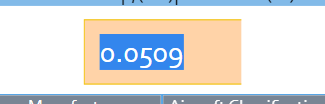
When I enter: 0.05 

PowerBI decreases to 0.0509


mrothschild_0-1628039987975.png


1 ACCEPTED SOLUTION
mrothschild
Continued Contributor

The workaround to fix this is to use Whole Numbers and then custom format the number by pasting the following into the Format field under the Column Tools menu item:


0.#\%;(0.#\%)

View solution in original post

3 REPLIES 3
mrothschild
Continued Contributor

The workaround to fix this is to use Whole Numbers and then custom format the number by pasting the following into the Format field under the Column Tools menu item:


0.#\%;(0.#\%)

amitchandak
Super User
Super User

@mrothschild , I think this is because of what if approximation, try to check if you can get the correct value using a slider. also, keep the value as 3 decimal places.

Share with Power BI Enthusiasts: Full Power BI Video (20 Hours) YouTube
Microsoft Fabric Series 60+ Videos YouTube
Microsoft Fabric Hindi End to End YouTube

If I change to a "Between" slicer, I can input the precise number.  With a Single Value, even with the slider, it still is forcing more significant digits than I'm asking of it.

Helpful resources

Announcements
November Power BI Update Carousel

Power BI Monthly Update - November 2025

Check out the November 2025 Power BI update to learn about new features.

Fabric Data Days Carousel

Fabric Data Days

Advance your Data & AI career with 50 days of live learning, contests, hands-on challenges, study groups & certifications and more!

FabCon Atlanta 2026 carousel

FabCon Atlanta 2026

Join us at FabCon Atlanta, March 16-20, for the ultimate Fabric, Power BI, AI and SQL community-led event. Save $200 with code FABCOMM.

Top Solution Authors
Top Kudoed Authors