FabCon is coming to Atlanta
Join us at FabCon Atlanta from March 16 - 20, 2026, for the ultimate Fabric, Power BI, AI and SQL community-led event. Save $200 with code FABCOMM.
Register now!- Power BI forums
- Get Help with Power BI
- Desktop
- Service
- Report Server
- Power Query
- Mobile Apps
- Developer
- DAX Commands and Tips
- Custom Visuals Development Discussion
- Health and Life Sciences
- Power BI Spanish forums
- Translated Spanish Desktop
- Training and Consulting
- Instructor Led Training
- Dashboard in a Day for Women, by Women
- Galleries
- Data Stories Gallery
- Themes Gallery
- Contests Gallery
- QuickViz Gallery
- Quick Measures Gallery
- Visual Calculations Gallery
- Notebook Gallery
- Translytical Task Flow Gallery
- TMDL Gallery
- R Script Showcase
- Webinars and Video Gallery
- Ideas
- Custom Visuals Ideas (read-only)
- Issues
- Issues
- Events
- Upcoming Events
View all the Fabric Data Days sessions on demand. View schedule
- Power BI forums
- Forums
- Get Help with Power BI
- Desktop
- Simple TOPN
- Subscribe to RSS Feed
- Mark Topic as New
- Mark Topic as Read
- Float this Topic for Current User
- Bookmark
- Subscribe
- Printer Friendly Page


- Mark as New
- Bookmark
- Subscribe
- Mute
- Subscribe to RSS Feed
- Permalink
- Report Inappropriate Content
Simple TOPN
Confused.
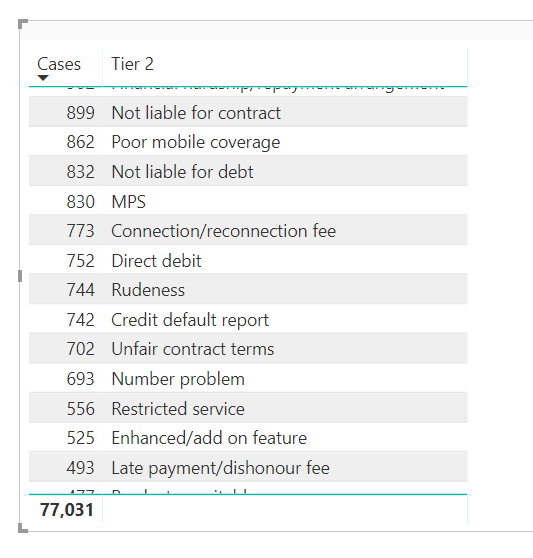
Here is my simple as data set.
Table name = complaints
Columns: Tier2, Cases
I just want to be able to filter the table by top5 cases by Tier2 category.
Any solutions?
Thanks
Solved! Go to Solution.


- Mark as New
- Bookmark
- Subscribe
- Mute
- Subscribe to RSS Feed
- Permalink
- Report Inappropriate Content
FilteredTable = TOPN(
5,
complaints,
complaints[cases],
DESC
)


- Mark as New
- Bookmark
- Subscribe
- Mute
- Subscribe to RSS Feed
- Permalink
- Report Inappropriate Content
Hi @johnmelbourne
You can use Rank as a measure like below.
Rank Cases by  Tier2=
RANKX(
    CALCULATETABLE(
        VALUES( complaints[Tier2] ),
        ALLSELECTED()
    ),
    CALCULATE(
        SUM( complaints[Cases] )
    ),,
    DESC
)
Or Column
Rank Cases by Tier2 =
RANKX(
    VALUES( complaints[Tier2] ),
    CALCULATE( SUM( complaints[Cases] ) ),,,
    Dense
)
Regards,
Mariusz
If this post helps, then please consider Accept it as the solution to help the other members find it more quickly.
- Mark as New
- Bookmark
- Subscribe
- Mute
- Subscribe to RSS Feed
- Permalink
- Report Inappropriate Content
Hi @johnmelbourne
You can use Rank as a measure like below.
Rank Cases by  Tier2=
RANKX(
    CALCULATETABLE(
        VALUES( complaints[Tier2] ),
        ALLSELECTED()
    ),
    CALCULATE(
        SUM( complaints[Cases] )
    ),,
    DESC
)
Or Column
Rank Cases by Tier2 =
RANKX(
    VALUES( complaints[Tier2] ),
    CALCULATE( SUM( complaints[Cases] ) ),,,
    Dense
)
Regards,
Mariusz
If this post helps, then please consider Accept it as the solution to help the other members find it more quickly.
- Mark as New
- Bookmark
- Subscribe
- Mute
- Subscribe to RSS Feed
- Permalink
- Report Inappropriate Content
Hi @Mariusz
I thought the TOPN to filter the table would be easy, but I am still struggling.
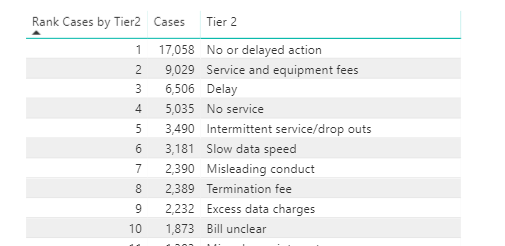
Here is my visualisation table using your rankx formula (which works great!). How would I use a TopN to reduce this table to say a top 5, or even better, a dynamic N using a variable? / slider?
Thanks
John
- Mark as New
- Bookmark
- Subscribe
- Mute
- Subscribe to RSS Feed
- Permalink
- Report Inappropriate Content
Hi @johnmelbourne
Please see the below.
Top N Sales =
VAR n = MAX( 'Top N Selection'[Select Top N] ) -- Unrelated Table with one column and values for top n selection, example (1, 5, 10, 15)
VAR tbl = TOPN(
    n,
    ALLSELECTED( 'Product'[Brand] ), -- replace with complaints[Tier2]
    [Sales], --replace with CALCULATE( SUM( complaints[Cases] ) )
    DESC
)
RETURN
CALCULATE(
    [Sales], --replace with SUM( complaints[Cases] )
    KEEPFILTERS( tbl )
)
Regards,
Mariusz
If this post helps, then please consider Accept it as the solution to help the other members find it more quickly.
- Mark as New
- Bookmark
- Subscribe
- Mute
- Subscribe to RSS Feed
- Permalink
- Report Inappropriate Content
Thank you @Mariusz for the additional procedure. Love to learn. Your solutions were perfect. My TOPN approach kept on throwing an error saying multiple columns. Then you provioded your solution and I also read this article which explained why TOPN is useless by itself. https://www.dutchdatadude.com/power-bi-pro-tip-confusion-about-topn-versus-rankx/
Your contribution was perfect. Thanks @Mariusz
- Mark as New
- Bookmark
- Subscribe
- Mute
- Subscribe to RSS Feed
- Permalink
- Report Inappropriate Content
FilteredTable = TOPN(
5,
complaints,
complaints[cases],
DESC
)
- Mark as New
- Bookmark
- Subscribe
- Mute
- Subscribe to RSS Feed
- Permalink
- Report Inappropriate Content
This article helped, in that TOPN is useless by itself.
https://www.dutchdatadude.com/power-bi-pro-tip-confusion-about-topn-versus-rankx/
- Mark as New
- Bookmark
- Subscribe
- Mute
- Subscribe to RSS Feed
- Permalink
- Report Inappropriate Content

Helpful resources

Power BI Monthly Update - November 2025
Check out the November 2025 Power BI update to learn about new features.

Fabric Data Days
Advance your Data & AI career with 50 days of live learning, contests, hands-on challenges, study groups & certifications and more!

FabCon Atlanta 2026
Join us at FabCon Atlanta, March 16-20, for the ultimate Fabric, Power BI, AI and SQL community-led event. Save $200 with code FABCOMM.


