Hello everyone, I am trying to figure out the best way to optimize my model importation while keeping all the data I need for a visual.
Here is my case, I am working with hospitality data where there is a stay "start date" and "end date". What I want to show to make it easy is when a stay has a start date on 07/28/2022 and 2 nights stay :
07/28/2022 : 1 night
07/29/2022 : 1 night
While I have been able to do this if my table has a granularity by night, it creates too much rows to import so I would like to : import all my rows with a granularity per "Stay" (versus per Night) and kind of pivot my table after the importation in Power BI to be able to show on a graph the data I want to display.
Here is what my data look like :
Table I want to import
| Start of stay | End of stay | Amount | KEY_ETAB | Client ID | Nights |
| 4/22/2019 | 4/25/2019 | 99 | Hotel Name | Generic Room | 14397 | 3 |
| 4/24/2019 | 4/12/2019 | 40 | Hotel Name | Generic Room | 14401 | 2 |
Table I want to avoid
| Stay Date | Amount | Room name | Client Id |
| 4/22/2019 | 33 | Hotel Name | Generic Room | 14397 |
| 4/23/2019 | 33 | Hotel Name | Generic Room | 14397 |
| 4/24/2019 | 33 | Hotel Name | Generic Room | 14397 |
| 4/24/2019 | 20 | Hotel Name | Private Room | 14401 |
| 4/25/2019 | 20 | Hotel Name | Private Room | 14401 |
To give you a basic idea, here is what I want to do :
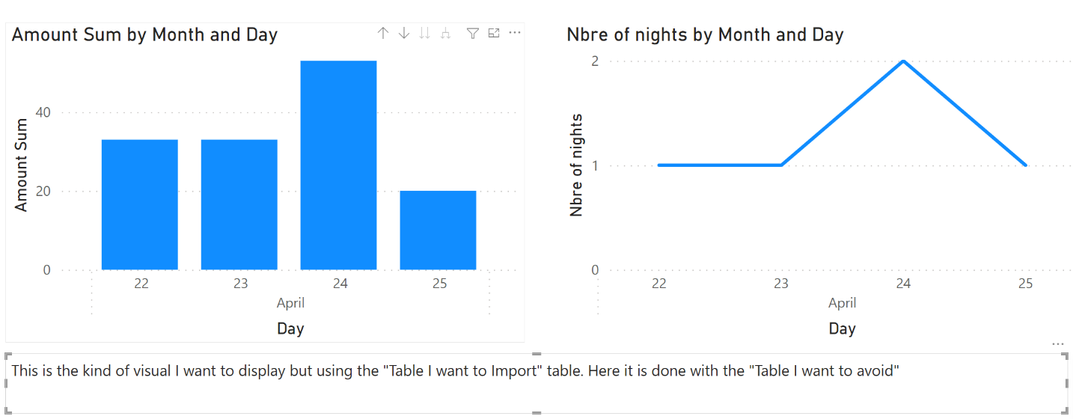
Thanks a lot for your help everyone, hope someone can help me sort this out


