This time we’re going bigger than ever. Fabric, Power BI, SQL, AI and more. We're covering it all. You won't want to miss it.
Learn moreGet Fabric Certified for FREE during AI Skills Fest. This week only. Secure your voucher now.
I have seen this asked a lot and the accepeted response is always Measure + 0, or an IF statement, or something along those lines.
However this give me an issue
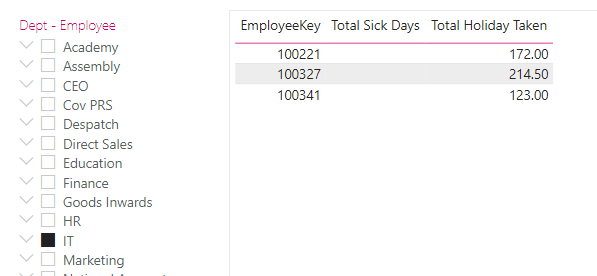
If I start with this table, you can see that the 3 employees in IT have taken no sick days.
If I add the measure to add in the scoring system I would get a blank. Do what is suggested and I get a zero but the filter gets ignored.
What I need it to do is show a zero but not overide the filter placed on it
Solved! Go to Solution.
@MCornish , Try something like this. an new measure
if(max(table[Dept-Employee]) in values(table[Dept-Employee]) , [Measure]+0, blank())
[measure] is your existing measure
@MCornish , Try something like this. an new measure
if(max(table[Dept-Employee]) in values(table[Dept-Employee]) , [Measure]+0, blank())
[measure] is your existing measure
Dude you are a genius
Check out the May 2026 Power BI update to learn about new features.
Sign up to receive a private message when registration opens and key events begin.
If you have recently started exploring Fabric, we'd love to hear how it's going. Your feedback can help with product improvements.
| User | Count |
|---|---|
| 24 | |
| 24 | |
| 21 | |
| 21 | |
| 18 |
| User | Count |
|---|---|
| 56 | |
| 53 | |
| 49 | |
| 26 | |
| 26 |