Join us at FabCon Atlanta from March 16 - 20, 2026, for the ultimate Fabric, Power BI, AI and SQL community-led event. Save $200 with code FABCOMM.
Register now!View all the Fabric Data Days sessions on demand. View schedule
Hello,
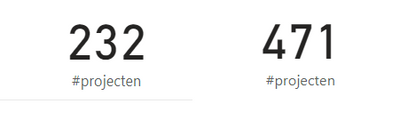
I have a source table with projects. I edited the query in a manner that there are 232 projects left.
I have a second table with projects, but not all are yet entered in this second table. My goal is to see the difference and so see which ones are missing.
The problem though is that this second table gives 471 projects. I guess it is listing also all other projects that are not in the source. I don't need to see those.
What I need to see instead of 471, is the amount of projects that is in source 2, that is also in 1. This would be about 130.
How to achieve this?
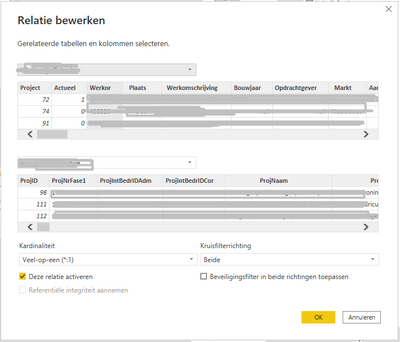
By the way, this is the relation:
Where the top table is the source.
Thanks in advance!
Solved! Go to Solution.
@BPTBPTBPT , if there is a relation, just try a measure like
Calculate(countrows(Table1), not(isblank(Table2[Column])) )
Also check
https://www.sqlbi.com/articles/propagate-filters-using-treatas-in-dax/
This was the solution. Thanks!
@BPTBPTBPT , if there is a relation, just try a measure like
Calculate(countrows(Table1), not(isblank(Table2[Column])) )
Also check
https://www.sqlbi.com/articles/propagate-filters-using-treatas-in-dax/
Check out the November 2025 Power BI update to learn about new features.
Advance your Data & AI career with 50 days of live learning, contests, hands-on challenges, study groups & certifications and more!