cancel
Showing results for 
Search instead for 
Did you mean: 

The Power BI Data Visualization World Championships is back! It's time to submit your entry. Live now!

Reply
enlamparter
Helper I
Helper I

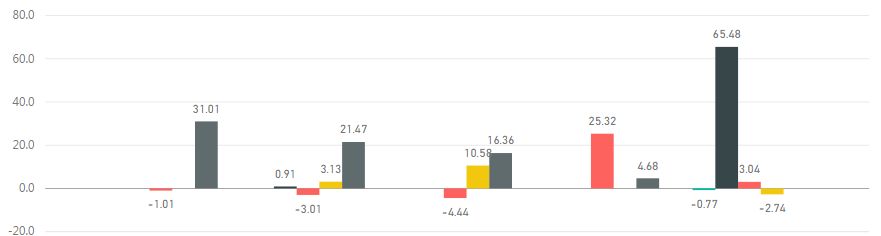
Show number as percentage value in visuals (i.e. 21.47 --> 21.47%)

It seems like a simple enough task, but I can't seem to make it work. I have a visual based on a measure that calculates the percentage difference between two columns and I want to show that difference as a percentage, not a number. This is the visual I'm working with:


Capture.PNG

1 ACCEPTED SOLUTION
Dog
Responsive Resident
Responsive Resident

HI @enlamparter


I think you just need to set the data type as a percentage type. (if imported data you should be able to set within Power BI file) 

obivously you'd need to change your calculation to ensure it's a percentage value being stored and the decimal equivalent.


Thanks


Dog

View solution in original post

2 REPLIES 2
Dog
Responsive Resident
Responsive Resident

HI @enlamparter


I think you just need to set the data type as a percentage type. (if imported data you should be able to set within Power BI file) 

obivously you'd need to change your calculation to ensure it's a percentage value being stored and the decimal equivalent.


Thanks


Dog

Yep, that would be the answer. I honestly didn't realize I could change the data type of a measure. Silly me! Thanks!

Helpful resources

Announcements
Power BI DataViz World Championships

Power BI Dataviz World Championships

The Power BI Data Visualization World Championships is back! It's time to submit your entry.

December 2025 Power BI Update Carousel

Power BI Monthly Update - December 2025

Check out the December 2025 Power BI Holiday Recap!

FabCon Atlanta 2026 carousel

FabCon Atlanta 2026

Join us at FabCon Atlanta, March 16-20, for the ultimate Fabric, Power BI, AI and SQL community-led event. Save $200 with code FABCOMM.