Join us at FabCon Atlanta from March 16 - 20, 2026, for the ultimate Fabric, Power BI, AI and SQL community-led event. Save $200 with code FABCOMM.
Register now!The Power BI Data Visualization World Championships is back! Get ahead of the game and start preparing now! Learn more
Hello,
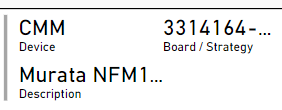
Is there a way to show more, if not all, information on a multi-row card without having to make the card bigger? For example, in the screenshot for board / strategy and description, there is a "..." to indicate more information but is there a way just to display all of it?
Thank you
Solved! Go to Solution.
Solved by using single-row cards and putting them together
Not really, no tooltips for card visuals. You can make the font smaller...
Hi @samanthamirae,
As I posted in your identical thread on the Service forum:
To my knowledge, not directly, other than maybe reducing the font size.
My question is, what behavior would you expect to make that work? I can't think of a UI/UX-friendly reason to pack a ton of into into a tiny square.
Additionally, try to keep questions in their respective forums. This is clearly a Desktop question, and double-posting generally isn't helpful.
Check out the November 2025 Power BI update to learn about new features.
Advance your Data & AI career with 50 days of live learning, contests, hands-on challenges, study groups & certifications and more!