Don't miss your chance to take the Fabric Data Engineer (DP-600) exam for FREE! Find out how by attending the DP-600 session on April 23rd (pacific time), live or on-demand.
Learn moreNext up in the FabCon + SQLCon recap series: The roadmap for Microsoft SQL and Maximizing Developer experiences in Fabric. All sessions are available on-demand after the live show. Register now
How can I just show data for items that are selected in the filter. As example below - I am selected Castellanos, Wilbert, the rest of the names in the table show up as 0, but how can I get the table only to show Wilbert's data?
Please go through this blog, you will get a clear idea
Hi @jcastr02,
Did these suggestions help with your scenario? if that is the case, you can consider Kudo or accept the helpful suggestions to help others who faced similar requirements to find it more quickly.
If these also not help, please share more detailed information to help us clarify your scenario to test.
How to Get Your Question Answered Quickly
Regards,
Xiaoxin Sheng
Hi @jcastr02 ,
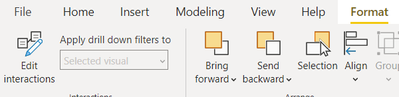
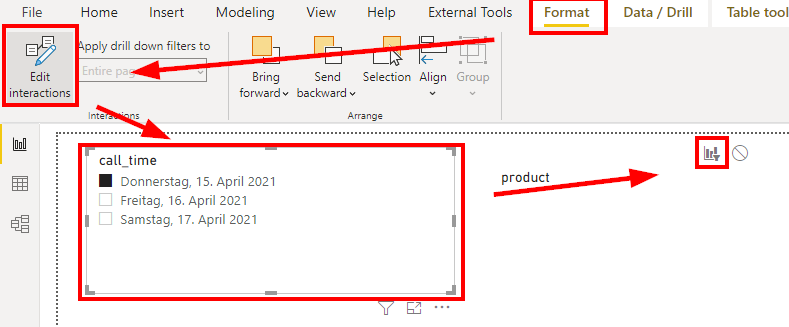
Click on your slicer visual, then Go to Format pane on top and click on Edit Interactions.
Then on the report page, you will see this icon
Make sure it is selected on filter as shown above. Then it should work.
Thanks,
Dheeraj
Something in your measures is returning 0 when there is no data instead of blank I assume? That is what is causing the rows to show up. In a visual if a measure returns blank (no result) that line will not show up but 0 is a result so they are showing.
Hey @jcastr02 ,
for me, it looks like either there is no connection between the two tables or that the filter doesn't interact with the table.
Check the interactions and make sure the "Filter" option is selection in the table for that specific slicer:
If you have recently started exploring Fabric, we'd love to hear how it's going. Your feedback can help with product improvements.
A new Power BI DataViz World Championship is coming this June! Don't miss out on submitting your entry.
Share feedback directly with Fabric product managers, participate in targeted research studies and influence the Fabric roadmap.
| User | Count |
|---|---|
| 48 | |
| 43 | |
| 39 | |
| 19 | |
| 17 |
| User | Count |
|---|---|
| 67 | |
| 63 | |
| 30 | |
| 30 | |
| 23 |