cancel
Showing results for 
Search instead for 
Did you mean: 

The Power BI Data Visualization World Championships is back! Get ahead of the game and start preparing now! Learn more

Reply
zhihai
Microsoft Employee
Microsoft Employee

Show different columns/values in a matrix based on the date measurement on relative date slicer

Hello team,


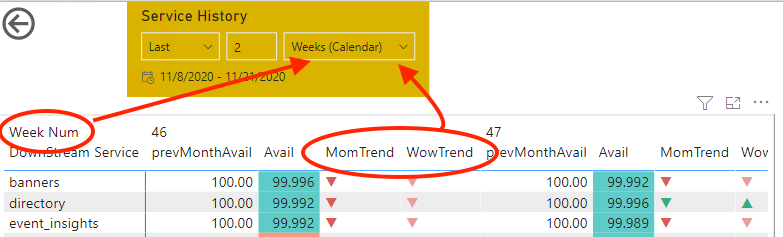
My need is, when relative date measurement is selected as "Week", I want to show aggregation column as Week(no month shown), and value as Week-over-week trend(WowTrend in the screenshot) and no Month-over-month trend(MomTrend in the screenshot) value shown. And when relative date measurement is selected as "Month", I need to show aggregation column as Month(no week), and value as Month-over-month trend and no week-over-week trend value. Is it do-able? Thanks!


Screen Shot 2020-11-24 at 6.20.55 PM.png

4 REPLIES 4
amitchandak
Super User
Super User

@zhihai , You can not change the axis/column/row using this method. To change  That you can use bookmark button or convert columns to rows.

refer

https://www.youtube.com/watch?v=6jeSIRpjv0M
https://datamonkeysite.com/2020/10/22/change-dimension-dynamically-using-parameter-in-powerbi/


https://radacad.com/bookmarks-and-buttons-making-power-bi-charts-even-more-interactive

Share with Power BI Enthusiasts: Full Power BI Video (20 Hours) YouTube
Microsoft Fabric Series 60+ Videos YouTube
Microsoft Fabric Hindi End to End YouTube

Thanks again @amitchandak ! These references are very help to create dynamic columns, I think bookmark button are a decent solution:

- I need to create a "week" button and a "month" button, and relates their actions to some bookmark

- User has to click "week"/"month" button aside from clicking from the date measurement dropdown menu in the date range slicer to see the updated visual.

To make user experience more smooth, I want to reduce 2 clicks to 1 click:

- Is there a way to associate the click of the dropdown in date range slicer with the action to show a bookmark?

- Is there a way to know the value(Weeks/Months) that user selected in the dropdown list in date range slicer?


Thanks in advance!

amitchandak
Super User
Super User

@zhihai , Not very clear. For WOW refer my blog

Power BI — Week on Week and WTD
https://medium.com/@amitchandak.1978/power-bi-wtd-questions-time-intelligence-4-5-98c30fab69d3
https://community.powerbi.com/t5/Community-Blog/Week-Is-Not-So-Weak-WTD-Last-WTD-and-This-Week-vs-La...


Refer for MOM

Power BI — Month on Month with or Without Time Intelligence
https://medium.com/@amitchandak.1978/power-bi-mtd-questions-time-intelligence-3-5-64b0b4a4090e

Share with Power BI Enthusiasts: Full Power BI Video (20 Hours) YouTube
Microsoft Fabric Series 60+ Videos YouTube
Microsoft Fabric Hindi End to End YouTube

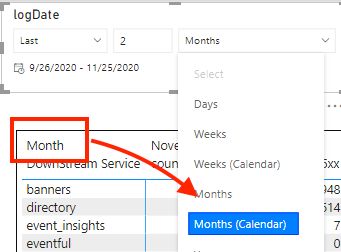
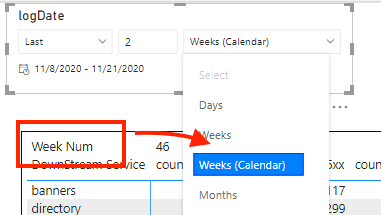
Thanks for your prompt reply @amitchandak ! My issue is not for calculation of WoW or MoM trend, it is how to switch the trend value, and the matrix column based on the relative date period. In other words, if user choose relative week in date slicer, the matrix aggregates on week(the data has week num column), if user choose relative month, the matrix aggregates on month(The data has month column). I showed a screenshot of what I wanna to acheive.


Screen Shot 2020-11-24 at 8.02.05 PM.pngScreen Shot 2020-11-24 at 8.06.22 PM.png


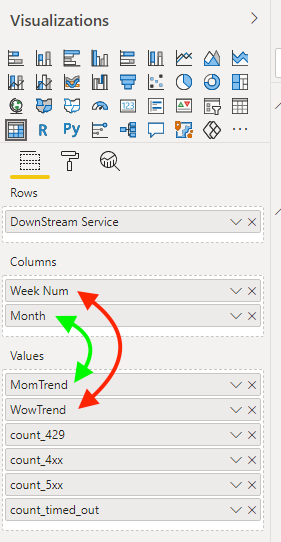
Red arrow shows the pair of week aggregation, and green arrow shows the pair of month aggregation as below. If relative date slicer is in week, then only red pair shows, and if relative date slicer is in month, then only green pair shows.

Screen Shot 2020-11-24 at 8.11.57 PM.png

Helpful resources

Announcements
November Power BI Update Carousel

Power BI Monthly Update - November 2025

Check out the November 2025 Power BI update to learn about new features.

Fabric Data Days Carousel

Fabric Data Days

Advance your Data & AI career with 50 days of live learning, contests, hands-on challenges, study groups & certifications and more!

FabCon Atlanta 2026 carousel

FabCon Atlanta 2026

Join us at FabCon Atlanta, March 16-20, for the ultimate Fabric, Power BI, AI and SQL community-led event. Save $200 with code FABCOMM.

Top Solution Authors
Top Kudoed Authors