Hi community!
I have a simple data model with 3 tables:
tblArticle
| Article |
Price |
Size |
| A |
50 |
40 |
| B |
60 |
50 |
This table shows me attributes for each article.
Then I have a second dimension table that shows me the required/planned process steps to be manufactured:
| Article |
Process Step Nr |
Description |
| A |
01A |
Packaging |
| A |
02A |
Mounting |
| A |
03A |
Drilling |
| B |
01B |
Packaging |
| B |
02B |
Drilling |
| C |
06C |
Drilling |
We have different Process Steps for each Article. This table is linked with Article with the first table.
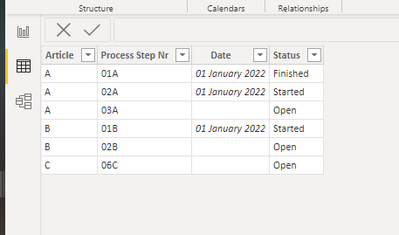
And then I have a transaction table that shows me if a process steps has already started or finished. Planned Process steps are not displayed. This table is linked with Article with the first table.
| Article |
Date |
Process Step |
Status |
| A |
01.01.2022 |
01 |
Finished |
| A |
01.01.2022 |
02 |
Started |
| B |
01.01.2022 |
01 |
Started |
Now I would like to create a matrix that shows me in rows the article and in columns the status per process step. But if a planned process steps has not started yet, I would like to see the string "Open". The displayed columns should be filtered / based on the selected articles. I don't want to see all process steps from the second table. Just the ones that are linked to the selected articles:
| Article |
01A |
02A |
03A |
01B |
02B |
| A |
Finished |
Started |
Open |
NA |
NA |
| B |
NA |
NA |
NA |
Started |
Open |
If a process step is not applicable / available for a selected article, then we should display "NA".
How would you do that?