Don't miss your chance to take the Fabric Data Engineer (DP-600) exam for FREE! Find out how by attending the DP-600 session on April 23rd (pacific time), live or on-demand.
Learn moreNext up in the FabCon + SQLCon recap series: The roadmap for Microsoft SQL and Maximizing Developer experiences in Fabric. All sessions are available on-demand after the live show. Register now
Hi ,
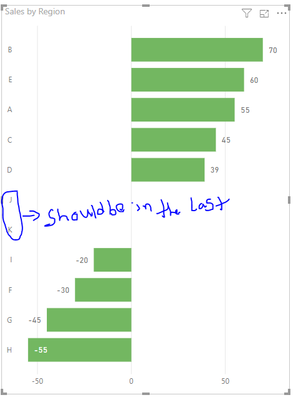
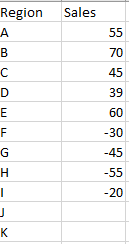
I have a dataset as below trying to represent it in stacked bar chart where null values items to be in the last but as the null values are considering as zero by deault it's showing in between +ve & _ve values .
see the data sheeta and sample graph below,
Quick help would be appreciated.
Thank you
Harsha Vardhan
Solved! Go to Solution.
Hi @Anonymous
Please make sure it’s “null” in the blank cell in query editor, rather than “0”. You can replace the value with “null” if needed.
If the problen still exist, I think you can try to add the measure as values:
Measure = IF(MAX(Table1[Sales])=BLANK(),BLANK(),MAX(Table1[Sales]))
Best regards,
Dina Ye
Hi @Anonymous ,
If my above post helps, could you please consider Accept it as the solution to help the other members find it more quickly. thanks!
Best regards,
Dina Ye
Hi @Anonymous
Please make sure it’s “null” in the blank cell in query editor, rather than “0”. You can replace the value with “null” if needed.
If the problen still exist, I think you can try to add the measure as values:
Measure = IF(MAX(Table1[Sales])=BLANK(),BLANK(),MAX(Table1[Sales]))
Best regards,
Dina Ye
Hi @Anonymous ,
If my above post helps, could you please consider Accept it as the solution to help the other members find it more quickly. thanks!
Best regards,
Dina Ye
If you have recently started exploring Fabric, we'd love to hear how it's going. Your feedback can help with product improvements.
A new Power BI DataViz World Championship is coming this June! Don't miss out on submitting your entry.
Experience the highlights from FabCon & SQLCon, available live and on-demand starting April 14th.
| User | Count |
|---|---|
| 48 | |
| 43 | |
| 40 | |
| 20 | |
| 15 |
| User | Count |
|---|---|
| 70 | |
| 67 | |
| 32 | |
| 27 | |
| 25 |