
cancel
Showing results for 
Search instead for 
Did you mean: 

Get Fabric Certified for FREE during Fabric Data Days. Don't miss your chance! Request now

Reply
guyatisk
Helper II
Helper II

Sharepoint person column with no fields?

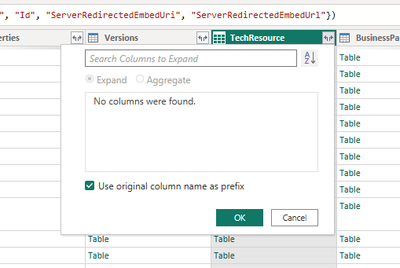
I want to be able to access the person name and email for this SharePoint column and usually I can expand the columns, however in this case I keep getting "No Columns Found".  Does anyone know why this would be happening? Thanks


UPDATE: This definitely has something to do with the person field able to be multiselected.  I changed the column to not allow multiselection and it works.  Now I just need to figure out how to get the email(s) from the multiselect person field and delimit by semi-colon


guyatisk_0-1700055893471.png


And other "person" fields like Author, Editor are RECORDS, not a Table.  Why would there be a difference?'

guyatisk_0-1700064158876.png


1 ACCEPTED SOLUTION
Anonymous
Not applicable

Hi @guyatisk 

Question 1:

After testing, it may affected by the data source connection, did you choose the 'SharePoint list' connection? If you choose this connection, when your emial is the  multiselect person, it cannot support, you can change the connection to 'SharePoint online list'

vxinruzhumsft_1-1700187994864.png

It support the multi choice and can return the related value.

Question 2

The user email you seleced is from another table in the sharepoint list, so it will return the data type, and the Editor column is existed in the current table, so it will return record.


Best Regards!

Yolo Zhu

If this post helps, then please consider Accept it as the solution to help the other members find it more quickly.


View solution in original post

1 REPLY 1
Anonymous
Not applicable

Hi @guyatisk 

Question 1:

After testing, it may affected by the data source connection, did you choose the 'SharePoint list' connection? If you choose this connection, when your emial is the  multiselect person, it cannot support, you can change the connection to 'SharePoint online list'

vxinruzhumsft_1-1700187994864.png

It support the multi choice and can return the related value.

Question 2

The user email you seleced is from another table in the sharepoint list, so it will return the data type, and the Editor column is existed in the current table, so it will return record.


Best Regards!

Yolo Zhu

If this post helps, then please consider Accept it as the solution to help the other members find it more quickly.


Helpful resources

Announcements
November Power BI Update Carousel

Power BI Monthly Update - November 2025

Check out the November 2025 Power BI update to learn about new features.

Fabric Data Days Carousel

Fabric Data Days

Advance your Data & AI career with 50 days of live learning, contests, hands-on challenges, study groups & certifications and more!

FabCon Atlanta 2026 carousel

FabCon Atlanta 2026

Join us at FabCon Atlanta, March 16-20, for the ultimate Fabric, Power BI, AI and SQL community-led event. Save $200 with code FABCOMM.

Top Solution Authors
Top Kudoed Authors