cancel
Showing results for 
Search instead for 
Did you mean: 

View all the Fabric Data Days sessions on demand. View schedule

Reply
vijay22kar
Helper II
Helper II

Set default time at x-axis

Hi All,


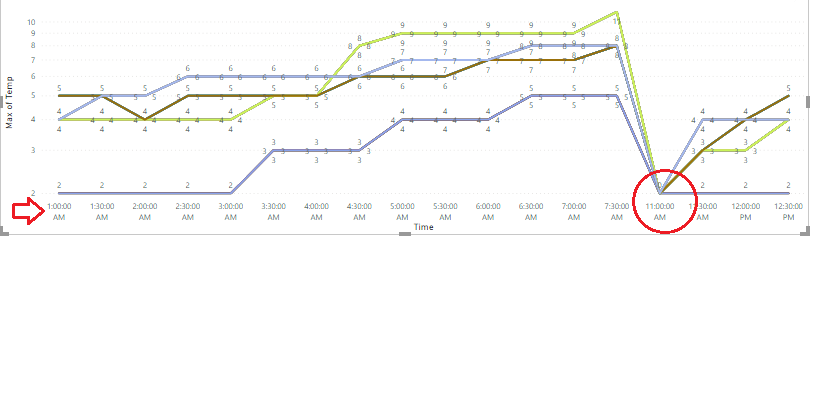
I want to set the time on the x-axis in the line chart starts from 11.00 PM to 7.30 AM. How to set. Please check my below graph.


6 REPLIES 6
vijay22kar
Helper II
Helper II

Hi All

I want to set the time on the x-axis in the line chart starts from 11.00 PM to 7.30 AM. How to set. Please check my below graph.


time_change.png


Hello! Did you get a satisfactory solution to this - so you could carry on using a line chart? I have a similar need, due to using a fairly wide date-filter to allow calculation of previous year's values alongside the current year's. But I want the user to focus on far RHS of the chart to view values for the current and recent months. It would be nice if Power BI allowed me to preset the position on the x-axis scroll, so it automatically displays the far RHS. I remember being able to do this in a previous BI tool (not Microsoft).
Thanks for any input ... anyone?
BR Mark

Tahreem24
Super User
Super User

@vijay22kar ,


That Scale Type Linear id supported in Stacked Bar chart column. Your requirement is for Line Chart. So In Line chart Scale type Linear is supported in Y-Axis Only. So you can do one of below approach to achieve your need:

Approach 1: Swap your scale in Line Chart. i.e. Put Time on Y-axis and other field in X-axis. As Linear Scale Type is only supported in Y-Axis of Line Chart.

Approach 2: You can replace Line Chart with Bar Chart and Set your default axis in X-axis itself. (Refer my prevoius reply)


Please don't forget to hit THUMBS UP and Accept this as a solution if it helps you!

Don't forget to give thumbs up and accept this as a solution if it helped you!!!

Please take a quick glance at newly created dashboards : Restaurant Management Dashboard , HR Analytics Report , Hotel Management Report, Sales Analysis Report , Fortune 500 Companies Analysis , Revenue Tracking Dashboard

@vijay22kar , If my reply helped you so please give THUMBS UP for support and also mark it as a solution so it may help other member to find it more quickly.


Don't forget to give thumbs up and accept this as a solution if it helped you!!!

Please take a quick glance at newly created dashboards : Restaurant Management Dashboard , HR Analytics Report , Hotel Management Report, Sales Analysis Report , Fortune 500 Companies Analysis , Revenue Tracking Dashboard
Tahreem24
Super User
Super User

@vijay22kar ,


Find the below screen shot for your reference:


Capture.JPG


Please don't forget to hit THUMBS UP and Accept this as a solution if it helps you!

Don't forget to give thumbs up and accept this as a solution if it helped you!!!

Please take a quick glance at newly created dashboards : Restaurant Management Dashboard , HR Analytics Report , Hotel Management Report, Sales Analysis Report , Fortune 500 Companies Analysis , Revenue Tracking Dashboard
rajulshah
Resident Rockstar
Resident Rockstar

Hello @vijay22kar,

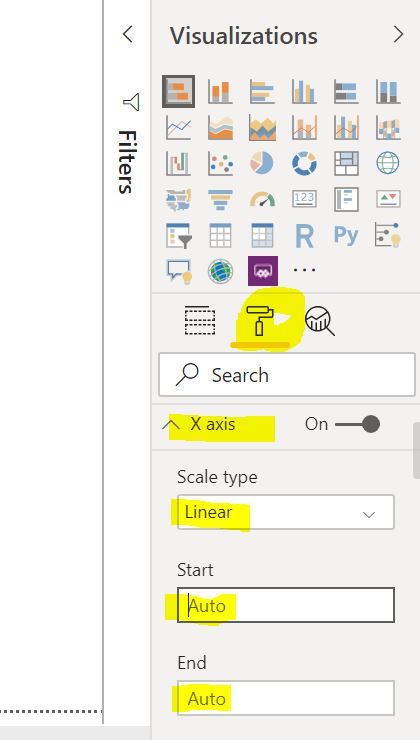
You can set this from 'Format' pane of the visual.

Go to Format > X axis and then specify Start and End values.
same X axis.png

 Hope this helps.


Helpful resources

Announcements
November Power BI Update Carousel

Power BI Monthly Update - November 2025

Check out the November 2025 Power BI update to learn about new features.

Fabric Data Days Carousel

Fabric Data Days

Advance your Data & AI career with 50 days of live learning, contests, hands-on challenges, study groups & certifications and more!

FabCon Atlanta 2026 carousel

FabCon Atlanta 2026

Join us at FabCon Atlanta, March 16-20, for the ultimate Fabric, Power BI, AI and SQL community-led event. Save $200 with code FABCOMM.

Top Solution Authors
Top Kudoed Authors