Party with Power BI’s own Guy in a Cube
Power BI is turning 10! Tune in for a special live episode on July 24 with behind-the-scenes stories, product evolution highlights, and a sneak peek at what’s in store for the future.
Save the date- Power BI forums
- Get Help with Power BI
- Desktop
- Service
- Report Server
- Power Query
- Mobile Apps
- Developer
- DAX Commands and Tips
- Custom Visuals Development Discussion
- Health and Life Sciences
- Power BI Spanish forums
- Translated Spanish Desktop
- Training and Consulting
- Instructor Led Training
- Dashboard in a Day for Women, by Women
- Galleries
- Webinars and Video Gallery
- Data Stories Gallery
- Themes Gallery
- Contests Gallery
- Quick Measures Gallery
- Notebook Gallery
- Translytical Task Flow Gallery
- R Script Showcase
- Ideas
- Custom Visuals Ideas (read-only)
- Issues
- Issues
- Events
- Upcoming Events
Enhance your career with this limited time 50% discount on Fabric and Power BI exams. Ends August 31st. Request your voucher.
- Power BI forums
- Forums
- Get Help with Power BI
- Desktop
- Re: Set column type while expanding from merged qu...
- Subscribe to RSS Feed
- Mark Topic as New
- Mark Topic as Read
- Float this Topic for Current User
- Bookmark
- Subscribe
- Printer Friendly Page


- Mark as New
- Bookmark
- Subscribe
- Mute
- Subscribe to RSS Feed
- Permalink
- Report Inappropriate Content
Set column type while expanding from merged query
Hello,
Here's a quick question:
I am expanding a column after merging. In the source the column type is text and has values like: 0333, 0555, 0888
While expanding it expands like a whole number and the relationships don't work anymore.
Here's the code:
#"Expanded Shifts" = Table.ExpandTableColumn(#"Merged Queries", "Shifts", {"Personnel Number"}, {"Personnel number"})Anyone with an idea how to expand as a text?
Thanks in advance!
Solved! Go to Solution.
- Mark as New
- Bookmark
- Subscribe
- Mute
- Subscribe to RSS Feed
- Permalink
- Report Inappropriate Content
I am working with Excel using Excel.Workbook(Web.Contents())
In matter of fact the type doesn't matter untill I don't lose the zeros. Like 0003 > 3, 0005 > 5.
@MarcelBeug the change of the data type occurs while expanding and zeros are lost. I guess there's nothing to get them back.
It is very nice how you values remain their zeros while their type is a number.
My temporary solution was to change the type to a number everywhere and duplicate the column with type text in the table that I visualize. Works pretty good but it would be better if that was not necessary.
Thank you both!


- Mark as New
- Bookmark
- Subscribe
- Mute
- Subscribe to RSS Feed
- Permalink
- Report Inappropriate Content
Here's a blog post I wrote on this problem showing how to solve it in M:
https://blog.crossjoin.co.uk/2017/09/25/setting-data-types-on-nested-tables-in-m/
HTH,
Chris


- Mark as New
- Bookmark
- Subscribe
- Mute
- Subscribe to RSS Feed
- Permalink
- Report Inappropriate Content
Still it is starnge that those text values are transfomed to numbers.
Even if the column would be typed as number, then still the merge doesn't effect the actual values (which are texts with leading zeroes).
So there must be something else, before the merge, that cause the values to be transformed to numbers.
Coincidentally I published a video this morning with an example of grouping tables, illustrating that the default code would change data types to any, and how that can be correccted before the tables are expanded.
The fragment starts at 4:08; keep watching until at least 5:50.
Back to your case, here is some example data:
Query Shifts:
#table(type table[ID =Int64.Type, Personnel Number = Int64.Type],{{1, "0333"},{2, "0555"},{3, "0888"}})
Query Table1:
= #table({"Key","Person"},{{11, 1},{12, 2},{13, 3}})
Query Merge1:
let
    Source = Table.NestedJoin(Table1,{"Person"},Shifts,{"ID"},"Shifts",JoinKind.LeftOuter),
    #"Expanded Shifts" = Table.ExpandTableColumn(Source, "Shifts", {"Personnel Number"}, {"Personnel Number"})
in
    #"Expanded Shifts"
Result from query Merge1:

- Mark as New
- Bookmark
- Subscribe
- Mute
- Subscribe to RSS Feed
- Permalink
- Report Inappropriate Content
Hello @cwebb,
Would you, please, be more specific?
I have already tried setting the type in the function like this
= Table.ExpandTableColumn(#"Merged Queries", "Shifts", {"Personnel Number"}, {"Personnel number"}, type text)But it won't works because Table.ExpandTableColumn doesn't accept a fifth parameter.
Table.NestedJoin function also doesn't allow a parameter for setting types.

- Mark as New
- Bookmark
- Subscribe
- Mute
- Subscribe to RSS Feed
- Permalink
- Report Inappropriate Content
I just requested this as a new "Idea". Please vote for it so we can see it added.
https://ideas.fabric.microsoft.com/ideas/idea/?ideaid=a55c3e56-d519-ef11-9899-000d3a0f4263
- Mark as New
- Bookmark
- Subscribe
- Mute
- Subscribe to RSS Feed
- Permalink
- Report Inappropriate Content
Can you give me more details about the data sources you're working with, and the query you're trying to write? I've just done some testing with the latest version of Power BI Desktop and it seems like Table.NestedJoin() automatically respects the data types of the columns from the tables it's joining, so there's no need to do anything special in code. I don't know whether this is new functionality though.
Chris
- Mark as New
- Bookmark
- Subscribe
- Mute
- Subscribe to RSS Feed
- Permalink
- Report Inappropriate Content
I am working with Excel using Excel.Workbook(Web.Contents())
In matter of fact the type doesn't matter untill I don't lose the zeros. Like 0003 > 3, 0005 > 5.
@MarcelBeug the change of the data type occurs while expanding and zeros are lost. I guess there's nothing to get them back.
It is very nice how you values remain their zeros while their type is a number.
My temporary solution was to change the type to a number everywhere and duplicate the column with type text in the table that I visualize. Works pretty good but it would be better if that was not necessary.
Thank you both!
- Mark as New
- Bookmark
- Subscribe
- Mute
- Subscribe to RSS Feed
- Permalink
- Report Inappropriate Content
I can't reproduce this with the build of Excel 2016 that I have, but it could be a bug in an older version of Excel/Power Query.
However, can you confirm that the data type conversion has not taken place in the original query that contains the text values? It's very common that an extra "Changed Type" step is added somewhere and does a data type conversion that you did not want.
Chris
- Mark as New
- Bookmark
- Subscribe
- Mute
- Subscribe to RSS Feed
- Permalink
- Report Inappropriate Content
I use the latest version of Power BI. There was a second update this month.
No new step is added.
Maybe you think that shouldn't happen or event it's not possible but that's what happened.
- Mark as New
- Bookmark
- Subscribe
- Mute
- Subscribe to RSS Feed
- Permalink
- Report Inappropriate Content
Can you post a screenshot of the Query Editor showing the output of the query that gets data from Excel, before you do the merge, please? If possible could you also post the M code for all of your queries too?
Thanks,
Chris
- Mark as New
- Bookmark
- Subscribe
- Mute
- Subscribe to RSS Feed
- Permalink
- Report Inappropriate Content
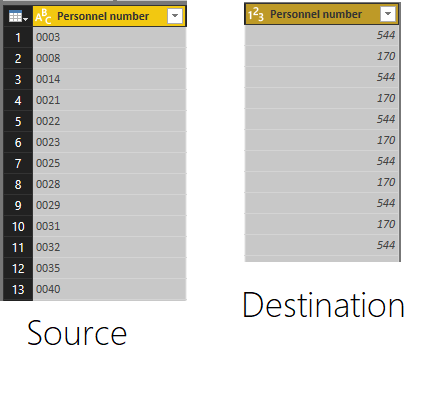
I can't post the M Code, but trust me there is nothing that usually would cause such a thing.
Here is an image of the source and destination (the expanded column):


- Mark as New
- Bookmark
- Subscribe
- Mute
- Subscribe to RSS Feed
- Permalink
- Report Inappropriate Content
Hi @Birdjo,
Could you please mark the proper answer as solution or share the solution if it's convenient for you? That will be a big help to the others.
Best Regards!
Dale
If this post helps, then please consider Accept it as the solution to help the other members find it more quickly.
- Mark as New
- Bookmark
- Subscribe
- Mute
- Subscribe to RSS Feed
- Permalink
- Report Inappropriate Content
Hi @Birdjo,
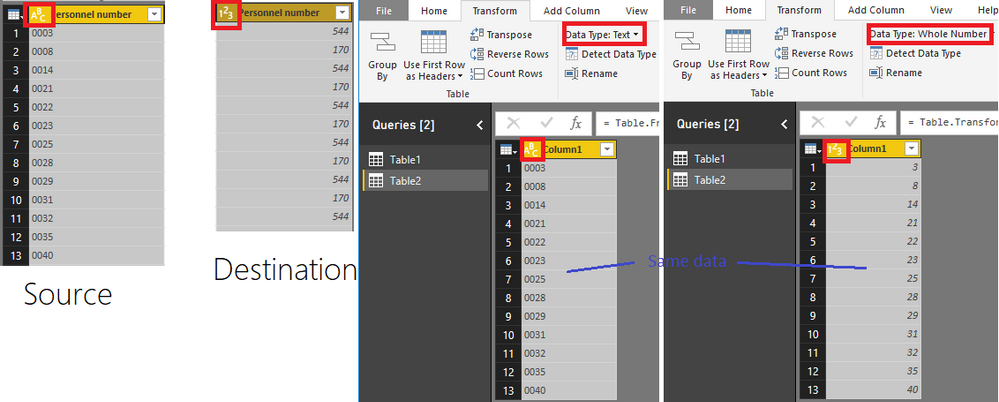
The data type of the destination is number. Can you change it to Text manually?
Best Regards,
Dale
If this post helps, then please consider Accept it as the solution to help the other members find it more quickly.
- Mark as New
- Bookmark
- Subscribe
- Mute
- Subscribe to RSS Feed
- Permalink
- Report Inappropriate Content
That way the zeros are missing.
- Mark as New
- Bookmark
- Subscribe
- Mute
- Subscribe to RSS Feed
- Permalink
- Report Inappropriate Content
Agree with Chris.
In any case: expanding does not change column data types nor convert values to another data type.
The column data types after expanding, are determined by the data type of the column with nested tables (before expanding).
If you have numbers after expanding, then you also have numbers before expanding.

- Mark as New
- Bookmark
- Subscribe
- Mute
- Subscribe to RSS Feed
- Permalink
- Report Inappropriate Content
How is this true?
Because before expanding, the column type is "text" and after expanding it is "any" data type (and reomves leading 0's).
Is it possible to disable this, because it messes things up significantly.
Or do I have to polute my dataset with a string so that power bi doesn't mess with it?
- Mark as New
- Bookmark
- Subscribe
- Mute
- Subscribe to RSS Feed
- Permalink
- Report Inappropriate Content
For anyone coming here from 2023
I have not managed to find a solution to this in Power Bi and I'm pretty sure there is nothing that can be done to fix this.
The only solution that seems to work correctly is by using either R, Python or javascript and manually padding the values in the column.
So in my instance it woulde be python:
dataset['column'] = dataset['column'].apply('{:0>4}'.format)
As for Power Query changing the type of the column, again python to the rescue.
Just put the entire dataset in a pandas dataFrame and set the column types manually the way you want it.
- Mark as New
- Bookmark
- Subscribe
- Mute
- Subscribe to RSS Feed
- Permalink
- Report Inappropriate Content
@Birdjo My values are texts, but they are in column with type number, which are 2 different things in Power Query.

Helpful resources

Power BI Monthly Update - July 2025
Check out the July 2025 Power BI update to learn about new features.

Join our Fabric User Panel
This is your chance to engage directly with the engineering team behind Fabric and Power BI. Share your experiences and shape the future.

Fabric Community Update - June 2025
Find out what's new and trending in the Fabric community.

| User | Count |
|---|---|
| 70 | |
| 68 | |
| 43 | |
| 34 | |
| 26 |


| User | Count |
|---|---|
| 86 | |
| 49 | |
| 45 | |
| 38 | |
| 37 |


