cancel
Showing results for 
Search instead for 
Did you mean: 

The Power BI Data Visualization World Championships is back! Get ahead of the game and start preparing now! Learn more

Reply
Yehudam
New Member

Send to Back

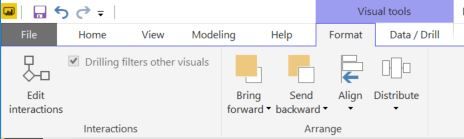
How do I send a shape to the back so that I can move othe visualizations around within it?

1 ACCEPTED SOLUTION
thomasronn
Resolver I
Resolver I

It's in the format tab

Capture.JPG

View solution in original post

5 REPLIES 5
carlilelance
Advocate I
Advocate I

Is there a way to do this in the browser editor?

NotMyJob
Helper III
Helper III

This is all well and good 5 years ago, however this menu bar has long since been replaced.  Is this functionality still here?  The 'Help' search bar produces no results, and the workarounds I've found on the web still don't match this really useful capability/feature.  

Hello,


When you select an object, you should see a new tab open. See below:

josh122398_0-1682533651251.png


Hope this helps!

thomasronn
Resolver I
Resolver I

It's in the format tab

Capture.JPG

Thank you!

Helpful resources

Announcements
Power BI DataViz World Championships

Power BI Dataviz World Championships

The Power BI Data Visualization World Championships is back! Get ahead of the game and start preparing now!

December 2025 Power BI Update Carousel

Power BI Monthly Update - December 2025

Check out the December 2025 Power BI Holiday Recap!

FabCon Atlanta 2026 carousel

FabCon Atlanta 2026

Join us at FabCon Atlanta, March 16-20, for the ultimate Fabric, Power BI, AI and SQL community-led event. Save $200 with code FABCOMM.

Top Solution Authors