Fabric Data Days starts November 4th!
Advance your Data & AI career with 50 days of live learning, dataviz contests, hands-on challenges, study groups & certifications and more!
Get registered- Power BI forums
- Get Help with Power BI
- Desktop
- Service
- Report Server
- Power Query
- Mobile Apps
- Developer
- DAX Commands and Tips
- Custom Visuals Development Discussion
- Health and Life Sciences
- Power BI Spanish forums
- Translated Spanish Desktop
- Training and Consulting
- Instructor Led Training
- Dashboard in a Day for Women, by Women
- Galleries
- Data Stories Gallery
- Themes Gallery
- Contests Gallery
- QuickViz Gallery
- Quick Measures Gallery
- Visual Calculations Gallery
- Notebook Gallery
- Translytical Task Flow Gallery
- TMDL Gallery
- R Script Showcase
- Webinars and Video Gallery
- Ideas
- Custom Visuals Ideas (read-only)
- Issues
- Issues
- Events
- Upcoming Events
Get Fabric Certified for FREE during Fabric Data Days. Don't miss your chance! Request now
- Power BI forums
- Forums
- Get Help with Power BI
- Desktop
- Re: Self entered data table cleared after refresh ...
- Subscribe to RSS Feed
- Mark Topic as New
- Mark Topic as Read
- Float this Topic for Current User
- Bookmark
- Subscribe
- Printer Friendly Page


- Mark as New
- Bookmark
- Subscribe
- Mute
- Subscribe to RSS Feed
- Permalink
- Report Inappropriate Content
Self entered data table cleared after refresh from Service-tool
Hello,
First of all Im not sure if this topic should lay under Desktop or Service since it concerns them both, sorry if I put it wrong.
Background:
I've created a pretty big data model in PowerBI desktop which runs perfectly fine by a scheduled refresh setup in the Power BI Service. One of the tables are "self entered" using the "enter data" function. I use this table as a lookup table creating measures calculacting performance from this "hardcoded" table.
Problem:
When I am refreshing my dataset in Power BI Desktop everything is working as it is supposed to. ALTHOUGH! When I publish my report to the service interface and i refresh the report from there my "self entered" data table clears and my measures related to this table of course will be blank in the service interface.
I have no idea how to solve this and Ive been googling alot! Anyone know how to fix this issue?
Thanks alot!!!
CJ
Solved! Go to Solution.
- Mark as New
- Bookmark
- Subscribe
- Mute
- Subscribe to RSS Feed
- Permalink
- Report Inappropriate Content
Thank you for all your help Qiuyu.
I was able to fix this issue with the help of one of our IT guys at work. He put up a new database for me so I can use it for lookups (so i had a source to point at at refresh).


- Mark as New
- Bookmark
- Subscribe
- Mute
- Subscribe to RSS Feed
- Permalink
- Report Inappropriate Content
In PBI Desktop if you go to Query Editor and remove that checkbox:
for the table in question only (right click it) before publishing
does that fix your issue?
- Mark as New
- Bookmark
- Subscribe
- Mute
- Subscribe to RSS Feed
- Permalink
- Report Inappropriate Content
Hello,
Actually i found that option and tried it without any success. It still cleared my table! Thank you for quick reply @cs_skit
- Mark as New
- Bookmark
- Subscribe
- Mute
- Subscribe to RSS Feed
- Permalink
- Report Inappropriate Content
Yeah sorry for those static tables I usually icreate the table in Excel quickly import and then stop the refresh I actually never published Enter Data stuff so far let me try that fast 🙂
- Mark as New
- Bookmark
- Subscribe
- Mute
- Subscribe to RSS Feed
- Permalink
- Report Inappropriate Content
So you mean I should use an Excel file as a datasource containing the information I just put in using "Enter data"? @cs_skit
- Mark as New
- Bookmark
- Subscribe
- Mute
- Subscribe to RSS Feed
- Permalink
- Report Inappropriate Content
Yeah you can do it its quick to create and import and if its just a static table disable refresha nd its fine
You could also type the table manually in M but your probably more comfortable with Excel.
In PowerQuery/Query Editor when importing from Excel use "First Row as Header" function after you imported.
Strangely I just tried with "Enter Data" and I did not get the problem you are having data stays on refresh.
- Mark as New
- Bookmark
- Subscribe
- Mute
- Subscribe to RSS Feed
- Permalink
- Report Inappropriate Content
Hi,
Even after you refreshed it from the Service interface? I have no idea what could be wrong.
Now I am facing "credential problems" when im trying to use an excel file as a data source.... im getting crazy over here 🙂
- Mark as New
- Bookmark
- Subscribe
- Mute
- Subscribe to RSS Feed
- Permalink
- Report Inappropriate Content
WTF??? that sounds strange... these are the steps
- You are in PowerBI Desktop
- Click Get Data - Excel
- Load Excel file from your PC into PBIX as new table
- Disable Refresh on that table in Query Editor
- publish to Service
can you maybe post some screenshots if you still have problems?
- Mark as New
- Bookmark
- Subscribe
- Mute
- Subscribe to RSS Feed
- Permalink
- Report Inappropriate Content
Its so strange.. My current report which is EXACTLY the same, but with entered data instead of Excel data source data..
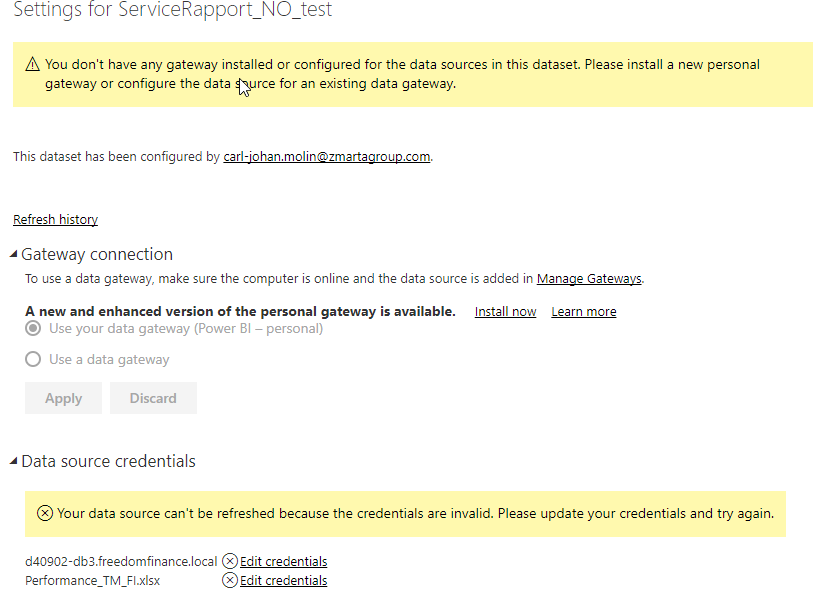
heres the message i get so i dont even know if the data clears or not.... 😞

- Mark as New
- Bookmark
- Subscribe
- Mute
- Subscribe to RSS Feed
- Permalink
- Report Inappropriate Content
Hi @CJMolin,
From the screnshoot, the dataset contains on-premise data source, so it requires gateway to act bridge between the on-premise data gateway and on-premise data source.
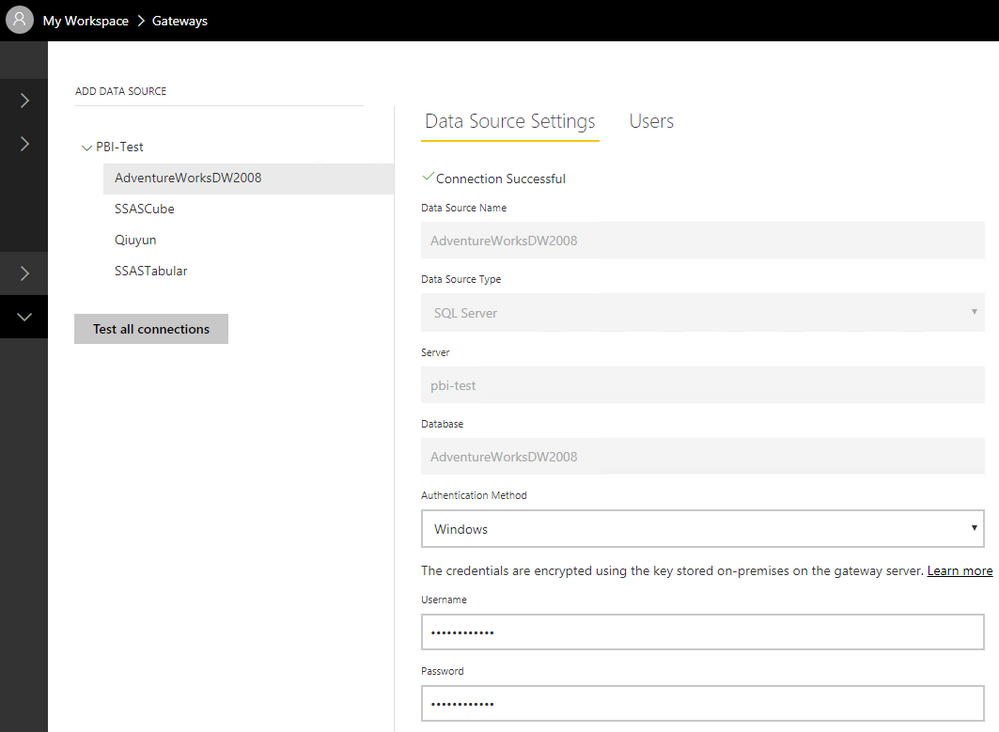
In your scenario, please download the on-premise data gateway and install it follow this article: On-premises data gateway . Then you can go to Manage Gateways, create two data source use the same connection information as used in Power BI desktop. Take the SQL Server data source as example, you can see: Manage your data source - SQL Server.
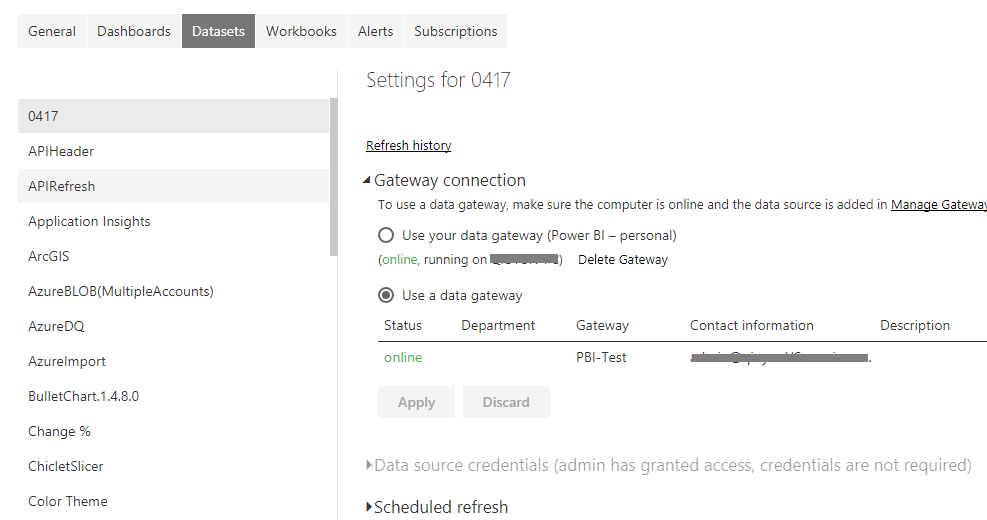
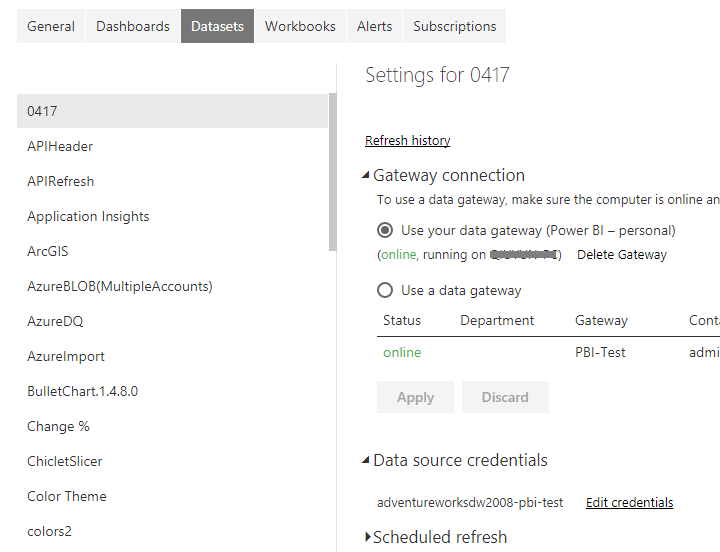
Or you can install the On-premises data gateway (personal mode), then you can see on-premise data gateway (personal mode) is available and you are able to edit data source.
Best Regards,
Qiuyun Yu
If this post helps, then please consider Accept it as the solution to help the other members find it more quickly.
- Mark as New
- Bookmark
- Subscribe
- Mute
- Subscribe to RSS Feed
- Permalink
- Report Inappropriate Content
Something that might work is if there is a possibilty to "disable" my static self entered data table to be refreshed when im trying to refresh through the PBI service.. is that possible @v-qiuyu-msft?
- Mark as New
- Bookmark
- Subscribe
- Mute
- Subscribe to RSS Feed
- Permalink
- Report Inappropriate Content
Hi @CJMolin,
In Power BI service, we are not able to refresh a part of data source in one dataset.
I'm not reproduce the issue on my side. In your scenario, please open the downloaded .pbix file in Power BI desktop version 2.48.4792.721 64-bit (July 2017).
Best Regards,
Qiuyun Yu
If this post helps, then please consider Accept it as the solution to help the other members find it more quickly.
- Mark as New
- Bookmark
- Subscribe
- Mute
- Subscribe to RSS Feed
- Permalink
- Report Inappropriate Content
Thank you for all your help Qiuyu.
I was able to fix this issue with the help of one of our IT guys at work. He put up a new database for me so I can use it for lookups (so i had a source to point at at refresh).
- Mark as New
- Bookmark
- Subscribe
- Mute
- Subscribe to RSS Feed
- Permalink
- Report Inappropriate Content
Thank you very much for your long answer. I realised it could be working if I was using a personal gateway. Unfortunately we're not allowed to use personal gateways on the company since we want to be all cloud based. So that brings this thread back to the main question I supppose.. 😞
Thank you very much again!
CJ
- Mark as New
- Bookmark
- Subscribe
- Mute
- Subscribe to RSS Feed
- Permalink
- Report Inappropriate Content
Hi @CJMolin,
For your original issue, I mean when you use entered data instead of connect to local Excel in the dataset, which kind of data source did you use in the dataset?
In Power BI service, as long as the dataste contains on-premise data source (eg: SQL Server database, local Excel file), we need to utilize the gateway to build bridge between the Power BI service and on-premise data source. Is there any specific reason that you can't use gateway?
If you don't want to use gateway, you can enter all data when you create the report in desktop. Or just connect to online data source which not require gateway, for example: Azure SQL database.
Best Regards,
Qiuyun Yu
If this post helps, then please consider Accept it as the solution to help the other members find it more quickly.
- Mark as New
- Bookmark
- Subscribe
- Mute
- Subscribe to RSS Feed
- Permalink
- Report Inappropriate Content
Hello again!
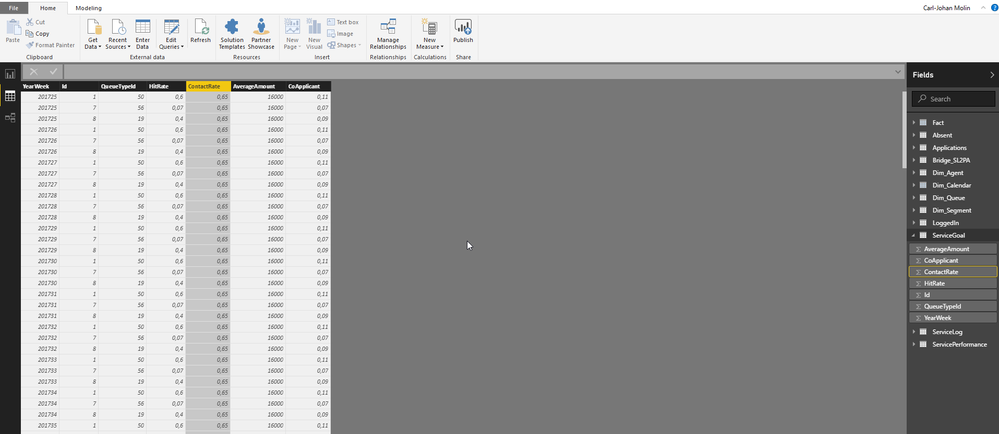
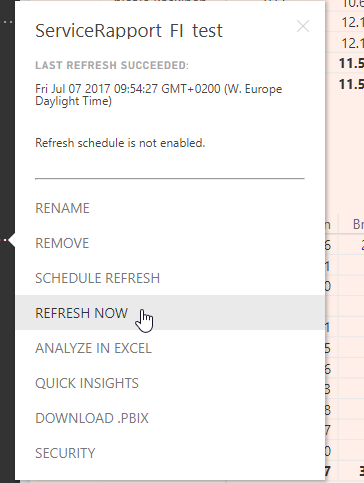
I am using a Gateway, but not a personal gateway, see picture attached. The other connection is to a MySqlServer..




Helpful resources

Power BI Monthly Update - November 2025
Check out the November 2025 Power BI update to learn about new features.

Fabric Data Days
Advance your Data & AI career with 50 days of live learning, contests, hands-on challenges, study groups & certifications and more!

FabCon Atlanta 2026
Join us at FabCon Atlanta, March 16-20, for the ultimate Fabric, Power BI, AI and SQL community-led event. Save $200 with code FABCOMM.


| User | Count |
|---|---|
| 97 | |
| 71 | |
| 50 | |
| 47 | |
| 44 |


