
Join us at FabCon Atlanta from March 16 - 20, 2026, for the ultimate Fabric, Power BI, AI and SQL community-led event. Save $200 with code FABCOMM.
Register now!The Power BI Data Visualization World Championships is back! Get ahead of the game and start preparing now! Learn more
HI all
I have a data set with price data, where prices are on a One Way basis..
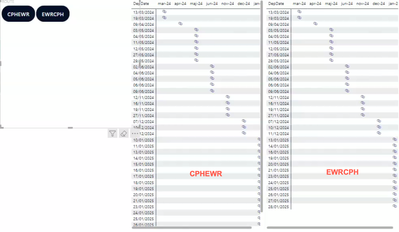
I am looking to create a visual where i can display the City Pair, i.e. LON-NYC and NYC-LON dates in pair, each with its own set of dates in a grid.
So when a routing is selected, i.e. LONNYC, you are presented with available dates on OUT dates and HOME dates independently in seperate visuals.
like this:
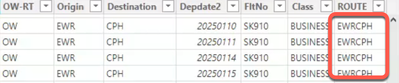
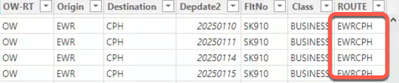
my data looks like this:
OUT
HOME
I have created the column ROUTE with the CONCATENATE function
but I cannot find a way to "bind" the city pair into one selection, with two independant visuals like described above.
Does any one have a creative idea on how to achieve this?
Cheers
Hi @Phsc1 ,
It seems that you want to create a slicer visual that filters both OUT and HOME visuals based on the selected city pair. You need to create a table that has unique city pairs and use it as the source for your slicer. The slicer will then control both OUT and HOME visuals through relationships or measures that filter data based on the selected city pair.
I think you can choose the visual you wish to add a slicer to. Click on the “Format” tab. Select “Edit Interactions”. Choose the desired slicer. Customize the slicer’s settings.
You can read this document for a further study: Slicers in Power BI - Power BI | Microsoft Learn
Best Regards
Yilong Zhou
If this post helps, then please consider Accept it as the solution to help the other members find it more quickly.
Thank you for your message and suggestion
I have tried to do as suggested, but I cannot find a way to Control both OUT and HOME dates simultaneously as you write.
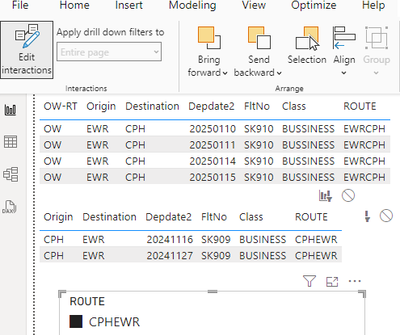
I do have a table with the City pairs, called ROUTE:
But it is the Pairs CPHWER and EWRCPH as two routes
So the only thing I can make work, is two independently working sliders; one that relates to OUT dates and another one (opposite routing) on HOME dates.
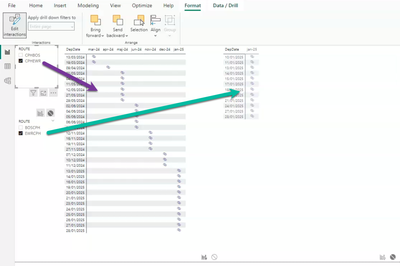
like this:
I am looking for a way to have one "button in one click": so CPHEWR updates the two visuals OUT and HOME dates , basically also updating (HOME) the opposite routing at the same time.
is that possible?
Cheers
Philip
Check out the November 2025 Power BI update to learn about new features.
Advance your Data & AI career with 50 days of live learning, contests, hands-on challenges, study groups & certifications and more!