FabCon is coming to Atlanta
Join us at FabCon Atlanta from March 16 - 20, 2026, for the ultimate Fabric, Power BI, AI and SQL community-led event. Save $200 with code FABCOMM.
Register now!- Power BI forums
- Get Help with Power BI
- Desktop
- Service
- Report Server
- Power Query
- Mobile Apps
- Developer
- DAX Commands and Tips
- Custom Visuals Development Discussion
- Health and Life Sciences
- Power BI Spanish forums
- Translated Spanish Desktop
- Training and Consulting
- Instructor Led Training
- Dashboard in a Day for Women, by Women
- Galleries
- Data Stories Gallery
- Themes Gallery
- Contests Gallery
- QuickViz Gallery
- Quick Measures Gallery
- Visual Calculations Gallery
- Notebook Gallery
- Translytical Task Flow Gallery
- TMDL Gallery
- R Script Showcase
- Webinars and Video Gallery
- Ideas
- Custom Visuals Ideas (read-only)
- Issues
- Issues
- Events
- Upcoming Events
Get Fabric Certified for FREE during Fabric Data Days. Don't miss your chance! Request now
- Power BI forums
- Forums
- Get Help with Power BI
- Desktop
- Re: Selecting only secound value from duplicate pa...
- Subscribe to RSS Feed
- Mark Topic as New
- Mark Topic as Read
- Float this Topic for Current User
- Bookmark
- Subscribe
- Printer Friendly Page

- Mark as New
- Bookmark
- Subscribe
- Mute
- Subscribe to RSS Feed
- Permalink
- Report Inappropriate Content
Selecting only secound value from duplicate pairs
I am trying to select only rows of secound values in duplcate pairs from my table. The problem is that I cannot seem to find the right Filter/Function to do this in DAX.
Below is a sample from my table, from which I removed sesitive data.
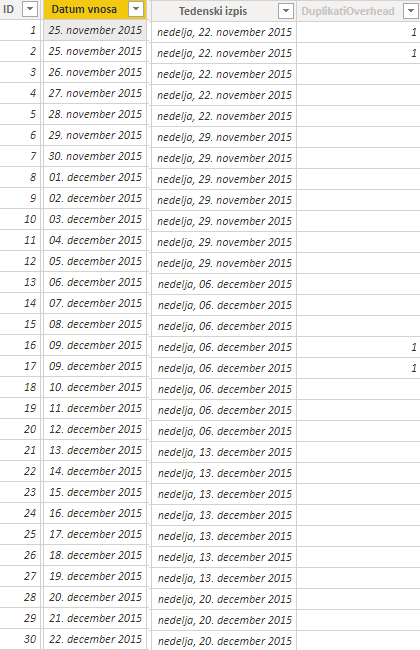
Decode colums of the table:
- ID - uniqe ID
- Date - date of insertion of data, this is where I want to Ignore first duplicate row and select only the secound one
- Tedenski izpis - date that is used for visualisation, Saturday(no sum across data)
- Duplicates - if set to 1, there are duplicates in the Datum vnosa cell(all of the duplicates are *always* inserted one after another as can be seen in the picture
An exaple of what I want to do in DAX:
- Select date first row
- Check for duplicates (IF([DuplicatiOverhead]=1))
- IF duplicate ignore first value (in this case, row with ID of 1)
- Write secound value to a separate column [ForGraph](in this case, a cell [Tedenski izpis] with ID of 2)
- IF no duplicates, write value of [Tedenski izpis] to separate column [ForGraph]
- IF duplicate ignore first value (in this case, row with ID of 1)
- Loop back until done
Solved! Go to Solution.


- Mark as New
- Bookmark
- Subscribe
- Mute
- Subscribe to RSS Feed
- Permalink
- Report Inappropriate Content
You can use below code to create a column. This only marks the first duplicated row as 1. [Date] is a column which only contains date values from the [Datum vnosa] column.
Duplicated Row =
VAR __latestID = MAXX(FILTER(SampleTable,SampleTable[Date]=EARLIER(SampleTable[Date])),SampleTable[ID])
RETURN
IF(SampleTable[ID]=__latestID,BLANK(),1)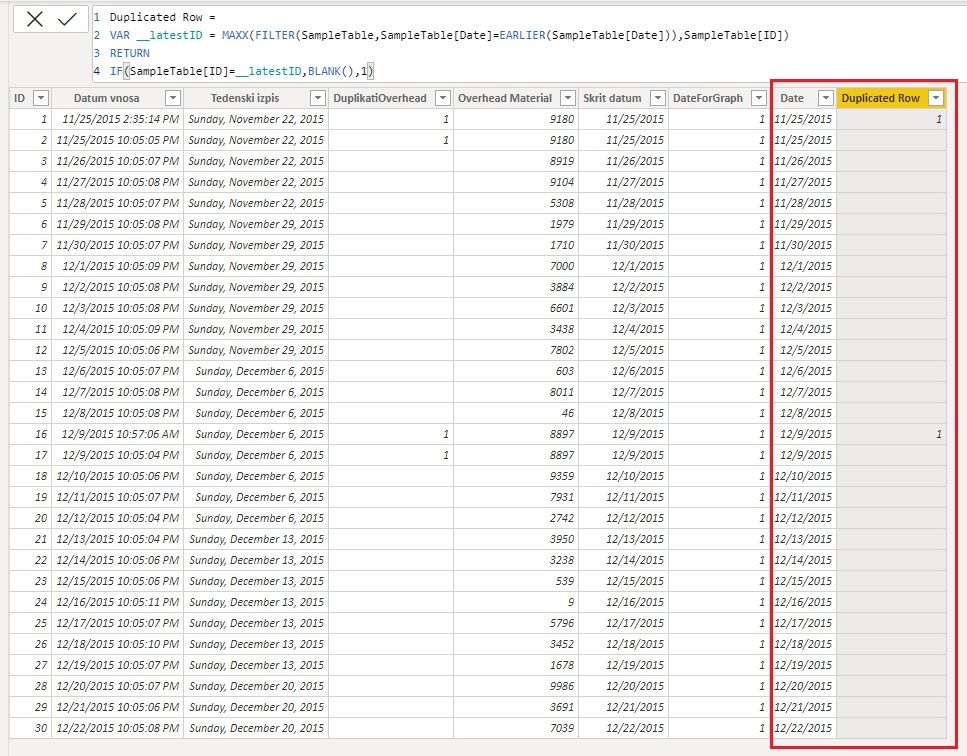
Then you can use this column to filter table in other DAX formulas. For example,
Overhead Material Measure = CALCULATE(SUM(SampleTable[Overhead Material]),SampleTable[Duplicated Row]<>1)
You can also remove the duplicated rows from the query in Power Query Editor if you don't want to use these data in the report further. Here is a similar thread for your reference: Select newest data in column
Regards,
Community Support Team _ Jing
If this post helps, please Accept it as the solution to help other members find it.
- Mark as New
- Bookmark
- Subscribe
- Mute
- Subscribe to RSS Feed
- Permalink
- Report Inappropriate Content
You can use below code to create a column. This only marks the first duplicated row as 1. [Date] is a column which only contains date values from the [Datum vnosa] column.
Duplicated Row =
VAR __latestID = MAXX(FILTER(SampleTable,SampleTable[Date]=EARLIER(SampleTable[Date])),SampleTable[ID])
RETURN
IF(SampleTable[ID]=__latestID,BLANK(),1)
Then you can use this column to filter table in other DAX formulas. For example,
Overhead Material Measure = CALCULATE(SUM(SampleTable[Overhead Material]),SampleTable[Duplicated Row]<>1)
You can also remove the duplicated rows from the query in Power Query Editor if you don't want to use these data in the report further. Here is a similar thread for your reference: Select newest data in column
Regards,
Community Support Team _ Jing
If this post helps, please Accept it as the solution to help other members find it.
- Mark as New
- Bookmark
- Subscribe
- Mute
- Subscribe to RSS Feed
- Permalink
- Report Inappropriate Content
Yeah, I've figured out that Power Querry -> Remove Duplicates was the easiest solution to this. Anyway, thanks for help @v-jingzhang.


- Mark as New
- Bookmark
- Subscribe
- Mute
- Subscribe to RSS Feed
- Permalink
- Report Inappropriate Content
Please provide sample data where we can copy.
Thank you
- Mark as New
- Bookmark
- Subscribe
- Mute
- Subscribe to RSS Feed
- Permalink
- Report Inappropriate Content
Here is a link to a zip archive with SampleData.xlsx and SampleDataDuplicates.pbix. https://ufile.io/hgprs86d
I hope this helps you, sadly I can not give you the full pbix file for data security reasons. I have also added a sample graph from which you can see the type of graph that I get.
As stated before, I get this columns by:
- Tedenski izpis = IF([St dan]<>7, [Datum vnosa]-[St dan], [Datum vnosa])
- Skrit datum = DAY([Datum vnosa])&". "&MONTH([Datum vnosa])&". "&[Year]
- DuplikatiOverhead = IF(CALCULATE(COUNTROWS(Overhead'),FILTER('Overhead',[Skrit datum]=EARLIER([Skrit datum])))>1, "1", BLANK())
Thanks for help @mussaenda.
- Mark as New
- Bookmark
- Subscribe
- Mute
- Subscribe to RSS Feed
- Permalink
- Report Inappropriate Content
If it helps, this is how I get [Tedeski zapis]:
Tedenski izpis = IF([St dan]<>7, [Datum vnosa]-[St dan], [Datum vnosa])
Skrit datum = DAY([Datum vnosa])&". "&MONTH([Datum vnosa])&". "&[Year]
DuplikatiOverhead = IF(CALCULATE(COUNTROWS(Overhead'),FILTER('Overhead',[Skrit datum]=EARLIER([Skrit datum])))>1, "1", BLANK())

Helpful resources

Power BI Monthly Update - November 2025
Check out the November 2025 Power BI update to learn about new features.

Fabric Data Days
Advance your Data & AI career with 50 days of live learning, contests, hands-on challenges, study groups & certifications and more!

FabCon Atlanta 2026
Join us at FabCon Atlanta, March 16-20, for the ultimate Fabric, Power BI, AI and SQL community-led event. Save $200 with code FABCOMM.


| User | Count |
|---|---|
| 103 | |
| 80 | |
| 64 | |
| 50 | |
| 45 |


