Join us at FabCon Atlanta from March 16 - 20, 2026, for the ultimate Fabric, Power BI, AI and SQL community-led event. Save $200 with code FABCOMM.
Register now!The Power BI Data Visualization World Championships is back! Get ahead of the game and start preparing now! Learn more
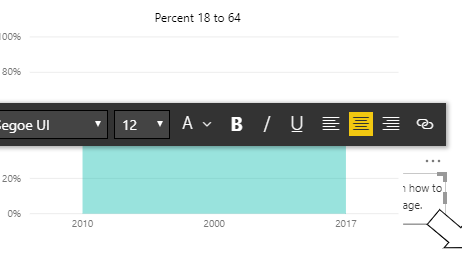
As mentioned in the title this started happening about a week or two ago for me after an update. Basically let's say I have a text box placed on top of a line graph and ahead of it in the layer order. If I select the text box, say to move it or to change the text, it then moves behind the graph. Note that it happens for all visuals, not just text boxes. I've included an image as an example.
When I move my cursor off the report page while keeping it selected, it then moves in front of the visual behind it again. Is this intended behavior added in an update? If so, is there a way to change it?
@Anonymous ,
Have made a text but couldn't reproduce your issue. The visual will be in front of other visuals when selected on my side. Please make sure you have installed the latest version of power bi desktop.
Community Support Team _ Jimmy Tao
If this post helps, then please consider Accept it as the solution to help the other members find it more quickly.
The Power BI Data Visualization World Championships is back! Get ahead of the game and start preparing now!
| User | Count |
|---|---|
| 38 | |
| 38 | |
| 36 | |
| 28 | |
| 28 |
| User | Count |
|---|---|
| 124 | |
| 88 | |
| 74 | |
| 66 | |
| 65 |