Join us at FabCon Atlanta from March 16 - 20, 2026, for the ultimate Fabric, Power BI, AI and SQL community-led event. Save $200 with code FABCOMM.
Register now!The Power BI Data Visualization World Championships is back! Get ahead of the game and start preparing now! Learn more
Dear All,
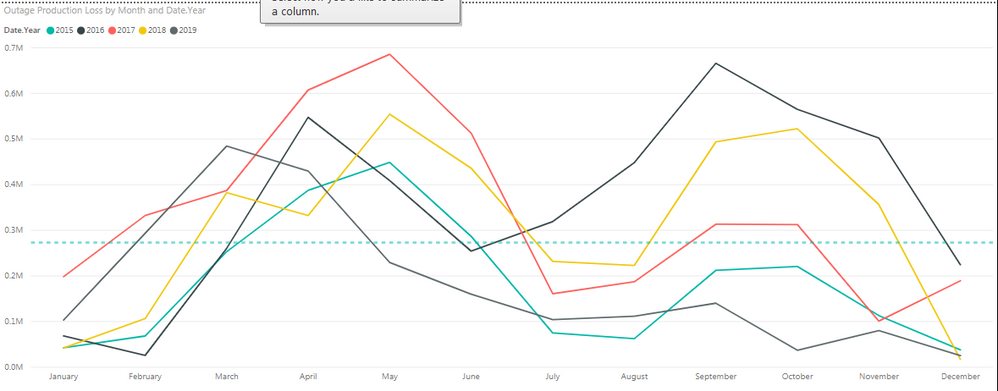
I was wondering if there is a way to calculate an average of the seasonality data, essentially showing a best fit curving through the middle of the graph below. How would I calculate it as I want it to be dynamic, and change when I change product type or location for example. Also, how can it be displayed as it is an average and will no longer be a date in the legend.
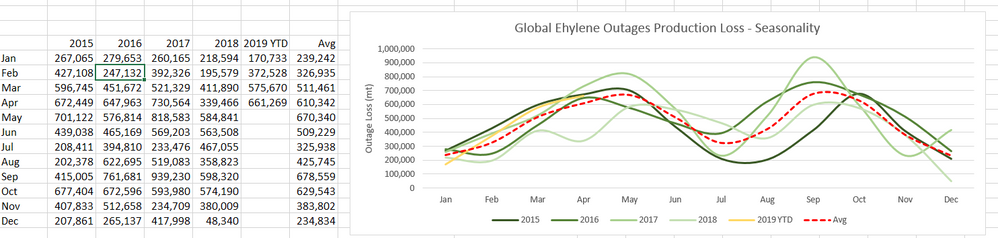
In excel, it is easy to create, as I just create a table with an 'Average' column
Many thanks if you are able to help
Solved! Go to Solution.
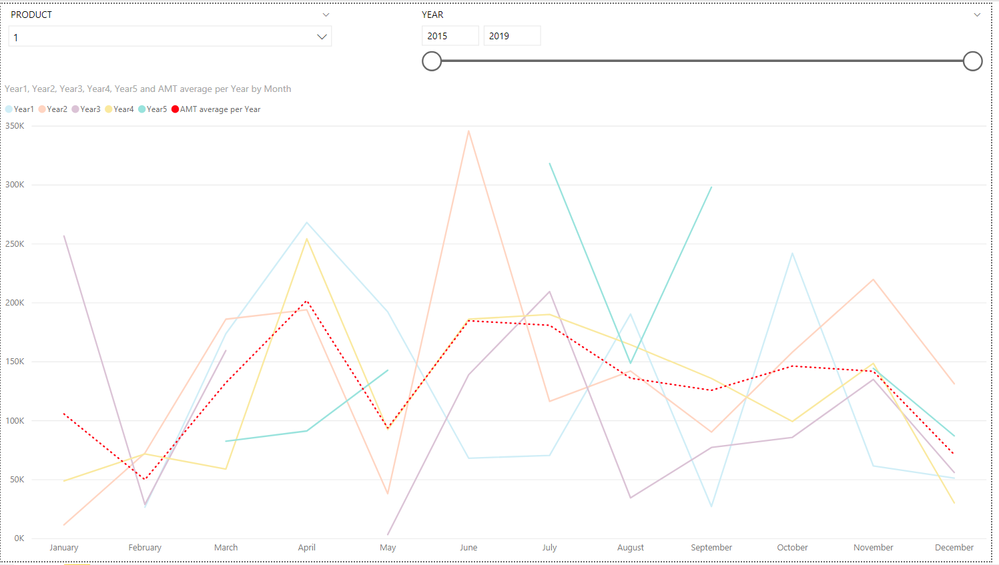
i have create a PBIX file that does what your after (using some randomised data).
if you need help in understanding the sheet then let me know
in order to get the avarage and 5 year values into one chart i needed to create a 5yer table that had the values of the years you want to compare.
this is then used to genarte 5 measues for tha values of each year
i then created a measure for the avarage of these 5 years
all 6 measures can then be used in a line chart with month to show what you wanted
Proud to be a Super User!
i have create a PBIX file that does what your after (using some randomised data).
if you need help in understanding the sheet then let me know
in order to get the avarage and 5 year values into one chart i needed to create a 5yer table that had the values of the years you want to compare.
this is then used to genarte 5 measues for tha values of each year
i then created a measure for the avarage of these 5 years
all 6 measures can then be used in a line chart with month to show what you wanted
Proud to be a Super User!
Do you have a source pbix file or an excel file with some sample data.
Proud to be a Super User!
The Power BI Data Visualization World Championships is back! Get ahead of the game and start preparing now!
Check out the November 2025 Power BI update to learn about new features.
| User | Count |
|---|---|
| 59 | |
| 43 | |
| 42 | |
| 23 | |
| 17 |
| User | Count |
|---|---|
| 190 | |
| 122 | |
| 96 | |
| 66 | |
| 47 |