- Power BI forums
- Updates
- News & Announcements
- Get Help with Power BI
- Desktop
- Service
- Report Server
- Power Query
- Mobile Apps
- Developer
- DAX Commands and Tips
- Custom Visuals Development Discussion
- Health and Life Sciences
- Power BI Spanish forums
- Translated Spanish Desktop
- Power Platform Integration - Better Together!
- Power Platform Integrations (Read-only)
- Power Platform and Dynamics 365 Integrations (Read-only)
- Training and Consulting
- Instructor Led Training
- Dashboard in a Day for Women, by Women
- Galleries
- Community Connections & How-To Videos
- COVID-19 Data Stories Gallery
- Themes Gallery
- Data Stories Gallery
- R Script Showcase
- Webinars and Video Gallery
- Quick Measures Gallery
- 2021 MSBizAppsSummit Gallery
- 2020 MSBizAppsSummit Gallery
- 2019 MSBizAppsSummit Gallery
- Events
- Ideas
- Custom Visuals Ideas
- Issues
- Issues
- Events
- Upcoming Events
- Community Blog
- Power BI Community Blog
- Custom Visuals Community Blog
- Community Support
- Community Accounts & Registration
- Using the Community
- Community Feedback
Earn a 50% discount on the DP-600 certification exam by completing the Fabric 30 Days to Learn It challenge.
- Power BI forums
- Forums
- Get Help with Power BI
- Desktop
- Scheduled refresh and pagination - can't refresh q...
- Subscribe to RSS Feed
- Mark Topic as New
- Mark Topic as Read
- Float this Topic for Current User
- Bookmark
- Subscribe
- Printer Friendly Page


- Mark as New
- Bookmark
- Subscribe
- Mute
- Subscribe to RSS Feed
- Permalink
- Report Inappropriate Content
Scheduled refresh and pagination - can't refresh query
Hi,
I'm having problems scheduling a refresh on the service with a query that's looking at multiple API pages. When I try this with one page it all works fine.
If I add the following Web Source it all works fine:
https://api.harvestapp.com/v2/time_entries?access_token=******&account_id=******&page=10
In this example I'm using page 10 as a test. But I want to be able to return pages 1-50. I've tried starting with a list of number in a table from 1-50:
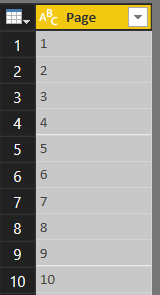
This I've added a custom column to merge these page numbers with the URL above:
= Json.Document(Web.Contents("https://api.harvestapp.com/v2/time_entries?access_token=******&account_id=******&page=" & Text.From([Page])))
I found I needed to add in "Json.Document(Web.Contents" in order to make the URLs active. Could this be where I'm going wrong?
This brings me back a list of all the records, which I then expand out:
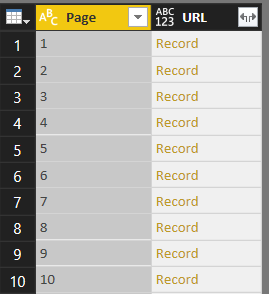
But for some reason it's not working. I'd previously tried adding pagination coding to my query but found that doesn't work with a scheduled refresh, so tried this as a way to pull in each URL individually, but it's not working.
Any ideas on where I'm going wrong?
As always, your help is very much appreciated.
Mark


- Mark as New
- Bookmark
- Subscribe
- Mute
- Subscribe to RSS Feed
- Permalink
- Report Inappropriate Content
It needs a trick: http://blog.datainspirations.com/2018/02/17/dynamic-web-contents-and-power-bi-refresh-errors/
Imke Feldmann (The BIccountant)
If you liked my solution, please give it a thumbs up. And if I did answer your question, please mark this post as a solution. Thanks!
How to integrate M-code into your solution -- How to get your questions answered quickly -- How to provide sample data -- Check out more PBI- learning resources here -- Performance Tipps for M-queries
- Mark as New
- Bookmark
- Subscribe
- Mute
- Subscribe to RSS Feed
- Permalink
- Report Inappropriate Content
HI @ImkeF,
This one is so close but still not quite there. Here’s the URI I’m using to pull back my data:
https://api.harvestapp.com/v2/time_entries?access_token=****&account_id=****
If I want to bring back a specific page my URIL looks as follows:
https://api.harvestapp.com/v2/time_entries?page=10&access_token=****&account_id=****
When I use the code in this post it replaces the ‘?’ with ‘/’ then introduces ‘page=10?’ after it, which doesn’t work with my URI:
https://api.harvestapp.com/v2/time_entries/page=10?access_token=****&account_id=****
When I put it into a brower it gives me a 404 error.
Any ideas?
- Mark as New
- Bookmark
- Subscribe
- Mute
- Subscribe to RSS Feed
- Permalink
- Report Inappropriate Content
Hi Mark,
To my understanding, your code should more look like this:
Json.Document(
	Web.Contents("https://api.harvestapp.com/v2/time_entries?access_token=******&account_id=******&page=10",
					[Query=[q="access_token=******&account_id=******&page=" & Text.From([Page])]])
			)
The dynamic part has to be added as a query parameter and the URL has to be an unparametrized sample.
Imke Feldmann (The BIccountant)
If you liked my solution, please give it a thumbs up. And if I did answer your question, please mark this post as a solution. Thanks!
How to integrate M-code into your solution -- How to get your questions answered quickly -- How to provide sample data -- Check out more PBI- learning resources here -- Performance Tipps for M-queries

- Mark as New
- Bookmark
- Subscribe
- Mute
- Subscribe to RSS Feed
- Permalink
- Report Inappropriate Content
hi @ImkeF - hoping you can help. trying to trick powerbi into having a scheduled refresh for pagination. I've tried all the different suggestions but can't seem to get it to work. I am posting my current code that works today without scheduled refresh:
(page as text) =>
let
    Source = Json.Document(Web.Contents("https://api.harvestapp.com/v2/time_entries?access_token=****&account_id=****&page="&(page))),
    #"Converted to Table" = Record.ToTable(Source),
    Value = #"Converted to Table"{0}[Value],
    #"Converted to Table1" = Table.FromList(Value, Splitter.SplitByNothing(), null, null, ExtraValues.Error)
in
    #"Converted to Table1"
and
let
    Source = Json.Document(Web.Contents("https://api.harvestapp.com/v2/time_entries?access_token=****&account_id=****")),
    List = {1..Source[total_pages]},
    #"Converted to Table" = Table.FromList(List, Splitter.SplitByNothing(), null, null, ExtraValues.Error),
    #"Changed Type" = Table.TransformColumnTypes(#"Converted to Table",{{"Column1", type text}}),
    #"Invoked Custom Function" = Table.AddColumn(#"Changed Type", "Data", each getPages([Column1])),
    #"Expanded Data" = Table.ExpandTableColumn(#"Invoked Custom Function", "Data", {"Column1"}, {"Column1.1"}),
thank you in advance!
- Mark as New
- Bookmark
- Subscribe
- Mute
- Subscribe to RSS Feed
- Permalink
- Report Inappropriate Content
Hi @fmr5000,
you cannot use the dynamic elements in the core URL-string. Instead you have to put it into a separate record like described here:
http://blog.datainspirations.com/2018/02/17/dynamic-web-contents-and-power-bi-refresh-errors/
Imke Feldmann (The BIccountant)
If you liked my solution, please give it a thumbs up. And if I did answer your question, please mark this post as a solution. Thanks!
How to integrate M-code into your solution -- How to get your questions answered quickly -- How to provide sample data -- Check out more PBI- learning resources here -- Performance Tipps for M-queries
- Mark as New
- Bookmark
- Subscribe
- Mute
- Subscribe to RSS Feed
- Permalink
- Report Inappropriate Content
Thank you @ImkeF
I think I am close but when applying the following code I receive an error when adding the custom column in the table query: “Unexpected error: Operation is not valid due to the current state of the object.”
getPage Code:
(page as text) =>
let
Source = Json.Document(Web.Contents(“https://api.harvestapp.com/v2/time_entries?access_token=*****&account_id=*****&page=”&(page),
[Query=[page=(page)]])),
#”Converted to Table” = Record.ToTable(Source),
Value = #”Converted to Table”{0}[Value],
#”Converted to Table1″ = Table.FromList(Value, Splitter.SplitByNothing(), null, null, ExtraValues.Error)
in
#”Converted to Table1″
table code:
let

Source = Json.Document(Web.Contents(“https://api.harvestapp.com/v2/time_entries?access_token=*****&account_id=*****”)),
List = {1..Source[total_pages]},

#”Converted to Table” = Table.FromList(List, Splitter.SplitByNothing(), null, null, ExtraValues.Error),

#”Renamed Columns” = Table.RenameColumns(#”Converted to Table”,{{“Column1”, “Page”}}),
#”Changed Type” = Table.TransformColumnTypes(#”Renamed Columns”,{{“Page”, type text}}),
#”Added Custom” = Table.AddColumn(#”Changed Type”, “Custom”, each getPage([Page]))
in
#”Added Custom”
Thank you for your help in advance.
- Mark as New
- Bookmark
- Subscribe
- Mute
- Subscribe to RSS Feed
- Permalink
- Report Inappropriate Content
That's a strange error. I got it ages ago when my data model was corrupt.
So maybe you transfer your queries to a new file.
Otherwise I have no idea unfortunately.
Imke Feldmann (The BIccountant)
If you liked my solution, please give it a thumbs up. And if I did answer your question, please mark this post as a solution. Thanks!
How to integrate M-code into your solution -- How to get your questions answered quickly -- How to provide sample data -- Check out more PBI- learning resources here -- Performance Tipps for M-queries

Helpful resources


Power BI Monthly Update - April 2024
Check out the April 2024 Power BI update to learn about new features.

Fabric Community Update - April 2024
Find out what's new and trending in the Fabric Community.

| User | Count |
|---|---|
| 98 | |
| 90 | |
| 78 | |
| 71 | |
| 64 |


| User | Count |
|---|---|
| 114 | |
| 97 | |
| 95 | |
| 68 | |
| 65 |


