Join us at FabCon Atlanta from March 16 - 20, 2026, for the ultimate Fabric, Power BI, AI and SQL community-led event. Save $200 with code FABCOMM.
Register now!View all the Fabric Data Days sessions on demand. View schedule
Hi everyone,
I've been scratching my head and searching for quite a while now, so time for my first post.
I have a calendar table with dates, yearmonth etc., and a project quotation table with estimated revenues, an estimated start date and end date. I've got an active relationship between Calendar[Date] and Project[Estimated Start Date] and an inactive relationship between Calendar[Date] and Project[Estimated End Date].
What I want to do is to show estimated revenues by YearMonth. I want to split the revenues evenly on all days. For example, say I have a project starting the 10th of May, running for 100 days with an estimated revenue of 100 million, I want to see the following:
May 2019 June 2019 July 2019 August 2019
Project X 21 mill 30 mill 31 mill 18 mill
Hopefully you brilliant minds can point me in the right direction, I am about to give up (not really, but frustrated atm).
Thanks,
Robert
Solved! Go to Solution.
hi, @Anonymous
You could use this way as below:
Step1:
Create a daily revenues column in QuotationTable
Project revenues/Day = DIVIDE(QuotationTable[Project revenues],DATEDIFF(QuotationTable[Estimated start date],QuotationTable[Estimated End date],DAY))
Step2:
Use this formula to add a new table
Table =
FILTER (
CROSSJOIN ( QuotationTable, 'Calendar' ),
'Calendar'[Date] >= QuotationTable[Estimated start date]
&& 'Calendar'[Date] < QuotationTable[Estimated End date]
)
Step3:
Create a relationship between Calendar table with new table by Date filed.
Step4:
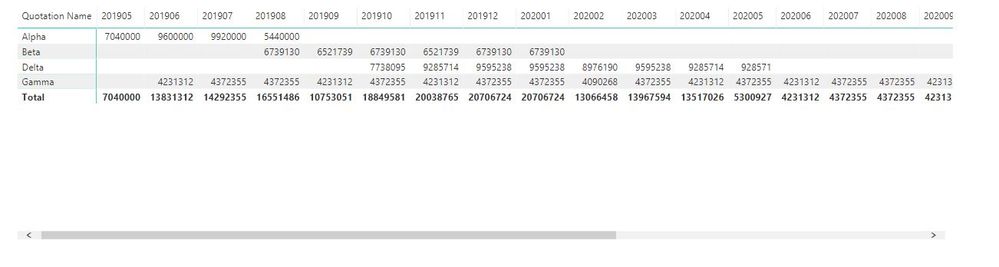
Now drag Year month from Calendar table, Quotation Name and Project revenues/Day from new table in a matrix visual.
Result:
and here is pbix file, please try it.
Best Regards,
Lin
hi, @Anonymous
You could use this way as below:
Step1:
Create a daily revenues column in QuotationTable
Project revenues/Day = DIVIDE(QuotationTable[Project revenues],DATEDIFF(QuotationTable[Estimated start date],QuotationTable[Estimated End date],DAY))
Step2:
Use this formula to add a new table
Table =
FILTER (
CROSSJOIN ( QuotationTable, 'Calendar' ),
'Calendar'[Date] >= QuotationTable[Estimated start date]
&& 'Calendar'[Date] < QuotationTable[Estimated End date]
)
Step3:
Create a relationship between Calendar table with new table by Date filed.
Step4:
Now drag Year month from Calendar table, Quotation Name and Project revenues/Day from new table in a matrix visual.
Result:
and here is pbix file, please try it.
Best Regards,
Lin
Thanks for the great help here! Several tricks here I didn't know about, and it worked like a charm.
Robert
Can you provide some sample dataset which can be copy pasted?
Thanks for the reply. Example file available in dropbox:
https://www.dropbox.com/s/nbfj0xr7hk7lgvt/Sales%20Forecasting.pbix?dl=0
Check out the November 2025 Power BI update to learn about new features.
Advance your Data & AI career with 50 days of live learning, contests, hands-on challenges, study groups & certifications and more!