FabCon is coming to Atlanta
Join us at FabCon Atlanta from March 16 - 20, 2026, for the ultimate Fabric, Power BI, AI and SQL community-led event. Save $200 with code FABCOMM.
Register now!- Power BI forums
- Get Help with Power BI
- Desktop
- Service
- Report Server
- Power Query
- Mobile Apps
- Developer
- DAX Commands and Tips
- Custom Visuals Development Discussion
- Health and Life Sciences
- Power BI Spanish forums
- Translated Spanish Desktop
- Training and Consulting
- Instructor Led Training
- Dashboard in a Day for Women, by Women
- Galleries
- Data Stories Gallery
- Themes Gallery
- Contests Gallery
- Quick Measures Gallery
- Notebook Gallery
- Translytical Task Flow Gallery
- TMDL Gallery
- R Script Showcase
- Webinars and Video Gallery
- Ideas
- Custom Visuals Ideas (read-only)
- Issues
- Issues
- Events
- Upcoming Events
To celebrate FabCon Vienna, we are offering 50% off select exams. Ends October 3rd. Request your discount now.
- Power BI forums
- Forums
- Get Help with Power BI
- Desktop
- Re: SUM Based on values in another column
- Subscribe to RSS Feed
- Mark Topic as New
- Mark Topic as Read
- Float this Topic for Current User
- Bookmark
- Subscribe
- Printer Friendly Page


- Mark as New
- Bookmark
- Subscribe
- Mute
- Subscribe to RSS Feed
- Permalink
- Report Inappropriate Content
SUM Based on values in another column
Hi
Probably a very basic question, but I"m stuck.
My table looks like this
Customer Week Sale
A 1 100
B 1 200
A 1 50
B 1 10
A 2 50
B 2 150
A 2 50
I want to be able to SUM sales per customer, per week
I want my table to look like this afterwards
Cust Week Sale Total
A 1 100 150
B 1 200 210
A 1 50 150
B 1 10 210
I would expect to use a SUMX, but I have not been able to understand how that works... Any help will be appreciated.
Thanks
R
Solved! Go to Solution.


- Mark as New
- Bookmark
- Subscribe
- Mute
- Subscribe to RSS Feed
- Permalink
- Report Inappropriate Content
Hi @roelf,
A simple SUM with filter would resolve the requirement
Total = CALCULATE(SUM('Table'[Sale]),ALLEXCEPT('Table','Table'[Customer],'Table'[Week]))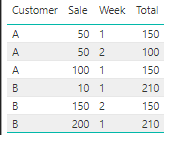
Please mark this post as an accepted solution if this helped you.
Regards,
Affan


- Mark as New
- Bookmark
- Subscribe
- Mute
- Subscribe to RSS Feed
- Permalink
- Report Inappropriate Content
Hi,
In a Matrix visual, drag all columns to the Row labels section. Write this measure
=CALCULATE(SUM(Data[Sale]),ALL(Data[Week])
Hope this helps.
Regards,
Ashish Mathur
http://www.ashishmathur.com
https://www.linkedin.com/in/excelenthusiasts/


- Mark as New
- Bookmark
- Subscribe
- Mute
- Subscribe to RSS Feed
- Permalink
- Report Inappropriate Content
Hi @roelf,
One sample for your reference. Here we need to create a measure as below.
Measure = CALCULATE(SUM(Table1[Sale]),ALLEXCEPT(Table1,Table1[Customer],Table1[Week]))
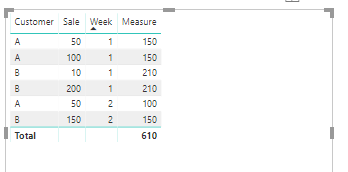
Also please find the pbix as attached.
Regards,
Frank
If this post helps, then please consider Accept it as the solution to help the others find it more quickly.
- Mark as New
- Bookmark
- Subscribe
- Mute
- Subscribe to RSS Feed
- Permalink
- Report Inappropriate Content
Hi @roelf,
Does that make sense? If so, kindly mark my answer as a solution to close the case.
Regards,
Frank
If this post helps, then please consider Accept it as the solution to help the others find it more quickly.
- Mark as New
- Bookmark
- Subscribe
- Mute
- Subscribe to RSS Feed
- Permalink
- Report Inappropriate Content
Hi @roelf,
Does that make sense? If so, kindly mark my answer as a solution to close the case.
Regards,
Frank
If this post helps, then please consider Accept it as the solution to help the others find it more quickly.
- Mark as New
- Bookmark
- Subscribe
- Mute
- Subscribe to RSS Feed
- Permalink
- Report Inappropriate Content
Hi,
In a Matrix visual, drag all columns to the Row labels section. Write this measure
=CALCULATE(SUM(Data[Sale]),ALL(Data[Week])
Hope this helps.
Regards,
Ashish Mathur
http://www.ashishmathur.com
https://www.linkedin.com/in/excelenthusiasts/
- Mark as New
- Bookmark
- Subscribe
- Mute
- Subscribe to RSS Feed
- Permalink
- Report Inappropriate Content
Hi @roelf,
One sample for your reference. Here we need to create a measure as below.
Measure = CALCULATE(SUM(Table1[Sale]),ALLEXCEPT(Table1,Table1[Customer],Table1[Week]))
Also please find the pbix as attached.
Regards,
Frank
If this post helps, then please consider Accept it as the solution to help the others find it more quickly.
- Mark as New
- Bookmark
- Subscribe
- Mute
- Subscribe to RSS Feed
- Permalink
- Report Inappropriate Content
Thanks all for the assistance !
Regards
Roelf
- Mark as New
- Bookmark
- Subscribe
- Mute
- Subscribe to RSS Feed
- Permalink
- Report Inappropriate Content
Hi @roelf,
A simple SUM with filter would resolve the requirement
Total = CALCULATE(SUM('Table'[Sale]),ALLEXCEPT('Table','Table'[Customer],'Table'[Week]))
Please mark this post as an accepted solution if this helped you.
Regards,
Affan

Helpful resources

Power BI Monthly Update - September 2025
Check out the September 2025 Power BI update to learn about new features.

Fabric Community Update - August 2025
Find out what's new and trending in the Fabric community.


