cancel
Showing results for 
Search instead for 
Did you mean: 

The Power BI Data Visualization World Championships is back! Get ahead of the game and start preparing now! Learn more

Reply
diamond
Regular Visitor

SSRS to Power BI Report


I am converting a SSRS report to Power-BI. In my SSRS report, I have the following SQL fragment (where RunDate is a parameter) -


CASE
WHEN (CAST(DateOfService AS date) <= @RunDate) AND (CAST(BankDate AS date) > @RunDate OR ISNULL(BankDate, '') = '') THEN Charges
ELSE 0
END AS ARCharges,


I added the following custom column to replicate the above SSRS query fragment - 

#"Added Custom2" = Table.AddColumn(#"Added Custom", "ARCharges", each if Date.From([DateOfService]) <= [RunDate] and

Date.From([BankDate]) > [RunDate] or
[BankDate] = null
then [Charges] else 0),


However, I the following questions - if I want RunDate to be a parameter that can be typed-in by the end-user, how can I go about doing this Power-BI. Would the above work where RunDate is a query-parameter - would the user be able to type-in whatever value he/she needs OR do I need to use some other technique?


I am a newbie to PowerBI and I appreciate any and all help. Thank you.

1 ACCEPTED SOLUTION
v-qiuyu-msft
Community Support
Community Support

Hi @diamond,


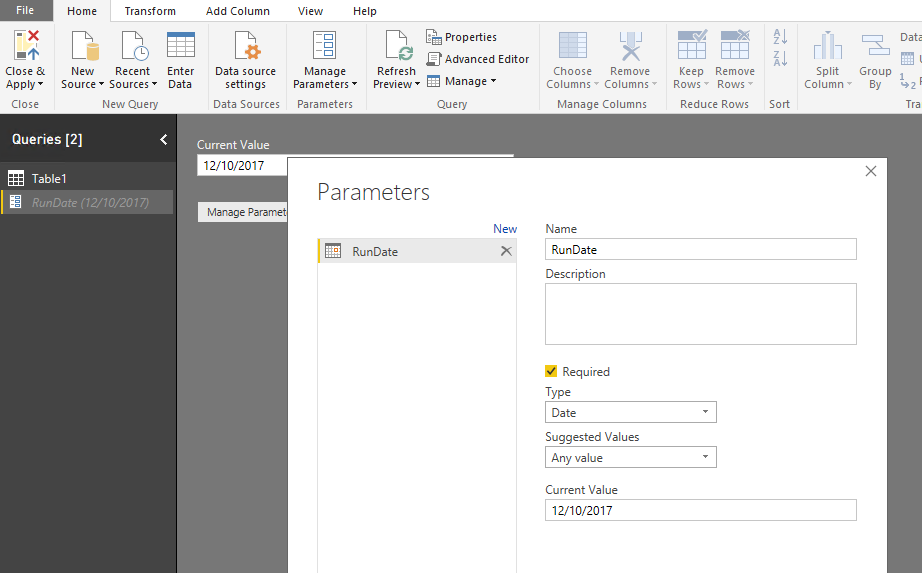
In Query Editor, you can create a Query Parameter named RunDate, 


w1.PNG


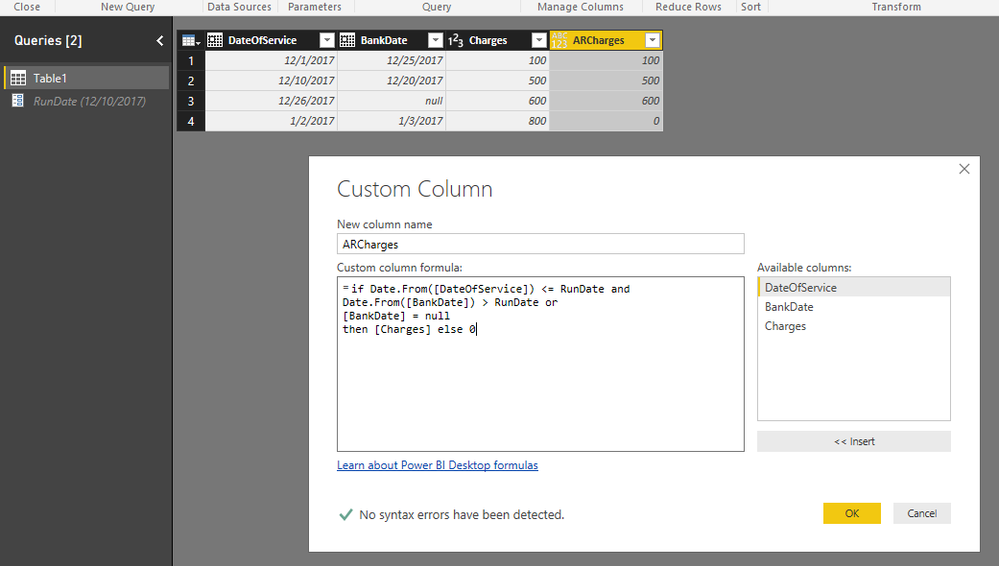
Then you can create a custom column based on the query parameter RunDate: 


=if Date.From([DateOfService]) <= RunDate and
Date.From([BankDate]) > RunDate or
[BankDate] = null
then [Charges] else 0


w2.PNG


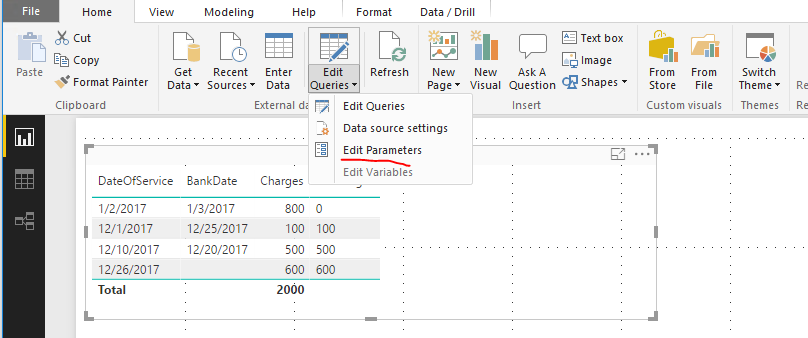
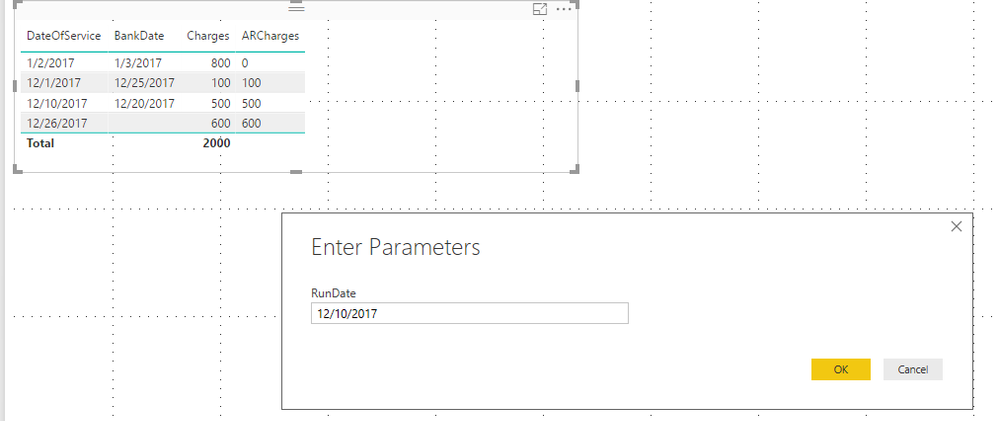
After apply change and load to data model, we can change parameter values by clicking Edit Parameters, enter expected date value and click Apply change. 


w3.PNGw4.PNG


You can also download attache sample file to have a look. One thing need to note that Query Parameter doesn't work after publish the report to Power BI service, you can vote this idea: https://ideas.powerbi.com/forums/265200-power-bi-ideas/suggestions/13820190-power-bi-online-query-pa...


Reference:
https://powerbi.microsoft.com/en-us/blog/deep-dive-into-query-parameters-and-power-bi-templates/


Best Regards,
Qiuyun Yu 


Community Support Team _ Qiuyun Yu
If this post helps, then please consider Accept it as the solution to help the other members find it more quickly.

View solution in original post

3 REPLIES 3
v-qiuyu-msft
Community Support
Community Support

Hi @diamond,


In Query Editor, you can create a Query Parameter named RunDate, 


w1.PNG


Then you can create a custom column based on the query parameter RunDate: 


=if Date.From([DateOfService]) <= RunDate and
Date.From([BankDate]) > RunDate or
[BankDate] = null
then [Charges] else 0


w2.PNG


After apply change and load to data model, we can change parameter values by clicking Edit Parameters, enter expected date value and click Apply change. 


w3.PNGw4.PNG


You can also download attache sample file to have a look. One thing need to note that Query Parameter doesn't work after publish the report to Power BI service, you can vote this idea: https://ideas.powerbi.com/forums/265200-power-bi-ideas/suggestions/13820190-power-bi-online-query-pa...


Reference:
https://powerbi.microsoft.com/en-us/blog/deep-dive-into-query-parameters-and-power-bi-templates/


Best Regards,
Qiuyun Yu 


Community Support Team _ Qiuyun Yu
If this post helps, then please consider Accept it as the solution to help the other members find it more quickly.

Qiuyun, do you know any plans to make Power BI Service user query parameters like in Power BI Desktop?


Thanks!
Grant

Thank you @v-qiuyu-msft. That's exactly how I ended up doing. Thank you so much for your prompt reply. BTW, I was able to publish this to PowerBI service and I am able to choose the RunDate parameter (i.e. choose a date from calendar).


Thanks again for your prompt response.

Helpful resources

Announcements
Power BI DataViz World Championships

Power BI Dataviz World Championships

The Power BI Data Visualization World Championships is back! Get ahead of the game and start preparing now!

December 2025 Power BI Update Carousel

Power BI Monthly Update - December 2025

Check out the December 2025 Power BI Holiday Recap!

FabCon Atlanta 2026 carousel

FabCon Atlanta 2026

Join us at FabCon Atlanta, March 16-20, for the ultimate Fabric, Power BI, AI and SQL community-led event. Save $200 with code FABCOMM.