cancel
Showing results for 
Search instead for 
Did you mean: 

The Power BI Data Visualization World Championships is back! Get ahead of the game and start preparing now! Learn more

Reply

SSAS Live Connection: Has no model

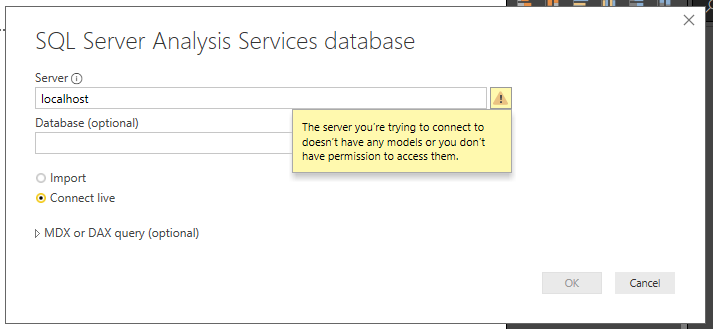
Hello, I have a problem with SSAS. I can't connect to SSAS with Live connection mode. with import mode everything is ok. I have seen other requests here which were solved here on the community, but It doesn't work for me. I have Visual Studio 2019, and I am creating data cubes in SSAS. I had the same problem on my local computer and I don't know how but it did resolve. But now I am trying to connect to SSAS from Power BI (on a remote server) Live connection and it gives me the same error: "The server you're trying to connect to doesn't have any models or you don't have permission to access them".

Before there were any cubes on Analysis Service, the live connection was possible, but after I have placed some working cubes (working on import mode, and working with a live connection on my PC) Error appeared. what type of permissions can it be or what type of a model does it refer to? 

I am working with SQL Server 2017
Visual Studio 2019 (SSAS)
Power BI Report Server Desktop 2019 May release. 

Analysis service is placed on the same VM I am working on. The database is placed on the Parent physical Server. I don't have any problems connecting with DB From SSAS. I can even connect With DB with direct Query  But not with SSAS live connection. 
Capture.PNG

1 ACCEPTED SOLUTION

I hade one cube with some problems. I deleted it and the problem was solved. 

View solution in original post

3 REPLIES 3
jdbuchanan71
Super User
Super User

Hello @giorgi_lommidd 

What is the name of the tabular server running?  When I want to connect to my local SSAS I use 

VBALT045\TABULAR or .\TABULAR  (.\ being the same as localhost\)

You should also be able to see the name if you fire up management studio and connect to tabular model then browse for more.

I hade one cube with some problems. I deleted it and the problem was solved. 

I have Multidimensional Server For SSAS. not tabular. where can I see name server name?

Helpful resources

Announcements
Power BI DataViz World Championships

Power BI Dataviz World Championships

The Power BI Data Visualization World Championships is back! Get ahead of the game and start preparing now!

November Power BI Update Carousel

Power BI Monthly Update - November 2025

Check out the November 2025 Power BI update to learn about new features.

FabCon Atlanta 2026 carousel

FabCon Atlanta 2026

Join us at FabCon Atlanta, March 16-20, for the ultimate Fabric, Power BI, AI and SQL community-led event. Save $200 with code FABCOMM.