FabCon is coming to Atlanta
Join us at FabCon Atlanta from March 16 - 20, 2026, for the ultimate Fabric, Power BI, AI and SQL community-led event. Save $200 with code FABCOMM.
Register now!- Power BI forums
- Get Help with Power BI
- Desktop
- Service
- Report Server
- Power Query
- Mobile Apps
- Developer
- DAX Commands and Tips
- Custom Visuals Development Discussion
- Health and Life Sciences
- Power BI Spanish forums
- Translated Spanish Desktop
- Training and Consulting
- Instructor Led Training
- Dashboard in a Day for Women, by Women
- Galleries
- Data Stories Gallery
- Themes Gallery
- Contests Gallery
- QuickViz Gallery
- Quick Measures Gallery
- Visual Calculations Gallery
- Notebook Gallery
- Translytical Task Flow Gallery
- TMDL Gallery
- R Script Showcase
- Webinars and Video Gallery
- Ideas
- Custom Visuals Ideas (read-only)
- Issues
- Issues
- Events
- Upcoming Events
The Power BI Data Visualization World Championships is back! Get ahead of the game and start preparing now! Learn more
- Power BI forums
- Forums
- Get Help with Power BI
- Desktop
- Re: Running total working backwards over time
- Subscribe to RSS Feed
- Mark Topic as New
- Mark Topic as Read
- Float this Topic for Current User
- Bookmark
- Subscribe
- Printer Friendly Page

- Mark as New
- Bookmark
- Subscribe
- Mute
- Subscribe to RSS Feed
- Permalink
- Report Inappropriate Content
Running total working backwards over time
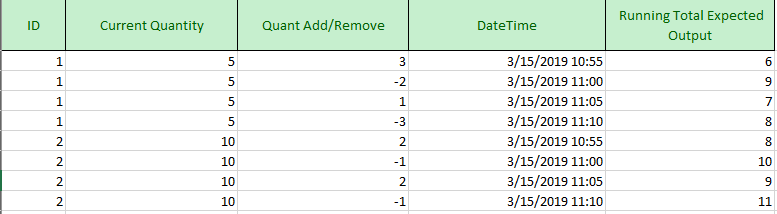
The above table gives a rough idea of my problem. I queried in data from SQL from two different tables, a current value snapshot table and an event table. I know what my current value is, but the event table does not calculate a running value for each id, only what was added or removed. I am essentially trying to work backward in time, using the datetime to index the order of quantities being removed or added and then finding the difference along the way. The running total gives what my quantity was BEFORE the action was taken so leaders can track the movement of values. I am not married to solving this problem in DAX or SQL, so whichever platform is provided will be considered so long as it doesn't cause serious performance issues.
Any and all help is appreciated.
Solved! Go to Solution.


- Mark as New
- Bookmark
- Subscribe
- Mute
- Subscribe to RSS Feed
- Permalink
- Report Inappropriate Content
Hi @Anonymous
You may create two columns to get the value.
Column =
IF (
    Table1[DateTime] = MAXX ( ALLEXCEPT ( Table1, Table1[ID] ), Table1[DateTime] ),
    Table1[Current Quantity] - Table1[Quant Add/Remove],
    Table1[Quant Add/Remove] * ( -1 )
)
Column 2 =
CALCULATE (
    SUM ( Table1[Column] ),
    FILTER (
        ALL ( Table1 ),
        Table1[ID] = EARLIER ( Table1[ID] )
            && Table1[DateTime] >= EARLIER ( Table1[DateTime] )
    )
)
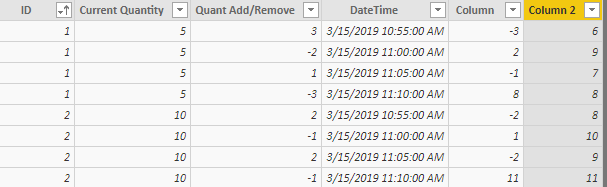
Regards,
Cherie
If this post helps, then please consider Accept it as the solution to help the other members find it more quickly.


- Mark as New
- Bookmark
- Subscribe
- Mute
- Subscribe to RSS Feed
- Permalink
- Report Inappropriate Content
M solution
let
    Source = Table.FromRows(Json.Document(Binary.Decompress(Binary.FromText("i45WMlTSUTIFYmMQ1jc01TcyMLRUMDSwMjVVitVByOsaoSowtDIwQFFgiCGPZoAxugJDiAEgg4FMHSUjHE6AK9DFtAO/EXBH4DQCYkksAA==", BinaryEncoding.Base64), Compression.Deflate)), let _t = ((type text) meta [Serialized.Text = true]) in type table [ID = _t, CQ = _t, Value = _t, #"Date Time" = _t]),
    #"Changed Type" = Table.TransformColumnTypes(Source,{{"ID", Int64.Type}, {"CQ", Int64.Type}, {"Value", Int64.Type}, {"Date Time", type datetime}}),
    #"Grouped Rows" = Table.Group(#"Changed Type", {"CQ"}, {{"AD", each _, type table}}),
    #"Added Custom" = Table.AddColumn(#"Grouped Rows", "Custom", each Table.AddIndexColumn(
Table.Sort([AD],{{"Date Time", Order.Descending}}),"Rank",1,1)),
    #"Removed Columns" = Table.RemoveColumns(#"Added Custom",{"AD"}),
    #"Expanded Custom" = Table.ExpandTableColumn(#"Removed Columns", "Custom", {"ID", "CQ", "Value", "Date Time", "Rank"}, {"ID", "CQ.1", "Value", "Date Time", "Rank"}),
    #"Grouped Rows1" = Table.Group(#"Expanded Custom", {"CQ"}, {{"AD", each _, type table}}),
    #"Added Custom1" = Table.AddColumn(#"Grouped Rows1", "Custom", each let
   Source =[AD],
   Add_Row = Table.InsertRows(Source,0,{[CQ=null, ID=null, CQ.1=null, Value=List.First(Source[CQ]), Date Time=null, Rank=null]})
 in
   Add_Row),
    #"Removed Columns1" = Table.RemoveColumns(#"Added Custom1",{"AD"}),
    #"Added Custom2" = Table.AddColumn(#"Removed Columns1", "Custom.1", each let
   Source=[Custom],
   Custom1 = List.Accumulate(Source[Value],{0},(state,current)=>if current=Source[Value]{0} then {current} else state&{List.Last(state)-(current)}),
    Custom2 = Table.FromColumns(Table.ToColumns(Source)&
{Custom1}),
 Remove= Table.RemoveRows(Custom2,0)
in
    Remove),
    #"Removed Columns2" = Table.RemoveColumns(#"Added Custom2",{"Custom", "CQ"}),
    #"Expanded Custom.1" = Table.ExpandTableColumn(#"Removed Columns2", "Custom.1", {"Column1", "Column2", "Column3", "Column4", "Column5", "Column6", "Column7"}, {"Custom.1.Column1", "Custom.1.Column2", "Custom.1.Column3", "Custom.1.Column4", "Custom.1.Column5", "Custom.1.Column6", "Custom.1.Column7"}),
    #"Renamed Columns" = Table.RenameColumns(#"Expanded Custom.1",{{"Custom.1.Column1", "ID"}, {"Custom.1.Column2", "CQ"}}),
    #"Removed Columns3" = Table.RemoveColumns(#"Renamed Columns",{"Custom.1.Column3"}),
    #"Renamed Columns1" = Table.RenameColumns(#"Removed Columns3",{{"Custom.1.Column4", "Q A/R"}, {"Custom.1.Column5", "Date Time"}, {"Custom.1.Column6", "Rank"}, {"Custom.1.Column7", "Desired Running Total"}})
in
    #"Renamed Columns1"
- Mark as New
- Bookmark
- Subscribe
- Mute
- Subscribe to RSS Feed
- Permalink
- Report Inappropriate Content
M solution
let
    Source = Table.FromRows(Json.Document(Binary.Decompress(Binary.FromText("i45WMlTSUTIFYmMQ1jc01TcyMLRUMDSwMjVVitVByOsaoSowtDIwQFFgiCGPZoAxugJDiAEgg4FMHSUjHE6AK9DFtAO/EXBH4DQCYkksAA==", BinaryEncoding.Base64), Compression.Deflate)), let _t = ((type text) meta [Serialized.Text = true]) in type table [ID = _t, CQ = _t, Value = _t, #"Date Time" = _t]),
    #"Changed Type" = Table.TransformColumnTypes(Source,{{"ID", Int64.Type}, {"CQ", Int64.Type}, {"Value", Int64.Type}, {"Date Time", type datetime}}),
    #"Grouped Rows" = Table.Group(#"Changed Type", {"CQ"}, {{"AD", each _, type table}}),
    #"Added Custom" = Table.AddColumn(#"Grouped Rows", "Custom", each Table.AddIndexColumn(
Table.Sort([AD],{{"Date Time", Order.Descending}}),"Rank",1,1)),
    #"Removed Columns" = Table.RemoveColumns(#"Added Custom",{"AD"}),
    #"Expanded Custom" = Table.ExpandTableColumn(#"Removed Columns", "Custom", {"ID", "CQ", "Value", "Date Time", "Rank"}, {"ID", "CQ.1", "Value", "Date Time", "Rank"}),
    #"Grouped Rows1" = Table.Group(#"Expanded Custom", {"CQ"}, {{"AD", each _, type table}}),
    #"Added Custom1" = Table.AddColumn(#"Grouped Rows1", "Custom", each let
   Source =[AD],
   Add_Row = Table.InsertRows(Source,0,{[CQ=null, ID=null, CQ.1=null, Value=List.First(Source[CQ]), Date Time=null, Rank=null]})
 in
   Add_Row),
    #"Removed Columns1" = Table.RemoveColumns(#"Added Custom1",{"AD"}),
    #"Added Custom2" = Table.AddColumn(#"Removed Columns1", "Custom.1", each let
   Source=[Custom],
   Custom1 = List.Accumulate(Source[Value],{0},(state,current)=>if current=Source[Value]{0} then {current} else state&{List.Last(state)-(current)}),
    Custom2 = Table.FromColumns(Table.ToColumns(Source)&
{Custom1}),
 Remove= Table.RemoveRows(Custom2,0)
in
    Remove),
    #"Removed Columns2" = Table.RemoveColumns(#"Added Custom2",{"Custom", "CQ"}),
    #"Expanded Custom.1" = Table.ExpandTableColumn(#"Removed Columns2", "Custom.1", {"Column1", "Column2", "Column3", "Column4", "Column5", "Column6", "Column7"}, {"Custom.1.Column1", "Custom.1.Column2", "Custom.1.Column3", "Custom.1.Column4", "Custom.1.Column5", "Custom.1.Column6", "Custom.1.Column7"}),
    #"Renamed Columns" = Table.RenameColumns(#"Expanded Custom.1",{{"Custom.1.Column1", "ID"}, {"Custom.1.Column2", "CQ"}}),
    #"Removed Columns3" = Table.RemoveColumns(#"Renamed Columns",{"Custom.1.Column3"}),
    #"Renamed Columns1" = Table.RenameColumns(#"Removed Columns3",{{"Custom.1.Column4", "Q A/R"}, {"Custom.1.Column5", "Date Time"}, {"Custom.1.Column6", "Rank"}, {"Custom.1.Column7", "Desired Running Total"}})
in
    #"Renamed Columns1"
- Mark as New
- Bookmark
- Subscribe
- Mute
- Subscribe to RSS Feed
- Permalink
- Report Inappropriate Content
Hi @Anonymous
Could you explain more about your expected output?How to calculated the value 6,9,7....?For example:You may get the next quant with below calculated column.
Next Quant =
CALCULATE (
    SUM ( Event[Quant Add/Remove] ),
    FILTER (
        ALLEXCEPT ( Event, Event[ID] ),
        Event[Index]
            = EARLIER ( Event[Index] ) + 1
    )
)
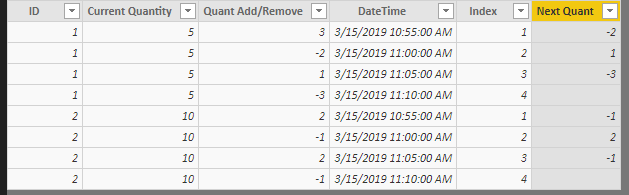
Regards,
Cherie
If this post helps, then please consider Accept it as the solution to help the other members find it more quickly.
- Mark as New
- Bookmark
- Subscribe
- Mute
- Subscribe to RSS Feed
- Permalink
- Report Inappropriate Content
I apologize for the lack of clarity in my post.
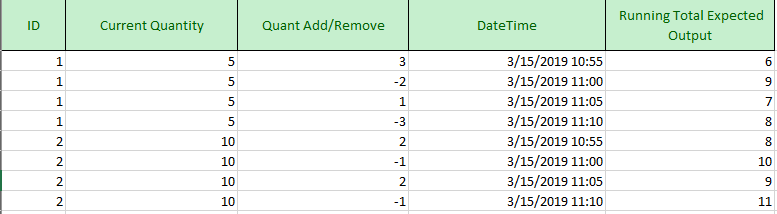
Each ID has a current quantity amount which acts as a snapshot for the current amount of that ID (this is why current quantity remains constant.) From there, I am seeking to work back in time using the amount that was added or removed from the quant add/remove column. Thus, the most recent add/remove for ID 1 occurred at 11:10 on 3/15. We see that 3 was removed, thus 5-(-3)=8 was in before this transaction. The next before that was at 11:05 where 1 was added, thus we subtract that from the prior amount (8)-(1)=7. Then before that at 11 we removed 2, so the prior amount of (7)-(-2)=9. I need to perform this function for each ID so I can help track the amount per ID over time when rolling totals are not being calculated along with transaction amounts. Does this help @v-cherch-msft ? Thank you for your willingness to help.
- Mark as New
- Bookmark
- Subscribe
- Mute
- Subscribe to RSS Feed
- Permalink
- Report Inappropriate Content
Here is what I came up with SQL side, although it does not work in the way I intended yet:
MIN("Current Quantity") OVER(Partition BY ID)-
SUM("Quant Add/Remove") OVER(Partition by ID order by DateTime) as 'Running Total Expected Output'
Problematically, this BEGINS the running total at the current amount rather than ENDING it there. Just at a loss at the moment.
- Mark as New
- Bookmark
- Subscribe
- Mute
- Subscribe to RSS Feed
- Permalink
- Report Inappropriate Content
Hi @Anonymous
You may create two columns to get the value.
Column =
IF (
    Table1[DateTime] = MAXX ( ALLEXCEPT ( Table1, Table1[ID] ), Table1[DateTime] ),
    Table1[Current Quantity] - Table1[Quant Add/Remove],
    Table1[Quant Add/Remove] * ( -1 )
)
Column 2 =
CALCULATE (
    SUM ( Table1[Column] ),
    FILTER (
        ALL ( Table1 ),
        Table1[ID] = EARLIER ( Table1[ID] )
            && Table1[DateTime] >= EARLIER ( Table1[DateTime] )
    )
)
Regards,
Cherie
If this post helps, then please consider Accept it as the solution to help the other members find it more quickly.
Helpful resources

Power BI Dataviz World Championships
The Power BI Data Visualization World Championships is back! Get ahead of the game and start preparing now!

Power BI Monthly Update - December 2025
Check out the December 2025 Power BI Holiday Recap!

FabCon Atlanta 2026
Join us at FabCon Atlanta, March 16-20, for the ultimate Fabric, Power BI, AI and SQL community-led event. Save $200 with code FABCOMM.

| User | Count |
|---|---|
| 38 | |
| 37 | |
| 33 | |
| 32 | |
| 29 |


| User | Count |
|---|---|
| 132 | |
| 88 | |
| 82 | |
| 68 | |
| 64 |


