FabCon is coming to Atlanta
Join us at FabCon Atlanta from March 16 - 20, 2026, for the ultimate Fabric, Power BI, AI and SQL community-led event. Save $200 with code FABCOMM.
Register now!- Power BI forums
- Get Help with Power BI
- Desktop
- Service
- Report Server
- Power Query
- Mobile Apps
- Developer
- DAX Commands and Tips
- Custom Visuals Development Discussion
- Health and Life Sciences
- Power BI Spanish forums
- Translated Spanish Desktop
- Training and Consulting
- Instructor Led Training
- Dashboard in a Day for Women, by Women
- Galleries
- Data Stories Gallery
- Themes Gallery
- Contests Gallery
- QuickViz Gallery
- Quick Measures Gallery
- Visual Calculations Gallery
- Notebook Gallery
- Translytical Task Flow Gallery
- TMDL Gallery
- R Script Showcase
- Webinars and Video Gallery
- Ideas
- Custom Visuals Ideas (read-only)
- Issues
- Issues
- Events
- Upcoming Events
View all the Fabric Data Days sessions on demand. View schedule
- Power BI forums
- Forums
- Get Help with Power BI
- Desktop
- Re: Running total for a prior year based on slicer...
- Subscribe to RSS Feed
- Mark Topic as New
- Mark Topic as Read
- Float this Topic for Current User
- Bookmark
- Subscribe
- Printer Friendly Page


- Mark as New
- Bookmark
- Subscribe
- Mute
- Subscribe to RSS Feed
- Permalink
- Report Inappropriate Content
Running total for a prior year based on slicer Date selections
I have a formula that works great for calculating a running total of transactions between two dates in a date slicer:

- Mark as New
- Bookmark
- Subscribe
- Mute
- Subscribe to RSS Feed
- Permalink
- Report Inappropriate Content
Hi @apatnola ,
We can create a new measure based on your measure to meet your requirement.
Transactions Cumulative Current Period (last year) =
IF (
    COUNTROWS ( 'Confirmed Transactions' ) > 0,
    CALCULATE (
        [Transactions Cumulative Current Period],
        SAMEPERIODLASTYEAR (
            FILTER ( ALLSELECTED ( Dates[Date] ), 'Dates'[Date] <= MAX ( Dates[Date] ) )
        )
    )
)
Then we can get the result like this,
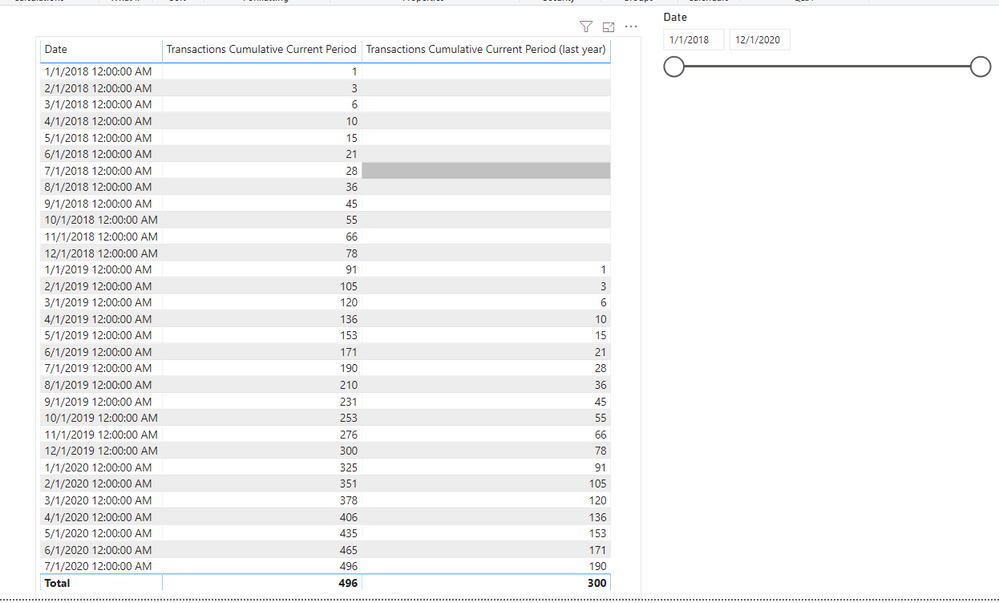
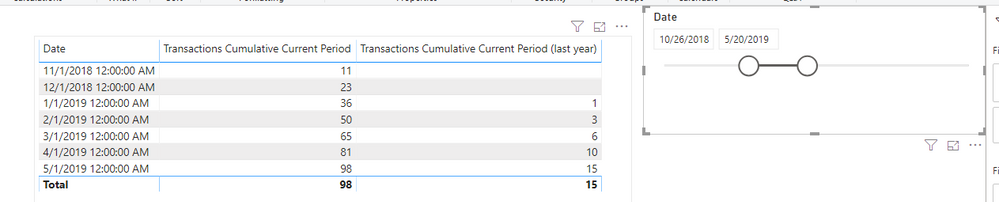
If it doesn’t meet your requirement, could you please show the exact expected result based on the table that we have shared?
Best regards,
If this post helps, then please consider Accept it as the solution to help the other members find it more quickly.
- Mark as New
- Bookmark
- Subscribe
- Mute
- Subscribe to RSS Feed
- Permalink
- Report Inappropriate Content
Thank you, I tried:
- Mark as New
- Bookmark
- Subscribe
- Mute
- Subscribe to RSS Feed
- Permalink
- Report Inappropriate Content
Hi @apatnola ,
How about the result after you follow the suggestions mentioned in my original post?Could you please provide more details about it If it doesn't meet your requirement?
Best regards,
If this post helps, then please consider Accept it as the solution to help the other members find it more quickly.
- Mark as New
- Bookmark
- Subscribe
- Mute
- Subscribe to RSS Feed
- Permalink
- Report Inappropriate Content
Hi @apatnola ,
We found that it miss a right brackets in the first measure and column name in the second measure, please try to use the following measure:
Transactions **bleep** Prior Period =
IF (
    COUNTROWS ( 'Confirmed Transactions' ) > 0,
    CALCULATE (
        [Transactions **bleep** Current Period],
        SAMEPERIODLASTYEAR (
            FILTER ( ALLSELECTED ( Dates[Date] ), Dates[Date] <= MAX ( Dates[Date] ) )
        )
    )
)
Best regards,
If this post helps, then please consider Accept it as the solution to help the other members find it more quickly.


- Mark as New
- Bookmark
- Subscribe
- Mute
- Subscribe to RSS Feed
- Permalink
- Report Inappropriate Content
Something like this. With date calendar
Cumm Sales = CALCULATE(SUM(Sales[Sales Amount]),filter(date,date[date] <=maxx(date,date[date])))

Cumm Sales = CALCULATE(SUM(Sales[Sales Amount]),filter(date,date[date] <=maxx(date,max(dateadd(date[date]),-1,year))))
To get the best of the time intelligence function. Make sure you have a date calendar and it has been marked as the date in model view. Also, join it with the date column of your fact/s. Refer :
https://radacad.com/creating-calendar-table-in-power-bi-using-dax-functions
https://www.archerpoint.com/blog/Posts/creating-date-table-power-bi
https://www.sqlbi.com/articles/creating-a-simple-date-table-in-dax/
- Mark as New
- Bookmark
- Subscribe
- Mute
- Subscribe to RSS Feed
- Permalink
- Report Inappropriate Content
Thank you, I tried:


- Mark as New
- Bookmark
- Subscribe
- Mute
- Subscribe to RSS Feed
- Permalink
- Report Inappropriate Content
Should be able to use PREVIOUSYEAR like:
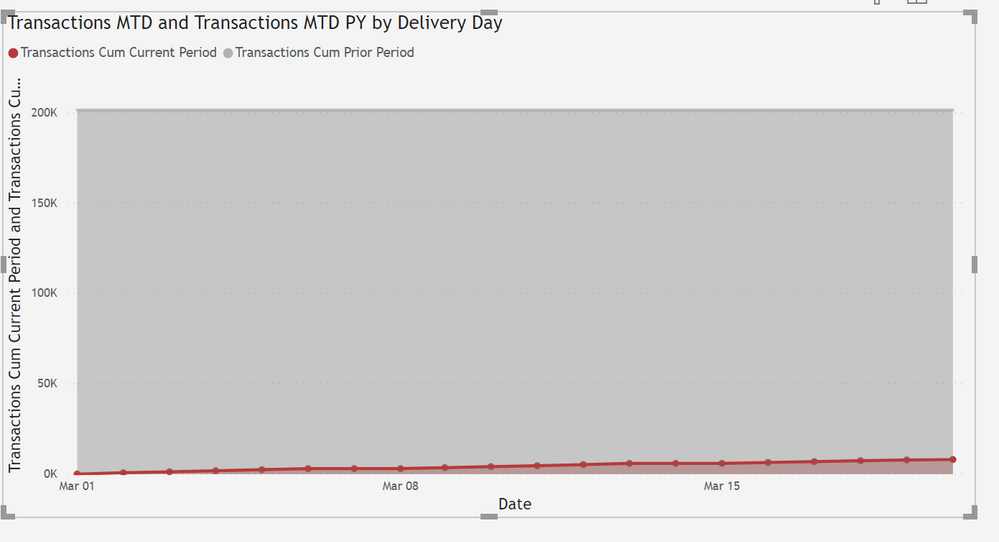
Last year = CALCULATE([Transactions Cumulative Current Period],PREVIOUSYEAR('Dates'[Date]))
Also, if TI doesn't work See if my Time Intelligence the Hard Way provides a different way of accomplishing what you are going for.
https://community.powerbi.com/t5/Quick-Measures-Gallery/Time-Intelligence-quot-The-Hard-Way-quot-TIT...
Follow on LinkedIn
@ me in replies or I'll lose your thread!!!
Instead of a Kudo, please vote for this idea
Become an expert!: Enterprise DNA
External Tools: MSHGQM
YouTube Channel!: Microsoft Hates Greg
Latest book!: DAX For Humans
DAX is easy, CALCULATE makes DAX hard...
- Mark as New
- Bookmark
- Subscribe
- Mute
- Subscribe to RSS Feed
- Permalink
- Report Inappropriate Content
If I use previous year as follows:

Helpful resources

Power BI Monthly Update - November 2025
Check out the November 2025 Power BI update to learn about new features.

Fabric Data Days
Advance your Data & AI career with 50 days of live learning, contests, hands-on challenges, study groups & certifications and more!

FabCon Atlanta 2026
Join us at FabCon Atlanta, March 16-20, for the ultimate Fabric, Power BI, AI and SQL community-led event. Save $200 with code FABCOMM.


