FabCon is coming to Atlanta
Join us at FabCon Atlanta from March 16 - 20, 2026, for the ultimate Fabric, Power BI, AI and SQL community-led event. Save $200 with code FABCOMM.
Register now!- Power BI forums
- Get Help with Power BI
- Desktop
- Service
- Report Server
- Power Query
- Mobile Apps
- Developer
- DAX Commands and Tips
- Custom Visuals Development Discussion
- Health and Life Sciences
- Power BI Spanish forums
- Translated Spanish Desktop
- Training and Consulting
- Instructor Led Training
- Dashboard in a Day for Women, by Women
- Galleries
- Data Stories Gallery
- Themes Gallery
- Contests Gallery
- QuickViz Gallery
- Quick Measures Gallery
- Visual Calculations Gallery
- Notebook Gallery
- Translytical Task Flow Gallery
- TMDL Gallery
- R Script Showcase
- Webinars and Video Gallery
- Ideas
- Custom Visuals Ideas (read-only)
- Issues
- Issues
- Events
- Upcoming Events
Get Fabric Certified for FREE during Fabric Data Days. Don't miss your chance! Request now
- Power BI forums
- Forums
- Get Help with Power BI
- Desktop
- Re: Running Total solution for slicer
- Subscribe to RSS Feed
- Mark Topic as New
- Mark Topic as Read
- Float this Topic for Current User
- Bookmark
- Subscribe
- Printer Friendly Page

- Mark as New
- Bookmark
- Subscribe
- Mute
- Subscribe to RSS Feed
- Permalink
- Report Inappropriate Content
Running Total solution for slicer
Hi community
I've been trying to apply solutions proposed in this forum for similar issues to mine, but have not been successful so far.
I want to create either a measure or a column that can help me visualize a running total that always calculates from the begining even when slider applied. Let me explain.
This is my table "data"
| Month | Account | Date | Amount |
| 1 | 101 | 1/15/2020 | 10 |
| 1 | 102 | 1/15/2020 | 4 |
| 1 | 101 | 1/31/2020 | 10 |
| 2 | 101 | 2/15/2020 | 15 |
| 2 | 102 | 2/15/2020 | 8 |
| 2 | 101 | 2/29/2020 | 15 |
And when I write a DAX measure like this:
Running Total =
CALCULATE(
	SUM('data'[Amount]),
	FILTER(
		ALL('data'[Date]),
		ISONORAFTER('data'[Date], MAX('data'[Date]), DESC)
	)
)
I get this result (assume I filter account 101)
| Month | Account | Date | Amount | Running Tot |
| 1 | 101 | 1/15/2020 | 10 | 10 |
| 1 | 101 | 1/31/2020 | 10 | 20 |
| 2 | 101 | 2/15/2020 | 15 | 35 |
| 2 | 101 | 2/29/2020 | 15 | 50 |
And when I further filter Month 2, I expect to get the following:
| Month | Account | Date | Amount | Running Tot |
| 2 | 101 | 2/15/2020 | 15 | 35 |
| 2 | 101 | 2/29/2020 | 15 | 50 |
Note the first row is 35 because it includes the cumulated values from last month (20), or in other words, is including the opening balance that comes from January.
However the Running Total starts from 15 , instead of 35,
Any ideas for this?
I was thining of adding a new column that calculates the running total but, got the same.
Solved! Go to Solution.


- Mark as New
- Bookmark
- Subscribe
- Mute
- Subscribe to RSS Feed
- Permalink
- Report Inappropriate Content
Ok. I played with this some more. Please try this expression. Having account in both the table and the slicer makes this a challenge.
Regards,
Pat
Did I answer your question? Mark my post as a solution! Kudos are also appreciated!
To learn more about Power BI, follow me on Twitter or subscribe on YouTube.
@mahoneypa HoosierBI on YouTube
- Mark as New
- Bookmark
- Subscribe
- Mute
- Subscribe to RSS Feed
- Permalink
- Report Inappropriate Content
Please try this expression as a measure (replacing Table name "Total" with 'data').
RunningTotal =
VAR thisdate =
SELECTEDVALUE ( Total[Date] )
RETURN
CALCULATE (
SUM ( Total[Amount] ),
ALL ( Total ),
VALUES ( Total[Account] ),
Total[Date] <= thisdate
)
If this works for you, please mark it as the solution. Kudos are appreciated too. Please let me know if not.
Regards,
Pat
Did I answer your question? Mark my post as a solution! Kudos are also appreciated!
To learn more about Power BI, follow me on Twitter or subscribe on YouTube.
@mahoneypa HoosierBI on YouTube
- Mark as New
- Bookmark
- Subscribe
- Mute
- Subscribe to RSS Feed
- Permalink
- Report Inappropriate Content
Hey @mahoneypat , Thanks!
This worked! Just want to ask if there is something else it can be done.
This only works fine if I filter a specific account, but when I want to show all accounts, it doesnt calculate the "global" running total, it is doing it by account.
This is what I see when I filter Month 2 and show all accounts. The running total starts fine on 35, but then on account 102 it starts again from zero. I would also like to see a sort of "global" running total ("Expected running total" down below)
| Account | Month | Date | Amount | Running Total | Expected Running Total |
| 101 | 2 | 2/15/2020 | 15 | 35 | 35 |
| 101 | 2 | 2/29/2020 | 15 | 50 | 50 |
| 102 | 2 | 2/15/2020 | 8 | 12 | 62 |
So, if I filter account 101 the running total should show 50 at the end (even if I filter Month 2 or if show all months), also, if I filter account 102, running total should be 12 (no matter what Month I filter or if there is no month filter) and If i show All accounts, it should calculate 62 at the end (even if I filter Month 2 or show all months).
If you got any idea for this, it would be great!
- Mark as New
- Bookmark
- Subscribe
- Mute
- Subscribe to RSS Feed
- Permalink
- Report Inappropriate Content
Yes. You can just take the VALUES( ) clause out of the CALCULATE(). You only had one account in the example data, so assumed (incorrectly) you would want it that way.
Regards,
Pat
Did I answer your question? Mark my post as a solution! Kudos are also appreciated!
To learn more about Power BI, follow me on Twitter or subscribe on YouTube.
@mahoneypa HoosierBI on YouTube
- Mark as New
- Bookmark
- Subscribe
- Mute
- Subscribe to RSS Feed
- Permalink
- Report Inappropriate Content
Hi @mahoneypat
That's what I thought, so I erased that line, but get the following result (no filters applied):
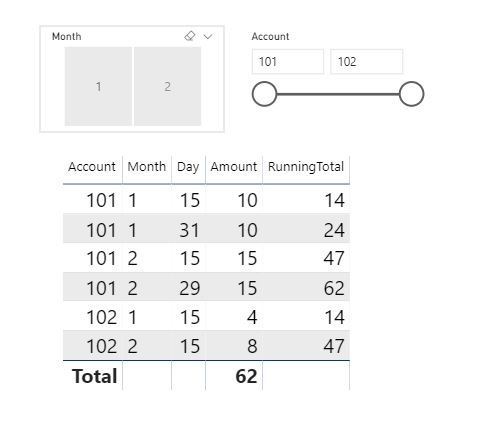
Running total is weird now, and If suppose, I apply filter month "2" and no filer on account, running total should be 62, but shows 47 on last line. If i happen to also add filter Account "102", the running total now should be 12, but nope, it shows 47.
😞
- Mark as New
- Bookmark
- Subscribe
- Mute
- Subscribe to RSS Feed
- Permalink
- Report Inappropriate Content
Try writing a new measure that references the original measure. This one will iterate over each account and add all of the running totals together. See if that works instead. Typing on a tablet. Sorry.
New = Sumx(values(table[account]), [original measure])
If not will look more later.
Pat
Did I answer your question? Mark my post as a solution! Kudos are also appreciated!
To learn more about Power BI, follow me on Twitter or subscribe on YouTube.
@mahoneypa HoosierBI on YouTube
- Mark as New
- Bookmark
- Subscribe
- Mute
- Subscribe to RSS Feed
- Permalink
- Report Inappropriate Content
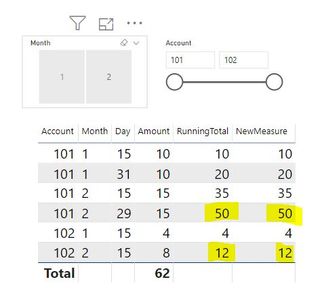
Thanks Pat, but still getting same result, 😞
I just returned the original formula for running total and created the new measure, but it gives same numbers
- Mark as New
- Bookmark
- Subscribe
- Mute
- Subscribe to RSS Feed
- Permalink
- Report Inappropriate Content
The reason you are seeing the weird #s is because the max date for Account 102 is less than the max for Account 101. You need to get the max date in the selected month in the variable first with this type of change.
Did I answer your question? Mark my post as a solution! Kudos are also appreciated!
To learn more about Power BI, follow me on Twitter or subscribe on YouTube.
@mahoneypa HoosierBI on YouTube
- Mark as New
- Bookmark
- Subscribe
- Mute
- Subscribe to RSS Feed
- Permalink
- Report Inappropriate Content
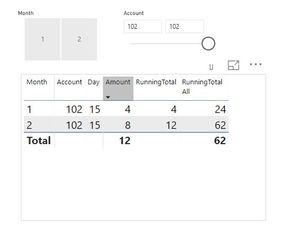
Hi Pat, thanks. I think is closer.
It shows 24 for Month 1 and 62 for Month 2, (indeed correct), but not showing the "development" of 10, 20, then 24, then 39, etc up until 62.

Also, if let's say I filter Account 102, should get 12, but get 62. In this case the original measure is the correct
- Mark as New
- Bookmark
- Subscribe
- Mute
- Subscribe to RSS Feed
- Permalink
- Report Inappropriate Content
Ok. I played with this some more. Please try this expression. Having account in both the table and the slicer makes this a challenge.
Regards,
Pat
Did I answer your question? Mark my post as a solution! Kudos are also appreciated!
To learn more about Power BI, follow me on Twitter or subscribe on YouTube.
@mahoneypa HoosierBI on YouTube

- Mark as New
- Bookmark
- Subscribe
- Mute
- Subscribe to RSS Feed
- Permalink
- Report Inappropriate Content
That is a great measure.
But, I'm facing the situation when I'd need to have all accounts with balances even if they are not in the selection range "From ... To ...."
So, it would be 0 for the Amount but some Running Total that came from all previouse/before the selected dates range periods.
Could this measure be modified to do it?
- Mark as New
- Bookmark
- Subscribe
- Mute
- Subscribe to RSS Feed
- Permalink
- Report Inappropriate Content
Oh! This works!!
I just took out the account column from the table, just kept it in the slider and now all numbers show as expected.
Thank you so much Pat!


- Mark as New
- Bookmark
- Subscribe
- Mute
- Subscribe to RSS Feed
- Permalink
- Report Inappropriate Content
try like with a date table
Cumm Sales = CALCULATE(SUM(Table[Amount]),filter(allselected(date),date[date] <=maxx(date,date[date])))
Cumm Sales = CALCULATE(SUM(Table[Amount]),filter(allselected(date),date[date] <=max(table[Date])))
To get the best of the time intelligence function. Make sure you have a date calendar and it has been marked as the date in model view. Also, join it with the date column of your fact/s. Refer :
https://radacad.com/creating-calendar-table-in-power-bi-using-dax-functions
https://www.archerpoint.com/blog/Posts/creating-date-table-power-bi
https://www.sqlbi.com/articles/creating-a-simple-date-table-in-dax/
See if my webinar on Time Intelligence can help: https://community.powerbi.com/t5/Webinars-and-Video-Gallery/PowerBI-Time-Intelligence-Calendar-WTD-Y...
Appreciate your Kudos.

Helpful resources

Power BI Monthly Update - November 2025
Check out the November 2025 Power BI update to learn about new features.

Fabric Data Days
Advance your Data & AI career with 50 days of live learning, contests, hands-on challenges, study groups & certifications and more!

FabCon Atlanta 2026
Join us at FabCon Atlanta, March 16-20, for the ultimate Fabric, Power BI, AI and SQL community-led event. Save $200 with code FABCOMM.


| User | Count |
|---|---|
| 103 | |
| 80 | |
| 62 | |
| 50 | |
| 45 |


