Don't miss your chance to take exam DP-600 or DP-700 on us!
Request nowLearn from the best! Meet the four finalists headed to the FINALS of the Power BI Dataviz World Championships! Register now
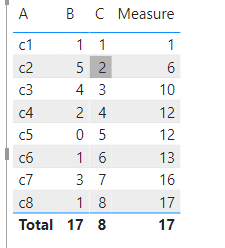
I have the following visual.A and B are table columns and C is a calculated measure. Can you created a rolling sum of B based on ascending order of C?
Thanks in advance.
Hi @ashamsuzzoha ,
What is the DAX formula for your measure [C]?
I need a complete sample data model.
Or you can refer to my .pbix file.
My [C] is a sorting of [A], so I add up according to [A] to avoid using measure [C].
Best regards,
Lionel Chen
If this post helps, then please consider Accept it as the solution to help the other members find it more quickly.
Can you do it without changing C to a calculated column?
Hi @a_shamsuzzoha ,
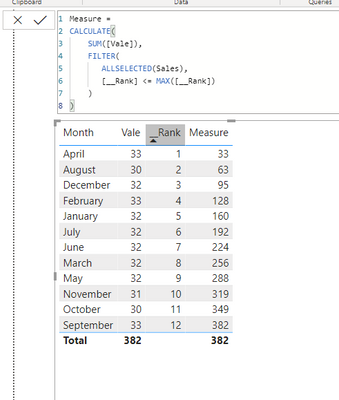
First, change column [C] to calculated column.
Measure =
CALCULATE(
SUM([B]),
FILTER(
ALLSELECTED(Table),
[C] <= MAX([C])
)
)
Best regards,
Lionel Chen
If this post helps, then please consider Accept it as the solution to help the other members find it more quickly.
Any help?
@a_shamsuzzoha , ascending order C or A ?
C can be a measure like
C =calculate(Sum(Table[B]), filter(allselected(Table), Table[A] <=max(Table[A])))
Share feedback directly with Fabric product managers, participate in targeted research studies and influence the Fabric roadmap.
Check out the February 2026 Power BI update to learn about new features.
| User | Count |
|---|---|
| 51 | |
| 40 | |
| 37 | |
| 14 | |
| 14 |
| User | Count |
|---|---|
| 85 | |
| 69 | |
| 38 | |
| 29 | |
| 27 |