- Power BI forums
- Updates
- News & Announcements
- Get Help with Power BI
- Desktop
- Service
- Report Server
- Power Query
- Mobile Apps
- Developer
- DAX Commands and Tips
- Custom Visuals Development Discussion
- Health and Life Sciences
- Power BI Spanish forums
- Translated Spanish Desktop
- Power Platform Integration - Better Together!
- Power Platform Integrations (Read-only)
- Power Platform and Dynamics 365 Integrations (Read-only)
- Training and Consulting
- Instructor Led Training
- Dashboard in a Day for Women, by Women
- Galleries
- Community Connections & How-To Videos
- COVID-19 Data Stories Gallery
- Themes Gallery
- Data Stories Gallery
- R Script Showcase
- Webinars and Video Gallery
- Quick Measures Gallery
- 2021 MSBizAppsSummit Gallery
- 2020 MSBizAppsSummit Gallery
- 2019 MSBizAppsSummit Gallery
- Events
- Ideas
- Custom Visuals Ideas
- Issues
- Issues
- Events
- Upcoming Events
- Community Blog
- Power BI Community Blog
- Custom Visuals Community Blog
- Community Support
- Community Accounts & Registration
- Using the Community
- Community Feedback
Register now to learn Fabric in free live sessions led by the best Microsoft experts. From Apr 16 to May 9, in English and Spanish.
- Power BI forums
- Forums
- Get Help with Power BI
- Desktop
- Re: Returning the Max of a measure
- Subscribe to RSS Feed
- Mark Topic as New
- Mark Topic as Read
- Float this Topic for Current User
- Bookmark
- Subscribe
- Printer Friendly Page

- Mark as New
- Bookmark
- Subscribe
- Mute
- Subscribe to RSS Feed
- Permalink
- Report Inappropriate Content
Returning the Max of a measure
Hi,
I have a summary table which is grouped by "Type", there are x number of years for each type but the table sums each years to return one value for each Type. I then need to return the MAX value overall but I can only seem to return the Max value year of each Type instead of one overall highest number.
Example of the Table and desired result is below - for Type B I need to return the Max overall, not Type B Max:
Any help greatly appreciated, thanks!
| Table: | ||
| Type | Amount | Year |
| A | 10000 | 2019 |
| A | 9000 | 2018 |
| A | 8000 | 2017 |
| B | 4000 | 2019 |
| B | 3000 | 2018 |
| B | 2000 | 2017 |
| Desired result: | ||
| Type | Amount | Max |
| A | 27000 | 27000 |
| B | 9000 | 27000 |
Solved! Go to Solution.


- Mark as New
- Bookmark
- Subscribe
- Mute
- Subscribe to RSS Feed
- Permalink
- Report Inappropriate Content
Hi @Anonymous :
We can create following measurs to meet your requirement:
Measure = SUM('Table'[Amount])
Measure 2 = MAXX(ALLSELECTED('Table'[Type]),[Measure])
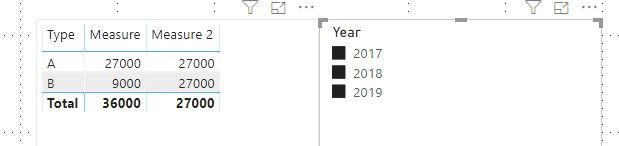
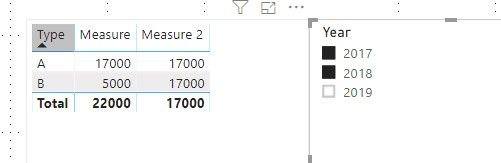
If it doesn't meet your requirement, Please show the exact expected result based on the Tables that you have shared.
Best regards,
If this post helps, then please consider Accept it as the solution to help the other members find it more quickly.
- Mark as New
- Bookmark
- Subscribe
- Mute
- Subscribe to RSS Feed
- Permalink
- Report Inappropriate Content
Hi @Anonymous ,
How about the result after you follow the suggestions mentioned in my original post?Could you please provide more details about it If it doesn't meet your requirement?
Best regards,
If this post helps, then please consider Accept it as the solution to help the other members find it more quickly.
- Mark as New
- Bookmark
- Subscribe
- Mute
- Subscribe to RSS Feed
- Permalink
- Report Inappropriate Content
@Anonymous
sum by type
- Mark as New
- Bookmark
- Subscribe
- Mute
- Subscribe to RSS Feed
- Permalink
- Report Inappropriate Content
Hi - thanks I tried this and it works but I have realised there is a rogue amount in a year 2020. I have a filter on all pages excluding year 2020, and have changed your solution to say AllExcept YOA but the rogue amount still comes through. Any ideas as to how to modify your solution to allow the measure to read the filter and ignore 2020 year please?
- Mark as New
- Bookmark
- Subscribe
- Mute
- Subscribe to RSS Feed
- Permalink
- Report Inappropriate Content
I want to avoid deleting rows in the data source by the way
- Mark as New
- Bookmark
- Subscribe
- Mute
- Subscribe to RSS Feed
- Permalink
- Report Inappropriate Content
I might have been over-complicating this. I simply need to return the higherst value in the below measure (but the measures change depending on filters selected:
Measure
4838
4831
3540
So I need a measure which returns 4838 for all rows in this example..
- Mark as New
- Bookmark
- Subscribe
- Mute
- Subscribe to RSS Feed
- Permalink
- Report Inappropriate Content
Hi @Anonymous :
We can create following measurs to meet your requirement:
Measure = SUM('Table'[Amount])
Measure 2 = MAXX(ALLSELECTED('Table'[Type]),[Measure])
If it doesn't meet your requirement, Please show the exact expected result based on the Tables that you have shared.
Best regards,
If this post helps, then please consider Accept it as the solution to help the other members find it more quickly.
Helpful resources

Microsoft Fabric Learn Together
Covering the world! 9:00-10:30 AM Sydney, 4:00-5:30 PM CET (Paris/Berlin), 7:00-8:30 PM Mexico City

Power BI Monthly Update - April 2024
Check out the April 2024 Power BI update to learn about new features.

Fabric Community Update - April 2024
Find out what's new and trending in the Fabric Community.

| User | Count |
|---|---|
| 107 | |
| 97 | |
| 75 | |
| 65 | |
| 53 |


| User | Count |
|---|---|
| 144 | |
| 103 | |
| 98 | |
| 85 | |
| 64 |