FabCon is coming to Atlanta
Join us at FabCon Atlanta from March 16 - 20, 2026, for the ultimate Fabric, Power BI, AI and SQL community-led event. Save $200 with code FABCOMM.
Register now!- Power BI forums
- Get Help with Power BI
- Desktop
- Service
- Report Server
- Power Query
- Mobile Apps
- Developer
- DAX Commands and Tips
- Custom Visuals Development Discussion
- Health and Life Sciences
- Power BI Spanish forums
- Translated Spanish Desktop
- Training and Consulting
- Instructor Led Training
- Dashboard in a Day for Women, by Women
- Galleries
- Data Stories Gallery
- Themes Gallery
- Contests Gallery
- QuickViz Gallery
- Quick Measures Gallery
- Visual Calculations Gallery
- Notebook Gallery
- Translytical Task Flow Gallery
- TMDL Gallery
- R Script Showcase
- Webinars and Video Gallery
- Ideas
- Custom Visuals Ideas (read-only)
- Issues
- Issues
- Events
- Upcoming Events
Get Fabric Certified for FREE during Fabric Data Days. Don't miss your chance! Request now
- Power BI forums
- Forums
- Get Help with Power BI
- Desktop
- Return applicable price within time frame
- Subscribe to RSS Feed
- Mark Topic as New
- Mark Topic as Read
- Float this Topic for Current User
- Bookmark
- Subscribe
- Printer Friendly Page

- Mark as New
- Bookmark
- Subscribe
- Mute
- Subscribe to RSS Feed
- Permalink
- Report Inappropriate Content
Return applicable price within time frame
Hello!
I'm still getting my way around BI and some simple things cause me to stumble.
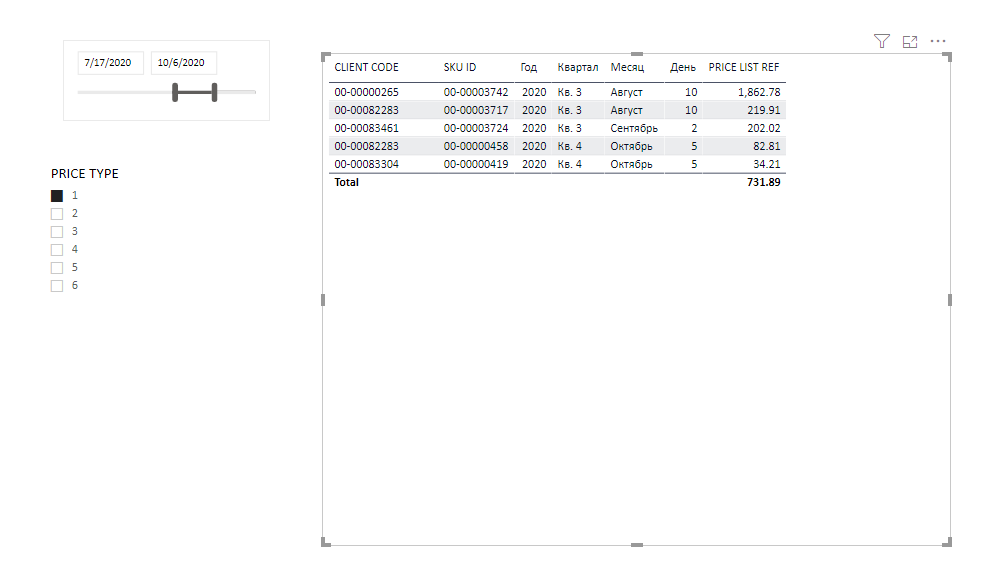
So I have a price list with different price types. Date column of the price lists sets time frame within which the prices are applicable to certain SKU's.
And I have a sales table. I need to calculate the applicable price list price on the sales date and average within month (but thats secondary) and calculate difference between it and an actual sales price.
Applicable price types have to be sliced by the slicer, i.e. user should be able to choose different price types.
Date slicer should slice only sales dates since some of the price list prices may be set well out of a sliced time frame.
Price List size is ~ 1++ mil rows
SKU ID's ~ 25 000+ rows
Clients ~ 16 000 + rows
Sales ~ 2+ mil rows
Tried this measure but it fails to calculate. Progress wheel spins and thats it 😞
SELECTEDVALUE(DATA_SALES[SALES DATE])
CALCULATE(AVERAGEX(PRICE_LIST,[PRICE]),ALL(DATES),
FILTER(DATES,DATES[DATES]>=SalesDate && DATES[DATES]<SalesDate))
Solved! Go to Solution.


- Mark as New
- Bookmark
- Subscribe
- Mute
- Subscribe to RSS Feed
- Permalink
- Report Inappropriate Content
Hi @Anonymous ,
Would you please try the following measure, if it doesn't work , please explain more about your expected output.
PRICE LIST REF =
var PriceValue = CALCULATE(AVERAGE(PRICE_LIST[PRICE]),FILTER(ALL(DATES),DATES[DATES] in VALUES(DATA_SALES[SALES DATE])))
return
PriceValue
If this post helps, then please consider Accept it as the solution to help the other members find it more quickly.
Best Regards,
Dedmon Dai
- Mark as New
- Bookmark
- Subscribe
- Mute
- Subscribe to RSS Feed
- Permalink
- Report Inappropriate Content
Cracked it. Turned out to be way simpler than I thought
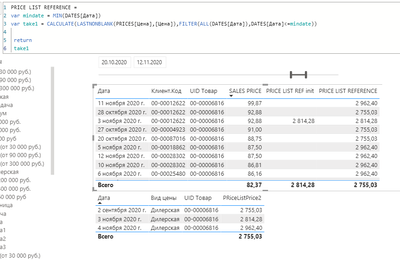
PRICE LIST REFERENCE =
var mindate = MIN(DATES[DATE])
var priceref= CALCULATE(LASTNONBLANK(PRICES[PRICE],[PRICE]),FILTER(ALL(DATES[DATE]),DATES[DATE]<=mindate))

return
priceref
- Mark as New
- Bookmark
- Subscribe
- Mute
- Subscribe to RSS Feed
- Permalink
- Report Inappropriate Content
Cracked it. Turned out to be way simpler than I thought
PRICE LIST REFERENCE =
var mindate = MIN(DATES[DATE])
var priceref= CALCULATE(LASTNONBLANK(PRICES[PRICE],[PRICE]),FILTER(ALL(DATES[DATE]),DATES[DATE]<=mindate))

return
priceref
- Mark as New
- Bookmark
- Subscribe
- Mute
- Subscribe to RSS Feed
- Permalink
- Report Inappropriate Content
Unfortunately the solution is not full. Guess it was my fault. I misinterpreted the task itself.
So the problem is that prices in price list may be set (and usaully are) on or before the sales dates. And the solution works only for the prices that were set in the selected dates range. If the prices were set before the date range - blank is returned 😞
Guess the right logic would be to check if there were any prices for the sold items set in the price list on or before the minimum date of the date range slicer and return date and prices range starting from the first date the price was set till the max date of the date range. Hope i got that one clear.
Current solution returns prices only within the set range, ignoring those that were set before thus resulting in empty cells.
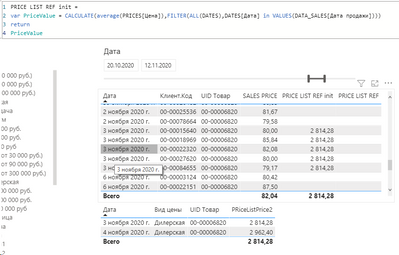
I guess that part
should be modified to start wtih the first date from the price list less or equal to first sales date.
Frankly I'm struggling with that problem but cant get my head around it. Dates are not consequtive in the price list and creating a virtual table would result in tenth of millions of rows
- Mark as New
- Bookmark
- Subscribe
- Mute
- Subscribe to RSS Feed
- Permalink
- Report Inappropriate Content
Hi @Anonymous ,
Would you please try the following measure, if it doesn't work , please explain more about your expected output.
PRICE LIST REF =
var PriceValue = CALCULATE(AVERAGE(PRICE_LIST[PRICE]),FILTER(ALL(DATES),DATES[DATES] in VALUES(DATA_SALES[SALES DATE])))
return
PriceValue
If this post helps, then please consider Accept it as the solution to help the other members find it more quickly.
Best Regards,
Dedmon Dai
- Mark as New
- Bookmark
- Subscribe
- Mute
- Subscribe to RSS Feed
- Permalink
- Report Inappropriate Content
Thank you very much!
Still testing, but beems to work like a charm with a minor alteration of using AVERAGEX instead of an AVERAGE.
- Mark as New
- Bookmark
- Subscribe
- Mute
- Subscribe to RSS Feed
- Permalink
- Report Inappropriate Content
Still no ideas?
Helpful resources

Power BI Monthly Update - November 2025
Check out the November 2025 Power BI update to learn about new features.

Fabric Data Days
Advance your Data & AI career with 50 days of live learning, contests, hands-on challenges, study groups & certifications and more!

FabCon Atlanta 2026
Join us at FabCon Atlanta, March 16-20, for the ultimate Fabric, Power BI, AI and SQL community-led event. Save $200 with code FABCOMM.


