Join us in Barcelona for FabCon and SQLCon, September 28 - October 1, 2026.
This is best Fabric, Power BI, SQL and AI community event. How do we know? The last event sold out! Save €200 with code FABCMTY200.
Register now- Power BI forums
- Get Help with Power BI
- Desktop
- Service
- Report Server
- Power Query
- Mobile Apps
- Developer
- DAX Commands and Tips
- Custom Visuals Development Discussion
- Health and Life Sciences
- Power BI Spanish forums
- Translated Spanish Desktop
- Training and Consulting
- Instructor Led Training
- Dashboard in a Day for Women, by Women
- Galleries
- Data Stories Gallery
- Themes Gallery
- Contests Gallery
- QuickViz Gallery
- Quick Measures Gallery
- Visual Calculations Gallery
- Fabric Apps Gallery
- Notebook Gallery
- Translytical Task Flow Gallery
- TMDL Gallery
- R Script Showcase
- Webinars and Video Gallery
- Ideas
- Custom Visuals Ideas (read-only)
- Issues
- Issues
- Events
- Upcoming Events
The Fabric community is now in read-only for platform upgrade. Learn more
- Power BI forums
- Forums
- Get Help with Power BI
- Desktop
- Re: Response Rate
- Subscribe to RSS Feed
- Mark Topic as New
- Mark Topic as Read
- Float this Topic for Current User
- Bookmark
- Subscribe
- Printer Friendly Page

- Mark as New
- Bookmark
- Subscribe
- Mute
- Subscribe to RSS Feed
- Permalink
- Report Inappropriate Content
Response Rate
Hey there,
I'm very new to Power BI, so I'm sure this is simple however I can't work it out. I need to make a simple response rate calculation column whereby I'm dividing the count of donors by the number solicited for each segment and display as a %, any help appreciated, thanks!
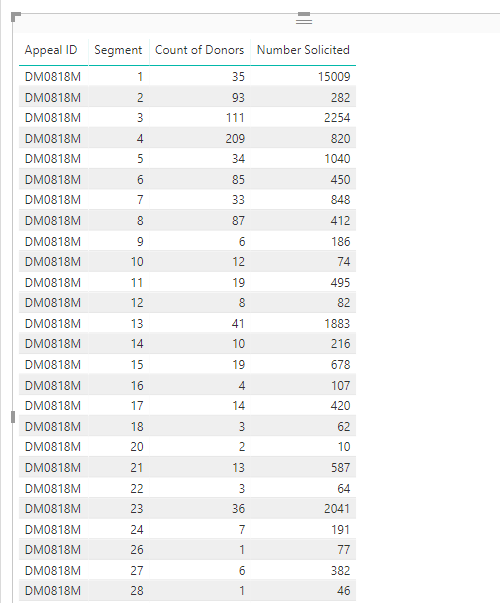
Solved! Go to Solution.
- Mark as New
- Bookmark
- Subscribe
- Mute
- Subscribe to RSS Feed
- Permalink
- Report Inappropriate Content
Ah shoot, sorry. Force of habit! (I use variations of the formula I gave you a lot). Just remove the -1
Response Rate = DIVIDE(COUNTA(Spring18[Donors]),AVERAGE(Spring18[Number Solicited]),0)

- Mark as New
- Bookmark
- Subscribe
- Mute
- Subscribe to RSS Feed
- Permalink
- Report Inappropriate Content
Are the Count of Donors and Number Solicited fields measures or columns?
Try adding the below measure if measures:
=DIVIDE([Count of Donors],[Number Solicited),0)-1
If columns
=DIVIDE(SUM(Count of Donors),SUM(Number Solicited),0)-1
- Mark as New
- Bookmark
- Subscribe
- Mute
- Subscribe to RSS Feed
- Permalink
- Report Inappropriate Content
Thanks for the reply, I think they columns - the count of donors is a count function and number solicited not summarized.
I get this error using the measure formula:
The following syntax error occurred during parsing: Invalid token, Line 1, Offset 26, [Number Solicited),0)-1)).
And this error using the columns formula:
The syntax for 'of' is incorrect. (DAX(DIVIDE(SUM(Count of Donors),SUM(Number Solicited),0)-1)).
- Mark as New
- Bookmark
- Subscribe
- Mute
- Subscribe to RSS Feed
- Permalink
- Report Inappropriate Content
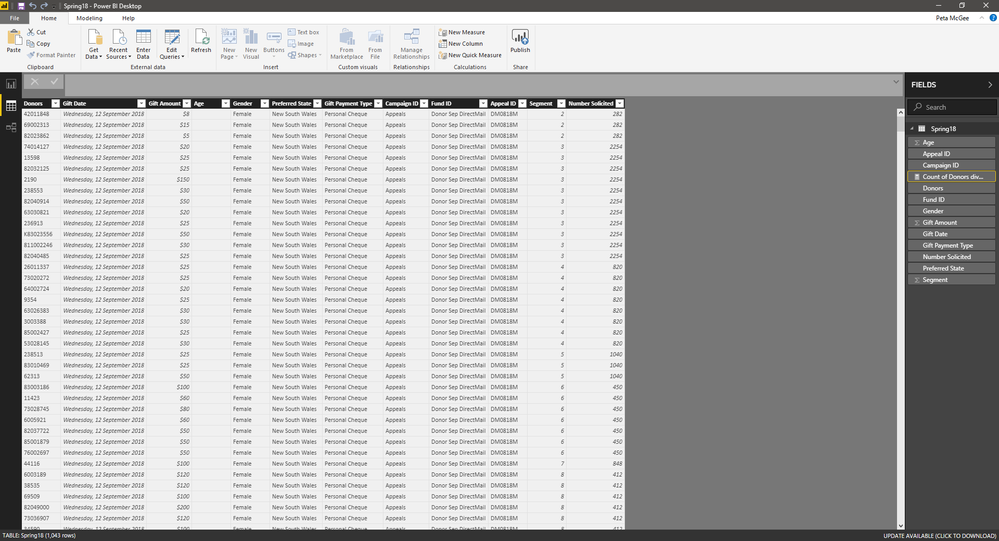
I'm a little confused. Can you send a screenshot of the table(s) where the two columns are?
- Mark as New
- Bookmark
- Subscribe
- Mute
- Subscribe to RSS Feed
- Permalink
- Report Inappropriate Content
No problem, here you go:
- Mark as New
- Bookmark
- Subscribe
- Mute
- Subscribe to RSS Feed
- Permalink
- Report Inappropriate Content
Update the Number Solicited column to a whole number and create the below measure:
Response Rate = DIVIDE(COUNTA(Spring18[Donors]),AVERAGE(Spring18[Number Solicited]),0)-1
- Mark as New
- Bookmark
- Subscribe
- Mute
- Subscribe to RSS Feed
- Permalink
- Report Inappropriate Content
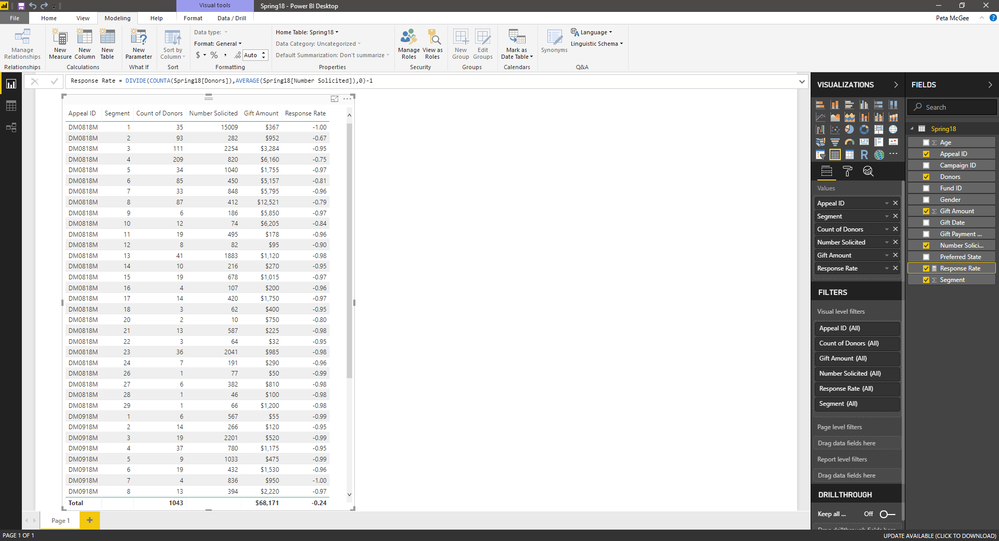
Thanks for you help with this! The formula gives a result, although it still doesn't look right - see below.
- Mark as New
- Bookmark
- Subscribe
- Mute
- Subscribe to RSS Feed
- Permalink
- Report Inappropriate Content
Ah shoot, sorry. Force of habit! (I use variations of the formula I gave you a lot). Just remove the -1
Response Rate = DIVIDE(COUNTA(Spring18[Donors]),AVERAGE(Spring18[Number Solicited]),0)
- Mark as New
- Bookmark
- Subscribe
- Mute
- Subscribe to RSS Feed
- Permalink
- Report Inappropriate Content
hello, may I know why you used average?
- Mark as New
- Bookmark
- Subscribe
- Mute
- Subscribe to RSS Feed
- Permalink
- Report Inappropriate Content
That works! Thank you so much.
Helpful resources

FabCon & SQLCon – Barcelona 2026
Join us in Barcelona for FabCon and SQLCon, the Fabric, Power BI, SQL, and AI community event. Save €200 with code FABCMTY200.

Power BI DataViz World Championships - June 2026
A new Power BI DataViz World Championship is coming this June! Don't miss out on submitting your entry.

| User | Count |
|---|---|
| 23 | |
| 22 | |
| 14 | |
| 14 | |
| 13 |


| User | Count |
|---|---|
| 47 | |
| 39 | |
| 24 | |
| 20 | |
| 20 |


