Join us at FabCon Atlanta from March 16 - 20, 2026, for the ultimate Fabric, Power BI, AI and SQL community-led event. Save $200 with code FABCOMM.
Register now!The Power BI Data Visualization World Championships is back! Get ahead of the game and start preparing now! Learn more
Hi
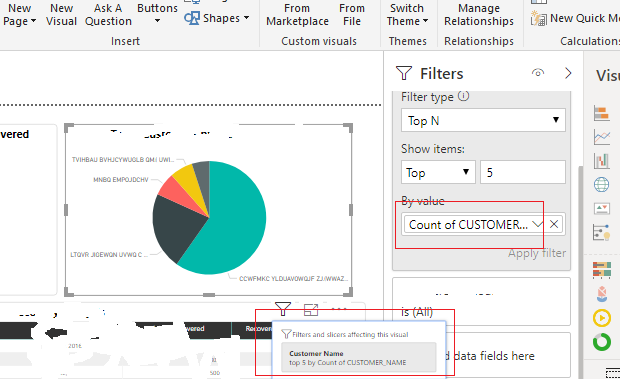
When i am trying to drag field on filters like when i am trying to do top N (5) customer then i drag customer_name on "by value" section and select count .. but here how i rename this field
this shows that count of cusotomer_name .. i just want to rename this field into "Customer Name" how i do this .. i left click on field but there is no rename option
Hi @Bakhtawar ,
You can't do rename operation on TOPN filter 'by value' field, it used displays the column name and summary mode applied on the value field.
Regards,
Xiaoxin Sheng
Hi Mate,
Two ways:
1. Double click on that field in visualization pane.
2. Right click on that field in visualization pane and you can see 'Rename' option.
Thanks,
RSD
i also done with 1st and 2nd step but did not work and i already told in question .. @Anonymous
Dont try it in Filter Pane, It will not work. please chenge it from visualization pane or Rename it from the table.
The Power BI Data Visualization World Championships is back! Get ahead of the game and start preparing now!
Check out the November 2025 Power BI update to learn about new features.
| User | Count |
|---|---|
| 59 | |
| 46 | |
| 42 | |
| 23 | |
| 18 |
| User | Count |
|---|---|
| 193 | |
| 124 | |
| 101 | |
| 67 | |
| 49 |