Forum Discussion

Remove totals in matrix table
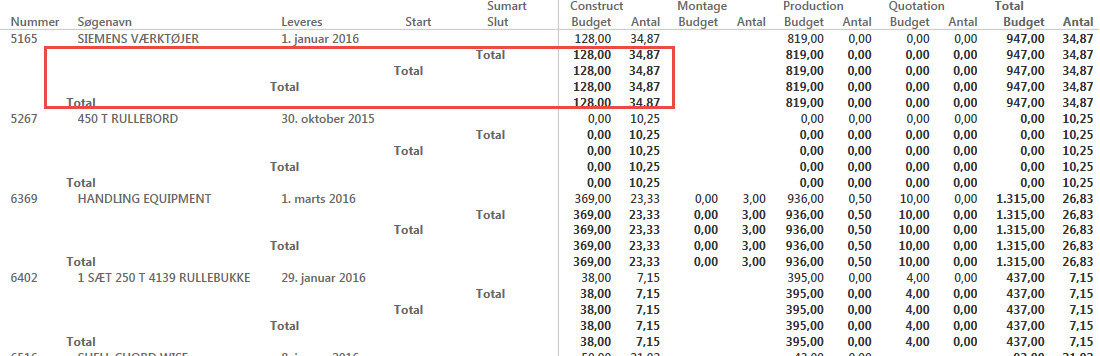
How do I remove totals from the rows. When I make a matrix the columns delivers a total for every column, distubing the picture.
According to me marix properties->General->Row Totals on/off should work
55 Replies
 Tsanka
Kudo Collector
According to me marix properties->General->Row Totals on/off should work
 HansMostafavi
Advocate I
Total Column shows each row's total. Total Row shows each column's total. It's a bit odd, particularly if you compare with pivot table terminology. Does anyone know how to hide those annoying sub-total rows but to show only the Grand Total row?
- AvinashNew Member
I am unable to find the properties for the Matrix, can you please show it visually.
Thanks.
- dlandry
Helper I
Where did you find the matrix properties I can't find them in Power BI desktop
 Bjoern
Continued Contributor
Yep, that should do the trick. You should consider getting the latest PBI version. It has not been enabled for long (4-6 weeks, I think).
- afosseNew Member
Hi Bjoern,
I have downloaded the latest version on 11/02/2016 and could not figure out how to remove totals in a matrix.
Can you advise of the process?
Thanks.
 pbi2015
Is there a way to remove totals from the rows but keeping the Grand Total?
 ash438Regular Visitor
Have you found any solution to this?
- CahabaData
Memorable Member
see my post of 4/20 on page 3 of this string
 swmcbriNew Member
Updated action list:
Select Matrix > Format tab > Subtotals > Row Subtotals > toggle to off
More words (same actions)
Select the Matrix >
In the visulaizations menu select "Format" tab (the painbrush) >
Select the submenu "Subtotals" >
In the list item "Row Subtotals" Toggle the slider to off.
 AnonymousNot applicable
swmcbri Thanks for the suggestion but we previously tried this. The action you are suggesting removes all subtotals, including that of Revenue, Total COS and Total SG&A so it is not a suitable solution. The solution we are looking for would be more akin to what you see in an Excel pivot where you can remove the grand totals for either rows or columns. While Power BI does have formating for grand totals, the abilty to exclude the grand total is not an option. Furthermore, if you were to attempt to change the font white (or whyatever your background is) the row label of "total" remains intact. Finally, text cannot be reduced below a point size of 8 so setting it to zero is not a viable option either. Perhaps someday Microsoft will allow the ability to exclude the grand total independent of the sub total.
- CahabaData
So I am going to add to this string because there is some confusion. Yes the solution identified turns of ALL TOTALS. But as per the original post - some of us want less sub-totals but still totals. This question is not answered.
There is a post saying that one can right click and select Do Not Summarize - - but that post is incorrect as several have noted - it applies only to the Table visual, not the Matrix visual.
What is happening is that there is a Total line for each Row. The Row fields are defined & showing in the Visual Design Pane at right. To have a less number of Total lines you need to have a less number of Row fields.
In my case I had separate fields for customer name, customer number - - so I created a new calculated field that merged those 2 fields - -so then in the matrix I could have one less Row field - thus one less Total line....
hope this helps someone......
- KarlinOz
Advocate III
Yes this is crazy. I want to be able to show totals for the columns I choose, not all columns.
I only want to show a total for my $ amounts, the other 'totals' are nonsensical. The same behaviour as the Table visual would be good. And While I'm making suggestions, I'd really like to be able to edit those column headings - what is there is just silly!
 strangerMike
Helper II
Thanks for your post CahabaData. It helped me.
- ydaoudFrequent Visitor
In power bi 2018
Matrix ==> Click on Format ==> subtotals ==> Row subtotals ON/OFF and/OR Column subtotals ON/OFF
Table ==> Format ==> Totals ==> ON/OFF
- AnonymousNot applicable
You are correct that you can remove totals for tables. However you cannot remove a grand total for a matrix at this time.
- brycedwhiteFrequent Visitor
I'm really quite surprised that we're not able to turn off grand totals on the matrix visual considering people have been requsting this enhancement for many years. As a work-around I set the font and background color to white - not perfect, but it's OK for the time being.
- ronnoc
Advocate II
This is a really hopeless thread. Obviously a few people including myself with no idea how to disable the row totals.
"Just go to matrix properties" is extremely vague as this ribbon or drop down either doesnt exist on the current version or is very well hidden.
- ash438Regular Visitor
how can I hide subtotals in Matrix but keeping the grand total?
- Mond
Helper III
Please find this link and you'll find tips.
https://www.burningsuit.co.uk/blog/2019/04/7-secrets-of-the-matrix-visual/
- abrownflFrequent Visitor
Format the visual. Under Subtotals turn off Row subtotals and Column subtotals
- Cornwell007New Member
Check this link, Very Useful
https://www.burningsuit.co.uk/blog/2019/04/7-secrets-of-the-matrix-visual/
- Mond
Thanks for the input.
This was really helpful tip.
- FrankcfFrequent Visitor
I have checked my version of power bi desktop and do not seem to have the ability to turn off subtotals in a matix


