This time we’re going bigger than ever. Fabric, Power BI, SQL, AI and more. We're covering it all. You won't want to miss it.
Learn moreLevel up your Power BI skills this month - build one visual each week and tell better stories with data! Get started
Hi all,
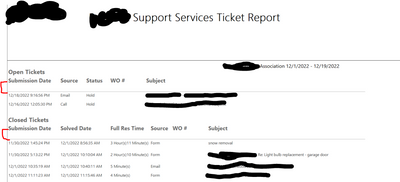
I am creating a tablix in a paginated report and am having an issue removing the margin between the column header and the actual tabular data. I essentially want to decrease the red space in this report.
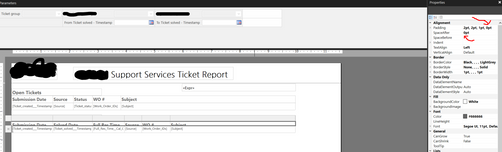
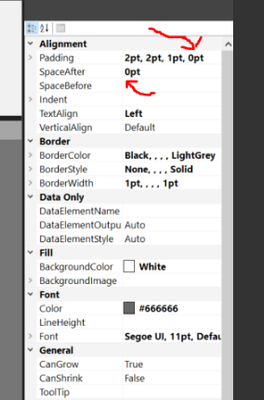
In the editor I have tried simply dragging my cursor along the column header rows to decrease the size, but that does not fix the issue. I have also tried making the bottom padding equal to 0pt and setting the SpaceAfter variable equal to 0. In the second image you can see I scrunched up the headers to the second table and set the alignment variables to no avail. Any ideas?
Appreciate your help!
Solved! Go to Solution.
Hi @jhalverson
Thanks for reaching out to us.
Please check if this tutorial helps,Report design tips in Power BI Report Builder - Power BI | Microsoft Learn
also, try to change Space before of the next visual
Best Regards,
Community Support Team _Tang
If this post helps, please consider Accept it as the solution to help the other members find it more quickly.
Hi @jhalverson
Thanks for reaching out to us.
Please check if this tutorial helps,Report design tips in Power BI Report Builder - Power BI | Microsoft Learn
also, try to change Space before of the next visual
Best Regards,
Community Support Team _Tang
If this post helps, please consider Accept it as the solution to help the other members find it more quickly.
Appreciate the response, turns out the issue was I just had a blank line after one of my column headers from accidentally hitting the enter key a long time ago. Not my greatest moment haha
Check out the April 2026 Power BI update to learn about new features.
Sign up to receive a private message when registration opens and key events begin.
If you have recently started exploring Fabric, we'd love to hear how it's going. Your feedback can help with product improvements.
| User | Count |
|---|---|
| 38 | |
| 28 | |
| 27 | |
| 22 | |
| 18 |
| User | Count |
|---|---|
| 67 | |
| 37 | |
| 32 | |
| 26 | |
| 25 |