This time we’re going bigger than ever. Fabric, Power BI, SQL, AI and more. We're covering it all. You won't want to miss it.
Learn moreLevel up your Power BI skills this month - build one visual each week and tell better stories with data! Get started
Hi,
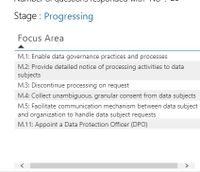
I have a table with word wrap switched on so all the data fits within the tile.
However, the horizontal scroll bars still appear at the bottom (despite not needing them).
Please advise how I can remove these - they are driving me mad
.
Thanks.
Kelly
Solved! Go to Solution.
Try narrowing the column width by grabbing the right side of the header and dragging left.
Br,
T
Widen the visual - the scroll should disappear.
If not, post some pics to illustrate your issue.
Br,
T
Hi,
I can't change the size because I need to fit in 4 similar tiles in a row.
See picture below:
Thanks,
Kelly
Hi
I have a table with word wrap on so all the text is visible within the tile but Power BI has still inserted a horizontal scroll which it doesn't need. How do I get rid of it, it is driving me crazy. ![]()
Thanks.
Make your table wider?
Can you post a screen shot or link to PBIX?
Try narrowing the column width by grabbing the right side of the header and dragging left.
Br,
T
That worked like a bomb!
Thank you so much! ![]()
Check out the April 2026 Power BI update to learn about new features.
Sign up to receive a private message when registration opens and key events begin.
If you have recently started exploring Fabric, we'd love to hear how it's going. Your feedback can help with product improvements.
| User | Count |
|---|---|
| 35 | |
| 27 | |
| 26 | |
| 22 | |
| 18 |
| User | Count |
|---|---|
| 67 | |
| 36 | |
| 32 | |
| 25 | |
| 25 |