Hello all,
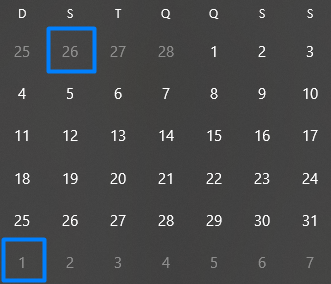
I'm trying to do a SWITCH for Time Periods but my Calendar its not standard, some month don't start at Day 1 not do they end at the 30/31, they start at the first Monday of the week the month's begins.
i.e: March 2018, it starts at 26th February and ends at 1st April
The switch I did is:
    Measure Period calculation = IF(COUNTROWS(VALUES('Time Period'[Index]))=1;
    SWITCH(VALUES('Time Period'[Name]);
                                    "YTD"; CALCULATE([Measure Selected];DATESYTD('Calendar'[Date]));
                                    "PY"; CALCULATE([Measure Selected];SAMEPERIODLASTYEAR('Calendar'[Date]));
                                    "MTD"; CALCULATE([Measure Selected];DATESMTD('Calendar'[Date]));
                                    "QTD"; CALCULATE([Measure Selected]; DATESQTD('Calendar'[Date]));
                                    "PYMTD"; CALCULATE([Measure Selected]; DATEADD(DATESMTD('Calendar'[Date]);-1;YEAR));
                                    "PYQTD"; CALCULATE([Measure Selected]; DATEADD(DATESQTD('Calendar'[Date]);-1;YEAR));
                                    "PYYTD"; CALCULATE([Measure Selected]; DATEADD(DATESYTD('Calendar'[Date]);-1;YEAR));
[Measure Selected]);
blank()
)
But since the month aren't standard the result it returns is not what I want:
i.e: Using "MTD" measure i get these results
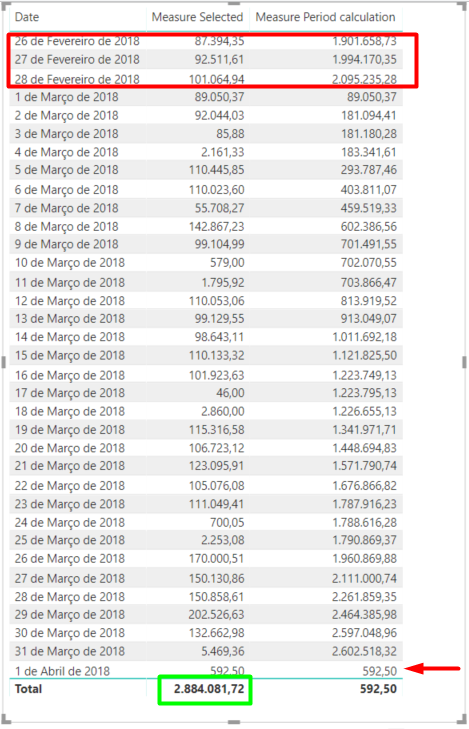
I need to add those 3 days in February plus the 1st of April since they "belong" to March so the total of Measure Period Calculation column shows the same result as Measure Selected column (green square)
PS: I do have a column in my Dim Calendar that provides the begin (Month_Start) and end (Month_End) of each months using these business logic.
If anyone could help, I really appreciate it.
Thanks,
Tiago


