- Power BI forums
- Updates
- News & Announcements
- Get Help with Power BI
- Desktop
- Service
- Report Server
- Power Query
- Mobile Apps
- Developer
- DAX Commands and Tips
- Custom Visuals Development Discussion
- Health and Life Sciences
- Power BI Spanish forums
- Translated Spanish Desktop
- Power Platform Integration - Better Together!
- Power Platform Integrations (Read-only)
- Power Platform and Dynamics 365 Integrations (Read-only)
- Training and Consulting
- Instructor Led Training
- Dashboard in a Day for Women, by Women
- Galleries
- Community Connections & How-To Videos
- COVID-19 Data Stories Gallery
- Themes Gallery
- Data Stories Gallery
- R Script Showcase
- Webinars and Video Gallery
- Quick Measures Gallery
- 2021 MSBizAppsSummit Gallery
- 2020 MSBizAppsSummit Gallery
- 2019 MSBizAppsSummit Gallery
- Events
- Ideas
- Custom Visuals Ideas
- Issues
- Issues
- Events
- Upcoming Events
- Community Blog
- Power BI Community Blog
- Custom Visuals Community Blog
- Community Support
- Community Accounts & Registration
- Using the Community
- Community Feedback
Register now to learn Fabric in free live sessions led by the best Microsoft experts. From Apr 16 to May 9, in English and Spanish.
- Power BI forums
- Forums
- Get Help with Power BI
- Desktop
- Re: Relationships Between Tables Wrong Results
- Subscribe to RSS Feed
- Mark Topic as New
- Mark Topic as Read
- Float this Topic for Current User
- Bookmark
- Subscribe
- Printer Friendly Page


- Mark as New
- Bookmark
- Subscribe
- Mute
- Subscribe to RSS Feed
- Permalink
- Report Inappropriate Content
Relationships Between Tables Wrong Results
Dear All,
I am unable to counter the problem related to Relationships between tables.
There are two Tables.
| TableA | ||||
| YearMont | Year | Month | Art | Total Gmts |
| 2022-July | 2022 | July | A | 1300 |
| 2022-July | 2022 | July | B | 17680 |
| 2022-July | 2022 | July | C | 2680 |
| 2022-July | 2022 | July | D | 5485 |
| 2022-August | 2022 | August | B | 10000 |
| 2022-August | 2022 | August | C | 24920 |
| 2022-August | 2022 | August | D | 2192 |
| 2022-August | 2022 | August | E | 1781 |
| 2022-September | 2022 | September | D | 2500 |
| 2022-September | 2022 | September | E | 5185 |
| 2022-September | 2022 | September | B | 6810 |
| 2022-September | 2022 | September | C | 12820 |
| TableB | ||||
| YearMont | Year | Month | Art | V.No. |
| 2022-July | 2022 | July | A | A10 |
| 2022-July | 2022 | July | B | B10 |
| 2022-July | 2022 | July | C | A10 |
| 2022-July | 2022 | July | D | B10 |
| 2022-August | 2022 | August | B | A10 |
| 2022-August | 2022 | August | C | B10 |
| 2022-August | 2022 | August | D | A10 |
| 2022-August | 2022 | August | E | B10 |
| 2022-September | 2022 | September | D | A10 |
| 2022-September | 2022 | September | E | B10 |
| 2022-September | 2022 | September | B | A10 |
| 2022-September | 2022 | September | C | B10 |
| Using USERELATIONSHIP function | Active Relationship | ||||
| TableA (Art) to TableB(Art) | TableA (YearMonth) to TableB(YearMonth) | ||||
| Year | Month | Art | Total Gmts | Count of V.No. | Count of V.No.1 |
| 2022 | July | A | 1300 | 1 | 63 |
| 2022 | July | B | 17680 | 3 | 63 |
| 2022 | July | C | 2680 | 5 | 63 |
| 2022 | July | D | 5485 | 7 | 63 |
| 2022 | August | B | 10000 | 3 | 97 |
| 2022 | August | C | 24920 | 5 | 97 |
| 2022 | August | D | 2192 | 7 | 97 |
| 2022 | August | E | 1781 | 11 | 97 |
| 2022 | September | D | 2500 | 7 | 58 |
| 2022 | September | E | 5185 | 34 | 58 |
| 2022 | September | B | 6810 | 3 | 58 |
| 2022 | September | C | 12820 | 5 | 58 |
Problem: When I use Art to Art relationship with Many-Many Wherever the Art B exists in any month, it is counted and displayed in every month.
Problem: And when I concatenate the Month and Year, and use that of Relationship, it counts total of the month and display infront of every Art.
Best Regards.
Solved! Go to Solution.


- Mark as New
- Bookmark
- Subscribe
- Mute
- Subscribe to RSS Feed
- Permalink
- Report Inappropriate Content
Hi @biengineer ,
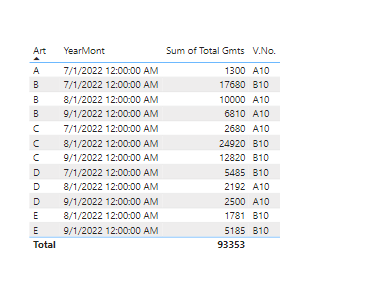
You can create 2 dim tables where you can save art and monthyear data in each table. and then build relation with both TableA and TableB - Download pbix here
Thanks,
Deevaker
+91-9711975011
- Mark as New
- Bookmark
- Subscribe
- Mute
- Subscribe to RSS Feed
- Permalink
- Report Inappropriate Content
May be you would like to use EOmonth function (for end of month date). So that it takes end of month date only.
- Mark as New
- Bookmark
- Subscribe
- Mute
- Subscribe to RSS Feed
- Permalink
- Report Inappropriate Content
Hi @biengineer ,
You can create 2 dim tables where you can save art and monthyear data in each table. and then build relation with both TableA and TableB - Download pbix here
Thanks,
Deevaker
+91-9711975011
- Mark as New
- Bookmark
- Subscribe
- Mute
- Subscribe to RSS Feed
- Permalink
- Report Inappropriate Content
Dear Sir,
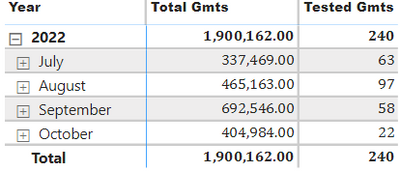
This is perfect.
----------------------
I am using this function to extract month and year from the date
YearMonth = Format('Export'[DATE:], "MMM YY")
And it creates multiple Month-Year with different day. There should be same day for all rows as I am extracting Month and Year only.

Though the results are fine when I filter the Date by Year and Monthly only in the first screenshot.
Best Regards.
- Mark as New
- Bookmark
- Subscribe
- Mute
- Subscribe to RSS Feed
- Permalink
- Report Inappropriate Content
May be you would like to use EOmonth function (for end of month date). So that it takes end of month date only.
- Mark as New
- Bookmark
- Subscribe
- Mute
- Subscribe to RSS Feed
- Permalink
- Report Inappropriate Content
Dear Sir, Thanks for your help.
I am applying the way you have directed, please can you accept my request to access the Download pbix here file. It requires permission.
Regards.
- Mark as New
- Bookmark
- Subscribe
- Mute
- Subscribe to RSS Feed
- Permalink
- Report Inappropriate Content
Yes, I have shared the permission just now. Please try again now

Helpful resources

Microsoft Fabric Learn Together
Covering the world! 9:00-10:30 AM Sydney, 4:00-5:30 PM CET (Paris/Berlin), 7:00-8:30 PM Mexico City

Power BI Monthly Update - April 2024
Check out the April 2024 Power BI update to learn about new features.

Fabric Community Update - April 2024
Find out what's new and trending in the Fabric Community.

| User | Count |
|---|---|
| 119 | |
| 106 | |
| 78 | |
| 73 | |
| 52 |


| User | Count |
|---|---|
| 145 | |
| 107 | |
| 107 | |
| 90 | |
| 64 |


