Get certified for free when you join Fabric Data Days 2026 and dive into Fabric, Power BI, SQL, AI, and other essential data skills.
Join nowJuly 7 - July 17 | Round 2 of the Power BI Dataviz World Championships. Don't miss your chance! Learn more
Hello,
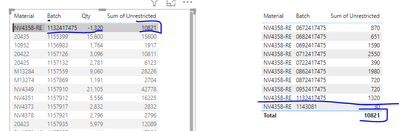
I have the following table (Left) which contains two columns Material and Batch#, the column "Qty" is coming from the same table as the batch # and "Sum Unrestricted" is coming from a different table, the goal is to compare the qty available at batch level but the column "Sum Unrestricted" is showing the result for the material not for the specific lot that I need. As you can see on the right table, the sum of all the lots is 10820 but the correct total should be 1320. How can I get the result for the lot# only showing on the right table?
Thanks!!!!
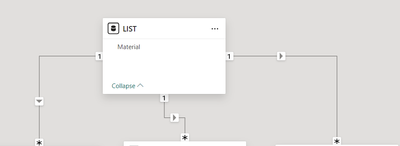
Can't help without seeing your data and file. Without these, can't see what is going on in the model.
Phil
Proud to be a Super User!
Join us in Barcelona for FabCon and SQLCon, the Fabric, Power BI, SQL, and AI community event. Save €200 with code FABCMTY200.
If you love stickers, then you will definitely want to check out our community sticker challenge, Barcelona edition!
Check out the July 2026 Power BI update to learn about new features.
| User | Count |
|---|---|
| 30 | |
| 26 | |
| 23 | |
| 23 | |
| 14 |
| User | Count |
|---|---|
| 46 | |
| 33 | |
| 20 | |
| 18 | |
| 16 |