cancel
Showing results for 
Search instead for 
Did you mean: 

The Power BI Data Visualization World Championships is back! Get ahead of the game and start preparing now! Learn more

Reply
CharlesRondo
Frequent Visitor

Relationship Many to Many error

I have two tables with the same format, I created them by applaying a filter from an original table, so they are exactly the same but with different values. The colums are: Country, year, segment, vehicle and value.

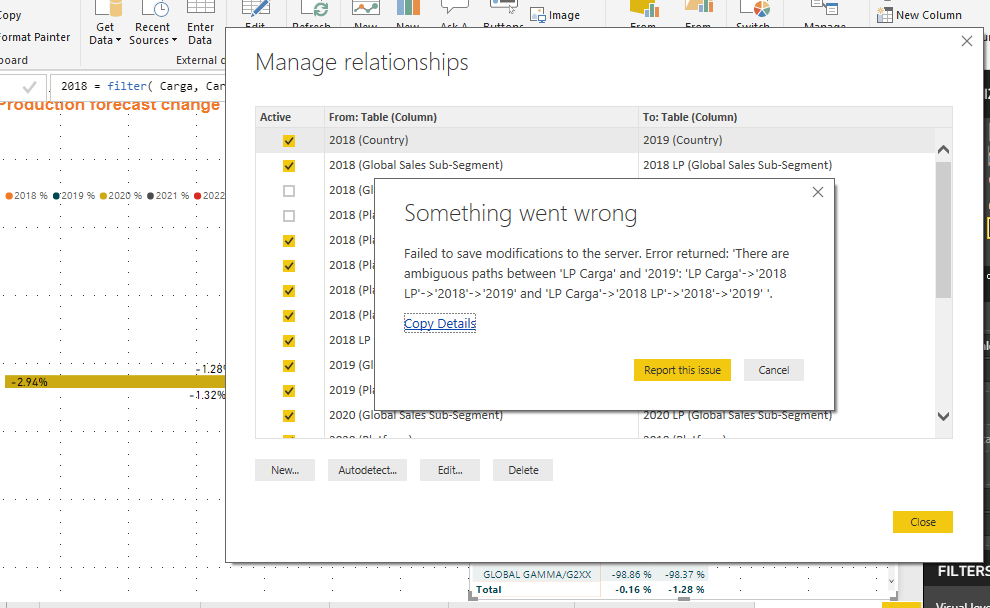
So, I created relationships to these tables, but I can't make them active telling me the relations are ambiguous

Plus, I made a simple measure  with the tables:


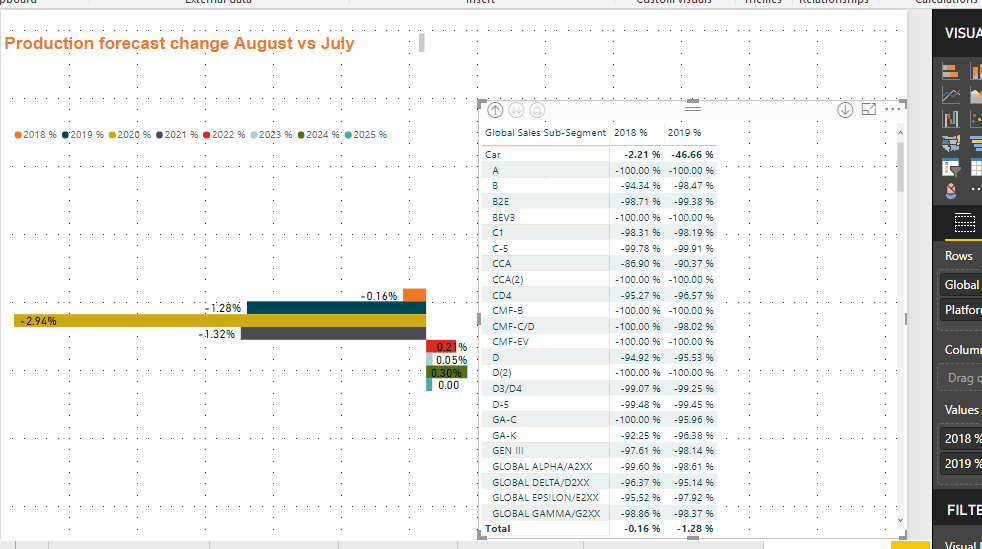
2018 % = sum('2018'[Production Volume])/ sum('2018 LP'[Production Volume])-1 


Works, but only at different levels.


the levels are: Country then Segment, then vehicle. Only works at Segment level.


Capture.PNGdelta.PNG


  Thanks for reading.


1 ACCEPTED SOLUTION
Anonymous
Not applicable

@CharlesRondo,

You would need to turn off bidirectional cross filtering on your tables, otherwise you are unable to make the above relationship active. For detailed reason, please check my reply in the similar thread below.

https://community.powerbi.com/t5/Desktop/Data-model-loop-cant-point-2-transaction-dates-to-DateTable...

In addition, the measure you create doesn't work as expected. Please share sample data of your tables following guide in the thread  below and post expected result here for us to analyze.

https://community.powerbi.com/t5/Community-Blog/How-to-Get-Your-Question-Answered-Quickly/ba-p/38490...

Regards,
Lydia

View solution in original post

1 REPLY 1
Anonymous
Not applicable

@CharlesRondo,

You would need to turn off bidirectional cross filtering on your tables, otherwise you are unable to make the above relationship active. For detailed reason, please check my reply in the similar thread below.

https://community.powerbi.com/t5/Desktop/Data-model-loop-cant-point-2-transaction-dates-to-DateTable...

In addition, the measure you create doesn't work as expected. Please share sample data of your tables following guide in the thread  below and post expected result here for us to analyze.

https://community.powerbi.com/t5/Community-Blog/How-to-Get-Your-Question-Answered-Quickly/ba-p/38490...

Regards,
Lydia

Helpful resources

Announcements
Power BI DataViz World Championships

Power BI Dataviz World Championships

The Power BI Data Visualization World Championships is back! Get ahead of the game and start preparing now!

December 2025 Power BI Update Carousel

Power BI Monthly Update - December 2025

Check out the December 2025 Power BI Holiday Recap!

FabCon Atlanta 2026 carousel

FabCon Atlanta 2026

Join us at FabCon Atlanta, March 16-20, for the ultimate Fabric, Power BI, AI and SQL community-led event. Save $200 with code FABCOMM.