Forum Discussion

saumitra's avatar
saumitra
Icon for Helper I rankHelper I
6 years ago

Refresh Stuck at "Creating Connection in Model"

Hello All,

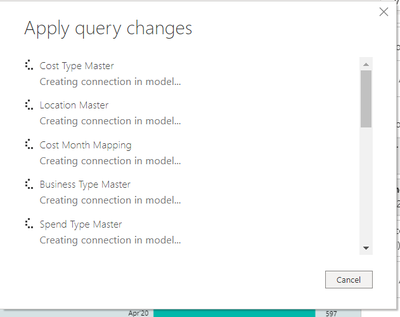
Whenever I start the refresh in my report, the refresh gets stuck at "Creating Connections in Model" for hours.

Please find the below screenshot for the same:


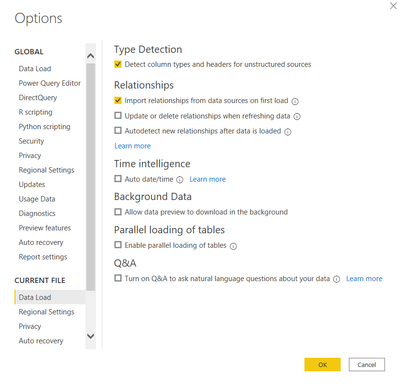
My dataset contains tables from a MySQL Database and excel files. I have made the changes in the data load settings as suggested in other posts regarding this issue but It doesn't seem to work. Please find the screenshot below:


Please help


Regards,

Saumitra Upadhyay

5 Replies

  • FarhanAhmed's avatar
    FarhanAhmed
    Icon for Community Champion rankCommunity Champion

    Try refresh your tables/data source one by one and see if they are refreshing fine ?

    Where are your Data sources residing ? are they hosted locally on your machine or they are over the internet/cloud ? See if you are connected to those sources fine outside the Power BI designer.


    Also try to refresh Cache of Power BI Designer under data load?

  • v-xuding-msft's avatar
    v-xuding-msft
    Icon for Community Support rankCommunity Support

    Hi saumitra ,


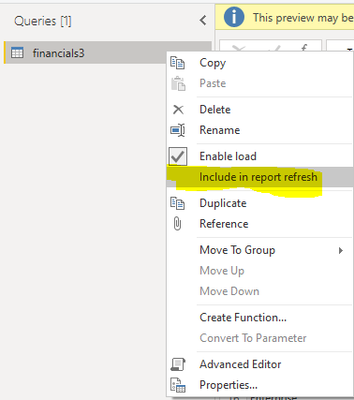
    Usually, it is caused by the vast amount of data. Please just import the tables that you need to calculate or you could turn off the option of "Include in report refresh" for the tables that you won't calculate. 


    • saumitra's avatar
      saumitra
      Icon for Helper I rankHelper I

      v-xuding-msft

      That Seems to be the problem, all the queries are needed. and i can't refresh them one by one as i need to apply the changes made in the power query mode first.


      All my files are hosted locally.


      Regards,

      Saumitra Upadhyay