Join us at FabCon Atlanta from March 16 - 20, 2026, for the ultimate Fabric, Power BI, AI and SQL community-led event. Save $200 with code FABCOMM.
Register now!View all the Fabric Data Days sessions on demand. View schedule
I have a page with a filter on it where Datetable[Actual]="Yes". this limits the data to todays date
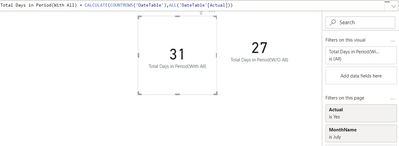
However I want ot count how many days are in the month chosen in totla so I wrote this expecting it to ignore the page filter and count 31 days in July. However it doenst work and still producing 27 as its the 27th today. I have no idea why this doesn't work as counldnt be any simpler?
Total Days in Period = CALCULATE(COUNTROWS(DateTable),ALL(DateTable[Actual]))
Any clues as seems ot be text book way to do this? Sadly modle is enormous so cant post it. If I click off the page filter it calcuates 31 so sure notihng lese is filtering as well
Thanks
Mike
Hello @theferret ,
Is the page filter that you are applying constitues of [Actual] Column? If that's a yes, so it should work.
If no, you will have to bring in the column name being used in your filter for this visual.
It is a column in the Datetable titled [Actual] and 100% sure my page filter is using the same field
I have tried to replicate your issue and it works fine for me.
See below:
[Actual] is a calculated column similar to what you described:
Actual =
if('DateTable'[Date] <= TODAY(),"Yes","No")
Let me know if I am missing from this sample.
Yup I have no idea why it doenst work as seems obvious? i've moved the page filter otthe visuals as only solution. Bit wierd, but thnaks for looking at this
Check out the November 2025 Power BI update to learn about new features.
Advance your Data & AI career with 50 days of live learning, contests, hands-on challenges, study groups & certifications and more!